Architecture
The system design below is the same document maintained in the
repository (docs/ARCHITECTURE.md).
Architecture
Ruscker is an Apache-2.0-licensed, lightweight Rust alternative to ShinyProxy and Shiny Server: a portal and orchestrator for container-per-session and container-per-API workloads. This document describes how the pieces fit together.
High-level diagram
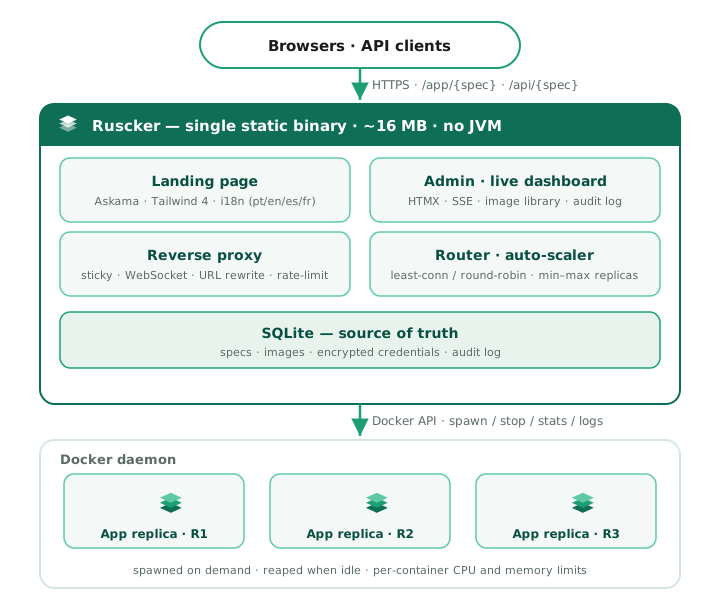
All of this is a single Rust process — one static binary, ~14 MB idle,
no JVM. The portal uses Askama templates with HTMX and Alpine.js and has
zero Node build step. Visitors and API clients reach it on one port; it
serves the landing page and admin UI, reverse-proxies /app/{spec} and
/api/{spec} to the right replica (keeping Shiny sessions sticky and
upgrading WebSockets), and drives the Docker daemon to spawn and reap
containers. SQLite is the source of truth for configuration; the live
replica registry and session store live in memory.
Crate map
The workspace is six crates. ruscker-config and ruscker-core are
pure-domain — no I/O, no async (bar the async trait definitions
in core). Everything that touches the network or Docker layers on top,
and the ruscker-cli binary stitches them together.
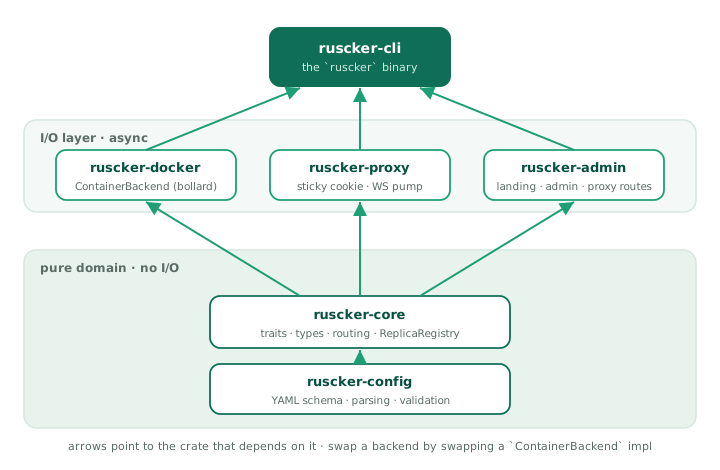
Keeping the backend behind the ContainerBackend trait in
ruscker-core is what made the multi-host backend
(ruscker-docker::MultiHostDockerBackend, Phase 6) a new impl rather
than a rewrite — and leaves the same door open for Kubernetes. The
multi-host impl covers the whole trait surface
(spawn/stop/list, metrics/logs, disk management, image
presence/pull), each operation fanning out across hosts with
degraded-mode tolerance for an unreachable daemon. See
Deployment shapes and docs/adr/.
Request flow
A Shiny session lifecycle
1. Visitor hits  https://portal/app/sales-dashboard/
2. Look up spec 'sales-dashboard' (DB first, YAML fallback)
3. Resolve access identity; enforce ACL and mfa::evaluate before any
   backend access or cold start
4. Read cookie  __ruscker_session_sales-dashboard   (one per app)
5. Cookie missing → resolve_replica:
     a. pick_or_spawn: pick a Ready replica with a free seat
        (least-conn) and reserve the seat atomically
     b. No replica yet → cold-start splash to the visitor while a
        coalesced spawn runs in the background; the splash polls a
        readiness probe and reloads into the app
     c. At max-replicas with no free seat → the splash says "full"
        and keeps polling for a freed seat
     d. SessionStore.touch_or_register(session, spec, R2)
     e. Sign + set cookie  __ruscker_session_sales-dashboard
        (Path={base}/app/sales-dashboard — never sent to other apps)
6. Forward GET /  to  http://127.0.0.1:<R2_port>/   (path strip)
7. Stream response back
8. Browser opens WebSocket  ws://portal/app/sales-dashboard/websocket
9. Proxy connects the upstream WS FIRST (query string preserved,
   subprotocol negotiated); only then answers the client's 101 — a
   dead replica gets a clean 502, not a post-upgrade drop
10. Bidirectional frame pump
11. On heartbeat: SessionStore.touch()
12. Idle timeout reached → Session purged → if last seat, container drained
An API request lifecycle
1. Client hits  https://portal/api/data-api/v1/data
2. Spec.kind() == Api  → no sticky cookie path
3. pick_replica() balances by in-flight request count → R3
4. Bump R3's in-flight gauge, forward request, stream response
5. In-flight gauge drops only after the full body has streamed out
6. No session state, no follow-up — done.
An Api spec has no sticky sessions, so its replicas have no seat
notion to balance on. Instead the proxy keeps a per-replica in-flight
request gauge (routes::proxy::INFLIGHT, a process-global DashMap)
and least-connections routing picks the replica with the fewest
in-flight requests, not the most free seats. An RAII
routes::proxy::InflightGuard bumps the gauge when the forward starts;
crucially it is moved into the streaming response body, so it only
drops once the whole (possibly long) download has been sent to the
client — a large file transfer keeps counting against the replica for
its full duration, and the scaler sees real concurrency rather than a
spike that vanishes the instant headers are written.
Access, MFA, and identity resolution
The proxy resolves a signed-in user’s groups and selected profile claims
once per request when an ACL or identity disclosure needs them. The
IdentityCache in AppState holds groups, e-mail, and department/unit for
30 seconds so an app page’s asset burst does not issue one database query
per request. User/group/profile mutations invalidate the cache with a
generation counter, preventing an in-flight stale read from repopulating
revoked identity data.
Admin-panel authorization keeps identity and row scope separate:
crate::auth answers who the caller is and which role the session carries;
scope::EditorScope answers which Application, User, and Group rows that
caller may see or change. It refetches an Editor’s groups on every request
and fails closed; an out-of-scope target looks absent (404). Admin and
break-glass sessions are unrestricted, open apps are shared by all Editors,
and Media is shared. Account deletion, CSV user import, MFA reset, and group
creation/rename/deletion remain Admin-only.
The request guard then applies these boundaries in order:
Spec::access_allowsenforces per-user/per-group access server-side.- For
require-mfa,mfa::evaluatechecks the user factor and browser grant before the backend, cold-start splash, replica picker, or spawn can run. Interactive visits redirect to enrollment/challenge; APIs fail with401or403; break-glass Admin sessions bypass with an audit record. - The proxy strips the entire client-supplied
X-SP-*andX-Ruscker-User-*namespaces, then adds only the opted-in authoritative values for a signed-in user. The same header list is passed to HTTP and WebSocket upstream connections; absent claims are omitted.
MFA persistence is part of the configuration catalog in both SQLite and Postgres:
| Table | Purpose |
|---|---|
user_mfa | One user-owned TOTP factor; AES-GCM ciphertext/nonce, confirmation state, replay step, and revocation epoch |
user_mfa_recovery | Salted hashes for the one-time recovery codes |
user_mfa_grants | Salted hashes of opaque trusted-device tokens, bound to the user, factor epoch, proof time, expiry, and login-session hash |
Scheduled jobs
jobs::spawn starts one scheduler loop per process when both a catalog DB
and container backend exist (the local Docker backend runs jobs; the
multi-host backend does not, so a due schedule there records an error).
Every 30 seconds it loads enabled schedules; only the LeaderElector
winner may fire in HA. Cron expressions are evaluated against the IANA wall
clock named by server.timezone; when it is absent, the historical UTC
behaviour is preserved. An invalid name also falls back to UTC with a
validation warning. The Schedules page calls the same next_occurrence
function and renders firing times in that operational zone.
db::schedules::mark_fired atomically advances last_run_at before
execution, so a split-brain second runner loses the claim and a crash does
not double-fire the occurrence.
A new schedule anchors at created_at (no fire-on-create). If downtime spans
several cron occurrences, the next tick collapses them to one firing. The job
uses the spec’s image, platform, resolved environment, volumes, limits,
network, labels, and registry credentials, with an optional command override,
and runs to completion outside the interactive replica registry. A
per-schedule timeout defaults to one hour in the backend. Results, duration,
exit code, and log tail land in schedule_runs; failures enqueue the
job-failed alert webhook.
These are deliberately two different time models. Stored instants remain
UTC. Ordinary admin tables emit those instants as <time datetime="…Z">;
the shared layout converts them in the browser to the viewer’s timezone and
keeps UTC as the no-JavaScript fallback. Schedules stay on the configured
operational clock because their timestamps explain when cron will fire.
Changing server.timezone on an installation with existing schedules can
produce one extra run on the switch-over day, so operators should review
their next-run values after adopting a zone.
Aggregated access counter
access_counter::AccessCounter keeps the proxy hot path free of database
writes. It synchronously increments an in-memory (spec_id, UTC day) delta
for each API request, new sticky app session, or external-card click. One
supervised task flushes touched buckets every two seconds into spec_access
with additive UPSERTs. Failed flushes merge deltas back for bounded
exponential-backoff retries, and graceful shutdown attempts a final flush.
Proxying an app under /app/{spec}/ — the strip-and-rewrite model
A containerised app expects to live at the host root: it emits
/lib/jquery.js, opens WebSocket('/websocket'), redirects to /lab.
Ruscker serves it from a sub-path (/app/sales-dashboard/). Two halves
reconcile that gap.
On the way in, the proxy strips the mount prefix. forward()
matches /app/{spec}/{*rest} and forwards only the *rest portion to
the container, so a request for /app/sales-dashboard/lib/x reaches the
upstream as /lib/x — the container believes it is at the root and
never has to know its public path. (This is the opposite of ShinyProxy’s
no-strip model; apps should be configured to serve at root, not to
self-prefix.) The proxy also stamps X-Forwarded-Prefix /
X-Script-Name / X-RStudio-Root-Path with the public mount so apps
that do build their own absolute URLs (RStudio, Jupyter) emit correct
links — see routes::proxy::apply_smart_routing_headers.
On the way out, the proxy rewrites the response so the browser sends
follow-up requests back under the mount. This lives in
routes::rewrite (inject_base_href) and runs only on the
/app/ route family, only for HTML responses:
<base href="/app/{spec}/">is injected at the top of<head>, so relative URLs (foo.css,./img/x.png) resolve under the mount.- Root-absolute attribute URLs (
<script src="/lib/x">,<link href="/...">,<form action="/...">, …) are prefixed with the mount via a streaminglol_htmlpass over a narrow selector set. A skip-list (/admin/,/assets/,/app/, …) avoids double-prefixing Ruscker’s own chrome; notably/api/is not skipped, because under the mount it is the app’s own namespace (Jupyter’s REST + kernel WebSocket live there). - A runtime JS shim is prepended before any page script. It
monkey-patches
fetch,XMLHttpRequest.open, andWebSocketto prefix absolute paths built at runtime. The shim was generalized to also patch the resource-loading property settersHTMLScriptElement.prototype.src,HTMLLinkElement.prototype.href, andHTMLImageElement.prototype.src(plusiframe/audio/video/sourceandElement.setAttribute). Those are the browser’s own fetches — never visible to the fetch/XHR wrappers — so patching them covers RequireJS/webpack chunk loading and runtime-set images generically. - A redirect
Locationheader that points at a root-absolute path (an app’s302 → /lab) is prefixed the same way, so the redirect stays inside the app instead of escaping to a Ruscker 404.
The generalized shim retired the old Voilà-specific rewrite: Voilà’s
RequireJS bootstrap assigns its static URLs to script.src at runtime,
which the patched src setter now prefixes without a bespoke pass.
The rewriter needs uncompressed HTML: nothing between
the container and the rewriter decompresses bodies, so when the
transform is enabled the upstream request carries
Accept-Encoding: identity (ShinyProxy does the same) — an app that
gzips its HTML (Dash behind flask-compress, nginx-fronted) would
otherwise stream compressed bytes straight past inject_base_href.
Defense-in-depth: a response that still arrives with a
Content-Encoding passes through untouched rather than being
corrupted. The /api/ family and inject-base-href: false specs are
never transformed and keep end-to-end compression.
JupyterLab is the one app that still needs a special case
(rewrite::rewrite_jupyter_config). Lab is served with base_url=/ and
reports baseUrl: "/" in its jupyter-config-data JSON; its bootstrap
then builds absolute, same-origin API and static URLs from that
config and injects <script src=…> for its lazy chunks. Because those
URLs are absolute strings baked into a config object — not relative paths
the browser resolves against <base href>, and not paths a root-relative
shim can intercept — Ruscker rewrites the baseUrl and full*Url fields
of that JSON to carry the mount before the HTML pass.
The base-path mount (Ruscker itself served under, e.g., /apps) is the
inverse rewrite and is handled separately: templates emit {{ base }}-
prefixed URLs directly, so the chrome no longer needs a per-request body
rewrite — only the redirect Location header (prefix_base_path).
Module boundaries
Pure layer (no I/O, no async)
ruscker-config::schemaruscker-config::envruscker-config::validateruscker-core::replica(types only — incl. the seat accounting onReplicaRegistry; the replica-picking logic lives next to the proxy inruscker-admin::routes::proxy::{pick_replica, pick_accepting}, where the seat reservation has to be atomic)- the trait definitions in
ruscker-core(ContainerBackend, …) are pure; the asyncSessionStoretrait + its in-memory/Postgres impls live inruscker-admin::sessions
I/O layer (async + tokio)
ruscker-docker— talks to Dockerruscker-proxy— sticky-cookie + WebSocket helpers (a library; it owns no socket)ruscker-admin— builds the single axum router (landing + admin + proxy routes). Proxy selection, access/MFA/identity guards, and response filtering live inroutes::proxy; persistent MFA operations live indb::mfa/db::mfa_grants; background subsystems live injobs,scaler, andaccess_counterruscker-cli— owns the one TCP listener and the tokio runtime, servingruscker-admin’s router
State and persistence
Three sources of state, ranked by authority
- SQLite (admin DB) — source of truth for spec configurations, images, credentials, users/groups, MFA factors and grants, schedules and run history, per-day access totals, landing-page sections, and audit log. Always write here first. Postgres implements the same catalog for HA.
- Live in-memory —
ReplicaRegistry(in proxy),SessionStore(in proxy, in-memory by default). Reflects the running state of containers and sessions. - Docker — actual containers and their state. Source of truth for “is this thing alive”. The proxy queries Docker on startup to rebuild the registry.
The YAML file is NOT the mutable source of truth in production — it is
the service bootstrap plus import/export format. ruscker.yml is the
canonical service-config filename; application.yml remains the compatible
ShinyProxy import/fallback name. Once imported, live catalog edits reside in
SQLite or the HA Postgres catalog.
State transitions
- First boot, no DB: Bootstrap from the selected service config
(
ruscker.ymlby default, withapplication.ymlas fallback) if present; otherwise create an empty DB. - Subsequent boots: Load from DB. The YAML is optional.
Concurrency model
- One tokio runtime, multi-threaded by default.
- The proxy accepts connections on one task per connection, handlers
use
towermiddleware stack. - Container spawns are direct
ContainerBackendcalls, serialized per spec by a coalescing mutex (state.spawn_locks) so concurrent visitors to a cold app produce one container, not N. - The auto-scaler runs as a periodic task (every 10s). Apps default to
min-replicas: 0(cold-start — spawn on the first visit, no pre-warm); it scales up on sustained saturation, retires idle replicas after a grace window, then waits out a post-drop cooldown (~60s) before it will respawn on saturation, so a single-seat long session can’t flap a replica up and down. Setmin-replicas: 1+ to keep an app warm. - The session-purger runs as a periodic task (every 5s).
- The leader-only job scheduler checks cron schedules every 30s and detaches
each run-to-completion job so long ETL work cannot block later ticks. It
evaluates cron on the
server.timezonewall clock (UTC when unset). - The access-counter drain batches in-memory deltas every 2s instead of writing on every proxy request.
DashMapbacks the replica/in-flight state and the short-TTL identity/spec caches (lock-free reads, sharded writes).
Security boundary
Trust levels
- Untrusted: visitors. They can hit
/app/*and/api/*only. Admin paths require an authenticated session. - Privileged: signed-in users. Authentication uses per-user passwords
and three roles — Viewer (portal access only; no admin section),
Editor (dashboard plus group-scoped Applications, Users, and Groups;
open apps and Media are shared), Admin (unrestricted) — enforced
server-side. A break-glass
RUSCKER_ADMIN_TOKENbootstraps the first account and is also unrestricted. Seedocs/SECURITY.md§2. - Operator: filesystem access (the person running Ruscker). Can edit YAML, restart the process.
Secrets at rest
- Docker registry passwords: stored encrypted in
credentials.password_encvia AES-GCM with a master key fromRUSCKER_MASTER_KEYenv var. - User TOTP secrets: stored as AES-GCM ciphertext and nonce in
user_mfaunder the same master key; recovery and trusted-device tokens are stored only as salted hashes. - Session cookie signing: HMAC-SHA256 with key from
RUSCKER_COOKIE_KEYenv var (randomized per process when unset — set it explicitly to keep sessions across restarts and across HA instances). - TLS: terminated by the reverse proxy in front (Ruscker never
terminates TLS itself — see
docs/SECURITY.md§7/§9).
Deployment shapes
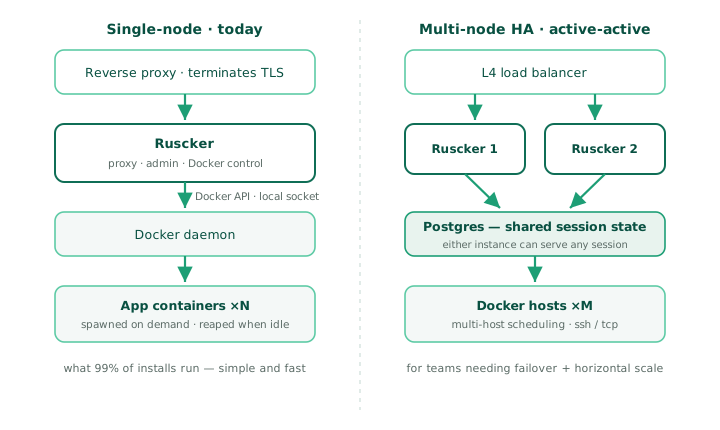
Single-node (default)
A reverse proxy terminates TLS in front of a single Ruscker, which talks to the local Docker daemon over its socket. This is what 99% of installs run — simple, fast, easy to operate.
Multi-node HA (active-active, since Phase 7)
Two or more Ruscker instances behind an L4 load balancer share a Postgres config catalog and session store, so either can serve any session. Exactly one instance holds leadership at a time via a Postgres advisory lock; standbys serve traffic and reconcile counts but skip the scaler and scheduled-job firing loops. The sticky cookie is an HMAC over a shared key, so any instance can validate any other’s cookie. See the deployment guide’s “Running active-active” section for the runnable example.
Multi-host Docker (since Phase 6)
Orthogonal to HA: one Ruscker instance can drive several Docker
daemons (proxy.hosts — ssh / tcp+TLS / unix), placing replicas by
weighted spread or bin-pack with optional anti-affinity. The proxy
reaches each container directly at host:published-port, so keep the
hosts on a private network. Combine with HA freely — the placement map
is per-instance, rebuilt from container labels on list().
What’s not covered here
- The admin UI internals — see the
ruscker-admincrate (cargo doc --open). - The proxy’s WebSocket handling — see the
ruscker-proxycrate. - Specific algorithm choices — see
docs/adr/. - The YAML schema — see
docs/YAML_SCHEMA.md.