

Ruscker
Ruscker is a high-performance portal and orchestrator for containerized web workloads. Behind a single proxy, it manages both:
- Container-per-session interactive apps — R/Shiny, Streamlit, Dash, Voilà, Jupyter, RStudio.
- Container-per-API stateless HTTP services — Plumber2, FastAPI.
Deployed as a single, ultra-lightweight static binary with instant startup and no JVM, Ruscker comes fully equipped with an admin panel, live monitoring, load balancing and scheduled container jobs. It uses a familiar YAML schema, so migration is smooth and configuration is effortless.
How it works
Visitors and API clients hit one Ruscker process. It serves the landing page and admin UI, and reverse-proxies each request to the right app container — picking a replica, keeping Shiny sessions sticky, upgrading WebSockets, and rewriting URLs. When no replica can take the load (and the spec allows it), Ruscker asks the Docker daemon to spawn one; idle containers are reaped automatically.
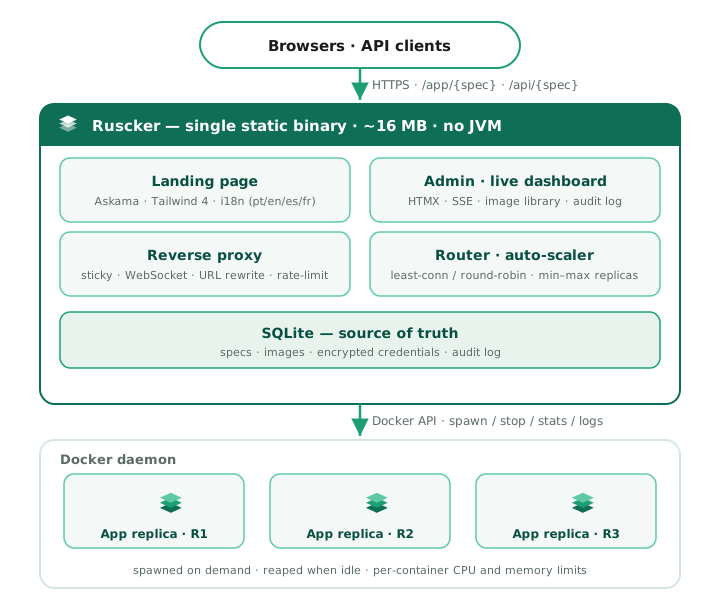
Why Ruscker
Modern web workloads demand speed and minimal overhead. Ruscker is engineered to keep the runtime light while staying compatible:
- Zero-friction migration — bring your apps over with a familiar YAML schema, no rewrite.
- Single compiled binary — one artifact to ship and run, measured at ~14 MB idle, with instant startup.
- Batteries included — a proper admin panel, a live monitoring dashboard, per-app step-up MFA, identity forwarding, scheduled jobs and load balancing, out of the box.
In production
Ruscker runs in production today — the releases page has the current release. Its measured idle footprint is:
~14 MB idle — measured on a real production deployment serving a real multi-app config. (The JVM-based proxy it replaced on the same machine sat at ~540 MB.)
The compatibility checker reports imported, ignored and unsupported ShinyProxy fields before a migration. Releases are multi-arch and cosign-signed; the Roadmap tracks what’s shipped and what’s next.
What’s in the box
- Reverse proxy + load balancer with sticky sessions, WebSocket
forwarding, per-spec replica pools, an auto-scaler, and URL rewriting
(a generalized runtime shim patches
fetch,XMLHttpRequest,WebSocket,script.src,link.href, and more) so unmodified apps work behind a sub-path. - Access at the proxy boundary with users/groups, per-app step-up TOTP MFA, and opt-in ShinyProxy-compatible identity headers plus selected profile claims for authenticated apps.
- Container backend (Docker) that spawns app containers on demand,
applies per-container CPU/memory limits, and reaps idle ones. Per-spec
container-envandcontainer-cmdlet you configure notebook servers (Jupyter, RStudio) without custom images. - Admin panel — apps CRUD with a full advanced form, a unified
media library (built-in logos, uploads, drag-and-drop, “in use”
badges), an encrypted credentials store (AES literal or
${VAR}env-ref, resolved only at pull time), a landing-page editor (colors, intros, SEO, social meta, analytics, custom HTML blocks, header/footer logos with alignment and links), audit log, user accounts with Viewer / Editor / Admin roles and group-scoped Editor delegation, and a live monitoring dashboard (CPU/memory, live-follow logs, stop/restart). Editors manage open apps, apps and non-Admin accounts in their own groups, while Admin and break-glass access stays global; the Media library remains shared. Admin tables and process logs show timestamps in each viewer’s browser timezone. On the local Docker backend, operators can also manage named Docker volumes and run a spec’s image to completion on a cron schedule, with history, log tails, timeouts and failure alerts. Cron usesserver.timezone(an IANA name) and remains on UTC when it is unset or invalid; the Schedules page labels the effective zone. Volumes and schedules are unavailable with the multi-host backend. - Sub-path mounting: serve the whole portal under a prefix via
server.context-pathor--base-path. Health probes (/healthz,/readyz) stay at the root for load balancers. - Operations: graceful shutdown, structured (JSON) logging, per-API
rate limiting + CORS, request body-size limits, gzip/br compression,
immutable-versioned static assets, and an opt-in Prometheus
/metricsendpoint. - Distribution: a cosign-signed multi-arch container image
(
ghcr.io/strategicprojects/ruscker), a Debian package with a hardenedsystemdunit, static musl tarballs, and a Homebrew tap. The project is Apache-2.0 licensed. - Server-rendered UI: Askama templates with HTMX and Alpine.js; there is no Node build step.
Where to next
- Quickstart — from zero to a running app in minutes.
- What Ruscker can serve — Shiny, Streamlit, Dash, FastAPI, JupyterLab, LLM UIs, BI tools, and more.
- Where Ruscker fits — what Ruscker is for and when to use it.
- Installation — Docker, the
.deb, orbrew. - Migrate an existing config — point Ruscker at your
existing
application.yml. - Configuration — the full YAML reference.
- The admin panel — what each screen does.
- Deploying in production — systemd + nginx.
- Roadmap — shipped phases and what’s planned.
What Ruscker can serve
Ruscker started as a ShinyProxy alternative, but the model underneath is more general: one container per session for stateful apps, one container per replica for stateless APIs. Anything that runs in a Docker container and speaks HTTP or WebSocket is a candidate — which makes Ruscker a portal runtime for containerized web apps, not just a Shiny host.
Each app becomes a card on the landing page and a route under
/app/{spec} (interactive) or /api/{spec} (stateless). Ruscker handles
spawning, sticky sessions, WebSocket upgrades, URL rewriting, load
balancing, and reaping idle containers. Sensitive apps can require a
recent MFA proof before any container starts; signed-in identity can be
forwarded to trusted apps through opt-in headers.
Showcase demos
A fresh Ruscker install seeds 13 demo cards automatically. Three of them use own-fork images published on Docker Hub; the rest link to official docs or use well-known public images:
| Card | Image | Notes |
|---|---|---|
| Shiny | openanalytics/shinyproxy-demo:latest | R Shiny demo app, port 3838 |
| Shiny for Python | openanalytics/shinyproxy-shiny-for-python-demo:latest | Python, port 8080 |
| Jupyter | quay.io/jupyter/minimal-notebook:latest | token-less, base_url=/ |
| RStudio Server | rocker/rstudio:latest | per-session IDE, port 8787 |
| R Markdown | openanalytics/shinyproxy-rmarkdown-demo:latest | Shiny backend, port 3838 |
| Streamlit | openanalytics/shinyproxy-streamlit-demo:latest | port 8501 |
| Dash | milkway/ruscker-dash-demo:latest | our fork — serves at root, no env quirks; multi-arch |
| Quarto | milkway/ruscker-quarto-demo:latest | our fork — pre-rendered static HTML on nginx (~67 MB vs ~430 MB) |
| FastAPI | milkway/ruscker-fastapi-demo:latest | our fork — stateless API kind; multi-arch |
| Voilà | openanalytics/shinyproxy-voila-demo:latest | Jupyter notebooks as apps |
| Bokeh | (external link) | docs card, no container |
| Plumber | (external link) | docs card, no container |
| Ruscker | (external link) | docs card, no container |
The three own-fork images (milkway/ruscker-dash-demo, milkway/ruscker-fastapi-demo,
milkway/ruscker-quarto-demo) are the reference for “how to make a Ruscker-ready
container”: they serve at root, ship no SHINYPROXY_PUBLIC_PATH dependency,
and the Dash/FastAPI forks are multi-arch (amd64 + arm64).
Seeding is idempotent — it only runs once per database. If you delete a showcase card, it stays gone on subsequent restarts.
Interactive, stateful apps
There are two interactive spec kinds in Ruscker:
shiny— the Shiny model: state on the server, a reactive WebSocket connection per session. Sticky sessions and WebSocket forwarding are on by default. Covers R Shiny and Shiny for Python.app(interactive app) — same sticky-session + WebSocket behavior, but for apps that aren’t Shiny specifically: Streamlit, Dash, Voilà, JupyterLab, RStudio Server, and similar. Usetype: appin your spec (or Ruscker infers it from well-knowntype:values likestreamlit,dash,voila).
Both kinds give each session its own container slot and forward WebSocket upgrades transparently.
Supported frameworks:
- R — Shiny (the reference case), Quarto Live,
flexdashboardwithruntime: shiny. - Python — Streamlit, Dash (Plotly), Gradio, Panel (HoloViz), Solara, Mesop, Reflex, Bokeh server.
- Notebooks as apps — Voilà, Marimo, Observable Framework.
- Julia — Pluto.jl, Genie + Stipple, Dash.jl.
Stateless HTTP APIs
Any request can go to any replica — the simplest case, load-balanced round-robin with no sticky cookie.
- R — Plumber and Plumber 2, Ambiorix, RestRserve.
- Python — FastAPI, Flask / Quart, Litestar, Django REST, Sanic.
- Other languages — Go (Gin, Echo, Chi), Node (Express, Fastify, Hono, Nest), Rust (Axum, Actix), Ruby (Rails API, Sinatra), Elixir (Phoenix API), PHP (Laravel, FrankenPHP).
This is something ShinyProxy doesn’t do naturally — Ruscker treats APIs as a first-class spec kind with their own scaling and rate limiting.
ML / LLM model serving
Models exposed over HTTP fit the stateless-API path; GPU workloads benefit from per-spec replica limits.
- Serving runtimes — BentoML, MLflow Models, Seldon, TorchServe, TensorFlow Serving (HTTP), NVIDIA Triton (HTTP).
- LLMs — Ollama, vLLM, Text Generation Inference, LiteLLM proxy.
Per-user notebooks and IDEs
Each user gets an isolated container — the JupyterHub pattern, with Ruscker’s portal and admin on top.
- JupyterLab / Jupyter Notebook (included in the showcase seed),
RStudio Server (included in the showcase seed),
code-server(VS Code in the browser), Theia, Marimo Lab.
BI and data exploration
Isolate a dashboard tool per team or per tenant.
- Apache Superset, Metabase, Redash, Apache Zeppelin, Datasette, Evidence, Rill, Grafana (when you want per-tenant isolation).
Generative-AI UIs
Multiplex GPUs and isolate users in front of generative tools.
- Stable Diffusion WebUI (AUTOMATIC1111, ComfyUI, Forge), Open WebUI, LibreChat, AnythingLLM, Flowise, Langflow, self-hosted Gradio demos.
Data tooling and ETL UIs
- Apache Airflow, Dagster, Prefect, Mage, Kestra, NocoDB, Baserow, Directus, self-hosted Supabase Studio.
Scheduled ETL, reports and maintenance
The admin Schedules page (local Docker backend) can run a containerized
spec to completion on a five-field cron: nightly ETL, report generation,
cache refreshes or small maintenance tasks. Set server.timezone to an IANA
name for the clock the expressions use; absent or invalid values retain the
UTC default. The Schedules page labels next and last executions in that same
zone. A job reuses the spec’s image, environment, volumes, resource limits
and registry credentials, with an optional command override. Runs have a
configurable timeout (1 hour by default), history and log tails; failures can
trigger the job-failed alert webhook.
Database admin consoles
Surface a DB console as just another card on the portal.
- pgAdmin, phpMyAdmin, Adminer, Mongo Express, Redis Insight, CloudBeaver.
Works, with caveats
- WebRTC apps (Jitsi, BigBlueButton) — Ruscker proxies the HTTP/WS signalling and the frontend, but UDP media needs a separate relay (e.g. coturn).
- gRPC — runs over HTTP/2; unary APIs work, bidirectional streaming with per-session routing needs extra configuration and testing.
Not the right tool
- Purely static sites (Hugo, Astro output) — overkill; use nginx or Caddy directly.
- Service-mesh-grade microservices (automatic mTLS, dense distributed tracing, complex canaries) — that’s Istio/Linkerd on Kubernetes. Ruscker is a portal proxy, not a service mesh.
- Large distributed or unbounded batch pipelines — use Slurm, Nomad, Airflow workers or another dedicated scheduler. Ruscker’s cron runner is for bounded run-to-completion jobs alongside the portal workloads.
Who it’s for
- Universities, research centers and other organizations publishing analytics dashboards for broad or internal audiences.
- BI and data-science teams that want to ship R/Shiny and Python/Streamlit apps without standing up a Kubernetes cluster.
- Consultancies delivering analytical tools to each client at isolated URLs.
- AI teams self-hosting LLM and generative WebUIs with per-user isolation.
The breadth here is the point: what looks like a “ShinyProxy alternative” is, in practice, a portal runtime for any containerized web app.
Where Ruscker fits
Ruscker is a portal-and-orchestrator for container-per-session and
container-per-API workloads — interactive apps that want a fresh
container per visitor, and stateless HTTP services pooled per replica. If
your apps run in a container and speak HTTP or WebSocket, Ruscker wraps
them in a portal, a reverse proxy, sticky sessions, auto-scaling and an
admin panel. Service settings can live in ruscker.yml; the editable app
catalog and operational state live in SQLite, or Postgres for HA.
What Ruscker is good at
- Per-session isolation — one container per visitor for stateful apps (Shiny, Streamlit, Dash, Voilà, notebooks), so sessions never share state.
- Stateless APIs — pooled per replica with an auto-scaler (Plumber2, FastAPI, and any HTTP service).
- Mixed frameworks under one portal — every app is a card on the landing page; anything in a container is first-class.
- A real admin panel — apps CRUD, a media library, an encrypted credentials store, a live monitoring dashboard, an audit log, and user roles — instead of editing a file and restarting. Editors are scoped by their group memberships to open/shared-group apps and non-Admin accounts; Admin and break-glass access remains global.
- Sensitive internal apps — per-app step-up TOTP MFA is enforced before a container starts, while opt-in identity headers let the app consume the signed-in username, groups and selected profile claims.
- Scheduled operations (local Docker backend) — run the same app
image/environment/volumes to completion on a cron for ETL, reports and
maintenance, with history, timeouts and failure alerts. Cron uses the IANA
zone in
server.timezoneand remains on UTC when unset. - Light to run — ~14 MB idle, a single static binary, no JVM and instant startup.
Compared with ShinyProxy
Ruscker keeps the familiar spec schema and /app/{spec} shape, including
opt-in add-default-http-headers: true compatibility through
X-SP-UserId and X-SP-UserGroups. It adds per-app step-up MFA, selected
X-Ruscker-User-* profile claims, stateless API pools, scheduled jobs and
an editable database-backed admin catalog. Identity forwarding defaults
off, so enable it explicitly for apps that need and trust those headers.
Self-hosting a single framework
Streamlit, Dash, Voilà and Gradio ship their own dev server but no multi-app portal, session isolation, auth, or scaling — self-hosting means rolling your own reverse proxy, container lifecycle and landing page. That glue is exactly what Ruscker is. Point a spec at your image and you get the portal, sticky sessions, WebSocket forwarding, scaling and reaping for free. See What Ruscker can serve.
Sub-path handling (the strip model)
Ruscker uses a strip model: the proxy strips /app/{id} from the
request path before forwarding, so the container always receives a
root-relative path (e.g. /lab/... instead of /app/jupyter/lab/...).
The container does not need to know its mount path — the proxy injects
a <base href>, rewrites static URLs in HTML responses, and patches
runtime fetches via a small JS shim.
The practical consequence: serve apps at the root and don’t hard-code a
mount path. Jupyter, for example, runs at --ServerApp.base_url=/:
- id: jupyter
  container-image: quay.io/jupyter/minimal-notebook:latest
  container-port: 8888
  container-cmd:
    - start-notebook.py
    - --IdentityProvider.token=
    - --ServerApp.allow_origin=*
    - --ServerApp.base_url=/
If you’re carrying over a config where the app reads a *_PUBLIC_PATH
environment variable to self-prefix its URLs, drop it under Ruscker —
the strip model already handles the mount path, and a self-prefixing app
would misconfigure itself and 404 on every request.
For the rare app that genuinely needs its external mount path — to build
absolute URLs the proxy can’t rewrite — Ruscker exposes an explicit opt-in
token #{publicPath}, substituted at spawn with the spec’s actual mount
path (including any --base-path prefix), for use in container-cmd or
container-env. Do not use it for Jupyter: under the strip model a
non-root base_url makes it 404 every path (see
Troubleshooting). Apps like Shiny, Streamlit, Dash
and Voilà never need it.
Secrets via env-var interpolation
Ruscker supports ${VAR} references in the YAML, resolved at spawn,
not at parse: the literal ${DB_PASSWORD} is stored in the config and the
database; only when a container is actually started does Ruscker look up
the environment variable and inject the real value. This means secrets
never land in the database — the DB only ever sees the placeholder. Set
secrets in the process environment (or in /etc/ruscker/ruscker.env for
the systemd service) and reference them by name in the YAML.
When Ruscker is not the right tool
- You need a publishing / authoring workflow — pushing source from an IDE, building content or versioning releases. Ruscker can schedule an existing image, but it does not replace your build and publishing system.
- You’re all-in on Kubernetes and want a CRD-native operator today — Ruscker schedules onto Docker hosts (over ssh/tcp), not Kubernetes.
- You need enterprise SSO gating app access per user (OIDC/SAML/LDAP
at the proxy level) — Ruscker’s auth covers admin roles (Viewer /
group-scoped Editor / Admin) and per-app visibility (
access-groups/access-users), but proxy-level SSO is not yet supported.
If none of those apply, start with the Quickstart.
Quickstart — a portal full of demos
From nothing to a portal of live demos in a couple of minutes. You
need Docker running locally and the ruscker binary (see
Installation — or just docker run the image,
shown below).
1. Run it (the portal seeds itself)
Ruscker reads a config file, but it can be almost empty — the database
seeds the demos. Save this two-line ruscker.yml:
proxy:
  title: My Ruscker
Then start it with an admin token, a master key and --db (the admin
database):
export RUSCKER_ADMIN_TOKEN="$(openssl rand -hex 32)"
export RUSCKER_MASTER_KEY="$(openssl rand -hex 32)"
ruscker serve --bind 127.0.0.1:8080 --db ruscker.db
The master key encrypts saved registry credentials and TOTP secrets. Keep
it stable if you reuse this database; without it, 2FA enrolment fails with
503.
If you plan to use Schedules, choose the clock in which cron expressions are written by adding an IANA timezone to the service config:
server:
  timezone: America/Recife
Leave it out to retain the UTC default. This setting controls the scheduler and its labelled next/last-run times; Activity, audit, Apps, Credentials, Users and process Logs instead follow the timezone of each viewer’s browser.
- Ruscker auto-connects to Docker when the daemon socket is
reachable, so app containers spawn out of the box. Pass
--no-dockerto run landing-only (then/app/*returns 503); pass--dockerto make a failed connect a fatal error instead of falling back to landing-only (useful for a remote daemon). - On first boot with
--db, Ruscker seeds 13 showcase cards — one live demo per supported framework (Shiny, Streamlit, Dash, Voilà, Jupyter, RStudio, …) plus external links for the rest — and seeds the framework logos into the Media library. The seed is idempotent; cards you delete stay deleted on subsequent boots.
Prefer the container image? Mount the Docker socket and a volume for the
DB (the image is cosign-signed; :latest tracks the current release):
docker run --rm -p 8080:8080 \
  -e RUSCKER_ADMIN_TOKEN \
  -e RUSCKER_MASTER_KEY \
  -v "$PWD/ruscker.yml:/etc/ruscker/ruscker.yml:ro" \
  -v "$PWD/ruscker.db:/data/ruscker.db" \
  -v /var/run/docker.sock:/var/run/docker.sock \
  ghcr.io/strategicprojects/ruscker:latest \
  serve --config /etc/ruscker/ruscker.yml --bind 0.0.0.0:8080 \
        --docker --db /data/ruscker.db
2. Open it
| URL | What you get |
|---|---|
| http://127.0.0.1:8080/ | the portal — the seeded showcase cards |
| http://127.0.0.1:8080/app/shiny/ | a live demo — Ruscker spawns the container on first hit |
| http://127.0.0.1:8080/admin | the admin panel (with RUSCKER_ADMIN_TOKEN set) |
| http://127.0.0.1:8080/healthz | liveness (always 200) |
Click any live-demo card to see on-demand container spawn in action, then watch the admin Containers page to see the replica start, serve, and stop. The first request to an app spawns its container; it’s reaped automatically once idle.
3. Add your own app
Two ways, neither of which needs a restart for the admin route:
-
From the admin panel (recommended) — go to
/admin→ Apps → Add app, pick a type, fill the form (there’s a live card preview), and Save. Everything is editable here — image, ports, scaling, resource limits, access — without touching YAML. -
In YAML — add a spec to your config. A tiny stateless example (
traefik/whoamiis a public echo image, so there’s nothing to build):proxy: title: My Ruscker specs: - id: hello display-name: Hello description: A stateless echo server. container-image: traefik/whoami:latest port: 80Validate before (re)starting — it catches typos and unsupported features:
ruscker validate ruscker.yml
# add --strict-compat to flag any ShinyProxy feature Ruscker would ignore
The schema is ShinyProxy-compatible, so an existing application.yml
works here too — see Migrating from ShinyProxy.
What just happened
Ruscker rendered the landing page, seeded the showcase catalogue into the database, and on the first request to an app asked Docker to start its container, routed you to it, and will reap it when idle. For interactive apps — Shiny, Streamlit, Dash, Voilà, Jupyter, RStudio — Ruscker adds sticky sessions and WebSocket forwarding automatically. For stateless APIs (Plumber2, FastAPI) it load-balances across replicas with no sticky overhead.
See What Ruscker can serve for the full framework list and Configuration for every spec field (replica pools, CPU/memory limits, registry credentials, routing, rate limits…).
Next steps
- Configuration — the full YAML reference. See Per-user access to restrict apps by user / group.
- The admin panel — manage specs, images, users, and the live container dashboard, identity headers, per-app 2FA and schedules without editing YAML. Editors are delegated by group: they see open apps plus apps and non-Admin accounts in groups they belong to; Admin and the break-glass token remain global.
- Deploying in production — systemd + nginx, TLS, multi-host, and active-active HA (including mounting the portal under a subpath and the sticky-upstream requirement for sign-in sessions in HA).
- Troubleshooting — when an app won’t load.
Installation
Ruscker is a single binary. Pick the packaging that fits your host.
Debian / Ubuntu (.deb)
The most ShinyProxy-like install: a systemd service on your Docker host. Packages for amd64 and arm64 are attached to every GitHub release.
# amd64
sudo apt install ./ruscker_<version>-1_amd64.deb

# arm64
sudo apt install ./ruscker_<version>-1_arm64.deb
This:
- installs
/usr/bin/ruscker, - creates a
rusckersystem user, - installs a hardened
ruscker.serviceunit and enables + starts it, - drops a minimal config at
/etc/ruscker/ruscker.ymland a secrets file at/etc/ruscker/ruscker.env, - generates a unique admin token on first install and prints it once (there is no default password),
- generates stable master and cookie keys without overwriting existing values, so encrypted credentials, MFA and sticky sessions survive restarts,
- runs with the admin catalog enabled (
--db /var/lib/ruscker/ruscker.db), so the admin panel works out of the box and a set of showcase apps seeds on first boot.
systemctl status ruscker
curl http://localhost:8080/healthz
sudo grep RUSCKER_ADMIN_TOKEN /etc/ruscker/ruscker.env   # your admin token
Log in at /admin with the printed token to manage apps, the landing
page and users — that’s where day-to-day configuration lives (stored
in the catalog DB, not the YAML). ruscker.yml holds deployment
settings; put secrets in /etc/ruscker/ruscker.env. After editing either
file, sudo systemctl restart ruscker.
One such deployment setting is the scheduler’s clock. Cron stays on UTC unless you opt into an IANA timezone:
server:
  timezone: America/Recife
The Schedules page labels next and last runs in the effective zone. An invalid name produces a validation warning and falls back to UTC instead of preventing startup. This setting does not change admin history timestamps, which render in each viewer’s browser timezone.
To actually run the demo apps (and your own containers) enable the Docker
backend: sudo ruscker-enable-docker. See Deploying in
production for nginx + TLS, and
Configuration for what lives where.
Upgrade in place
An upgrade replaces the binary and packaged unit while preserving the
operator-managed files in /etc/ruscker and the catalog, images and state
under /var/lib/ruscker. Back those directories up as usual, then install
the package for the host architecture:
sudo apt-get install -y --no-install-recommends \
  ./ruscker_<version>-1_amd64.deb
sudo systemctl restart ruscker
ruscker --version
curl -fsS http://127.0.0.1:<bind-port>/readyz
For a remote host where sudo requires a terminal, copy the package and its
matching .sha256 file to /tmp, then run:
ssh -tt <host> 'cd /tmp && \
  sha256sum -c ruscker_<version>-1_amd64.deb.sha256 && \
  sudo apt-get install -y --no-install-recommends \
    ./ruscker_<version>-1_amd64.deb && \
  sudo systemctl restart ruscker && \
  ruscker --version && sudo systemctl is-active ruscker'
Replace amd64 with arm64 where appropriate. A successful upgrade prints
the requested Ruscker version and active; /readyz must also return HTTP
200 before the node goes back into load-balancer rotation.
Uninstall & reset
Pick the scope you want:
| Goal | Command | What’s left |
|---|---|---|
| Remove the software, keep config + data | sudo apt remove ruscker | /etc/ruscker (config, admin token, keys) and /var/lib/ruscker (catalog DB) — a reinstall resumes where you left off. |
| Remove everything (no trace) | sudo apt purge ruscker | Nothing. Drops the catalog DB and /etc/ruscker — including ruscker.yml and the admin token / master key in ruscker.env. |
| Reset to a brand-new install | sudo apt purge ruscker && sudo apt install ./ruscker_<version>-1_amd64.deb | A pristine box: the default ruscker.yml (no custom title/specs) and freshly generated keys and admin token, exactly like a first install. |
| Wipe the data only, keep config | stop, remove the DB, start (below) | Config + token unchanged; the catalog is empty, so migrations re-run and the showcase cards re-seed on next boot. |
To wipe just the catalog (a “fresh portal” without uninstalling):
sudo systemctl stop ruscker
sudo rm -f /var/lib/ruscker/ruscker.db          # + -wal/-shm if present
sudo systemctl start ruscker
The catalog DB lives in
/var/lib/ruscker; your config and secrets live in/etc/ruscker.purgeclears both; removing the DB clears only the catalog. The portal title comes fromproxy.titleinruscker.yml, so it survives a data-only wipe — only apurge(or editing the file) changes it.
Static musl tarball
For hosts without a package manager, or for quick installs without a systemd unit, download the static musl binary directly. Tarballs for amd64 and arm64 are on the releases page.
tar -xzf ruscker-<version>-linux-amd64.tar.gz
sudo install -m 755 ruscker-<version>-linux-amd64/ruscker /usr/local/bin/ruscker
ruscker --version
The binary has no shared-library dependencies and runs on any glibc-free or glibc Linux system.
Homebrew (macOS / Linux)
For a local install — handy on a macOS workstation for development — use the tap:
brew install strategicprojects/tap/ruscker
ruscker --version
On Linux the formula pulls the static musl binary from the matching
release; on macOS it builds from source (so a Rust toolchain is fetched
as a build dependency). Each release auto-publishes its formula to the
tap, so brew upgrade tracks the latest version.
Ruscker spawns Linux containers, so the
--dockerbackend needs a Linux Docker host. A macOS Homebrew install is meant for running the portal locally and for development, not for hosting app containers.
Docker
docker run --rm -p 8080:8080 \
  -v "$PWD/ruscker.yml:/etc/ruscker/ruscker.yml:ro" \
  ghcr.io/strategicprojects/ruscker:latest \
  serve --config /etc/ruscker/ruscker.yml --bind 0.0.0.0:8080
To let Ruscker spawn app containers (the --docker backend), also
mount the Docker socket and add --docker:
docker run --rm -p 8080:8080 \
  -v "$PWD/ruscker.yml:/etc/ruscker/ruscker.yml:ro" \
  -v /var/run/docker.sock:/var/run/docker.sock \
  ghcr.io/strategicprojects/ruscker:latest \
  serve --config /etc/ruscker/ruscker.yml --bind 0.0.0.0:8080 --docker
Mounting the Docker socket grants control of the host’s Docker daemon — the same trade-off ShinyProxy carries. Prefer the
.debon the Docker host when you can.
From source
Requires Rust (the pinned toolchain installs automatically via
rust-toolchain.toml):
cargo build --release --bin ruscker
./target/release/ruscker --help
Development and release builds use Rust 1.96.0 from
rust-toolchain.toml. The MSRV source of truth is
workspace.package.rust-version in Cargo.toml (currently 1.94.0); the
dedicated msrv workflow reads that field and checks the locked graph.
Verifying release artifacts
Every tagged release is signed with cosign
using GitHub Actions OIDC (keyless — no public key to fetch). Each
asset ships a .sha256 plus a .sig + .pem (signing certificate);
the container image is signed by digest.
# Container image
cosign verify ghcr.io/strategicprojects/ruscker:<version> \
  --certificate-identity-regexp '^https://github.com/StrategicProjects/ruscker/' \
  --certificate-oidc-issuer https://token.actions.githubusercontent.com

# A downloaded asset (tarball or .deb)
cosign verify-blob ruscker-<version>-linux-amd64.tar.gz \
  --signature ruscker-<version>-linux-amd64.tar.gz.sig \
  --certificate ruscker-<version>-linux-amd64.tar.gz.pem \
  --certificate-identity-regexp '^https://github.com/StrategicProjects/ruscker/' \
  --certificate-oidc-issuer https://token.actions.githubusercontent.com
The exact commands are also printed in each release’s notes.
The serve command
ruscker serve [--config <path>] [--bind 0.0.0.0:8080] [--docker|--no-docker]
              [--db <file>] [--config-db-url <postgres-url>]
              [--images-dir <dir>] [--log-format json]
              [--base-path <prefix>]
| Flag | What it does |
|---|---|
--config | Path to the service config. When omitted, Ruscker prefers ruscker.yml in the working directory and falls back to application.yml for compatibility. |
--bind | Listen address (defaults to the YAML’s proxy.port). |
--docker / --no-docker | By default Ruscker auto-connects when the local daemon socket is reachable. --docker makes connection failure fatal; --no-docker forces landing-only mode. |
--db | SQLite file backing the admin catalog. Without it (and without --config-db-url), break-glass token login and the read-only monitoring dashboard still work, but the catalog-backed screens (Apps, Users, Groups, Media, Credentials, …) return 503. |
--config-db-url | PostgreSQL URL backing the admin panel and shared catalog in HA deployments. |
--images-dir | Directory served at /assets/img/. Auto-discovered from the config / ShinyProxy template-path when omitted. |
--log-format | text (default) or json. |
--base-path | Mount the whole portal under a URL prefix (e.g. --base-path /apps). Overrides server.context-path in the YAML. Health probes (/healthz, /readyz) stay at the root. |
Secrets come from the environment: RUSCKER_ADMIN_TOKEN,
RUSCKER_MASTER_KEY, RUSCKER_COOKIE_KEY,
DOCKER_REGISTRY_PASSWORD. RUSCKER_MASTER_KEY is required for encrypted
credentials and 2FA enrolment; keep it stable and back it up.
Migrating from ShinyProxy
Ruscker reads the same application.yml schema as ShinyProxy, so
in most cases you point it at your existing config and it just works.
(Your file keeps working as --config too — Ruscker’s canonical
service config is ruscker.yml, same schema; see
Configuration for how the pieces fit.)
1. Pre-flight check
Before switching anything, ask Ruscker what your config uses:
ruscker validate application.yml                 # general report
ruscker validate application.yml --strict-compat # migration pre-flight
--strict-compat lists every ShinyProxy feature your config uses that
Ruscker does not honour (e.g. Kubernetes backend, minimum-seats-available,
non-none authentication) and exits non-zero if it finds any. A clean
run means a drop-in migration.
In production, a real 31-spec ShinyProxy 3.2.0 config reported “no unsupported features”.
The validator also flags plaintext credentials in the YAML — move
any docker-registry-password to ${DOCKER_REGISTRY_PASSWORD} and set
the variable in the environment (or /etc/ruscker/ruscker.env).
2. Credentials and env-var interpolation
Any string value in application.yml can reference an environment
variable with ${VAR} or ${VAR:-default}:
docker-registry-password: ${DOCKER_REGISTRY_PASSWORD}
The literal ${VAR} token is what gets stored (in the config file, the
database, and exports) — it is resolved to the real value only when a
container is actually spawned. This means registry passwords and
per-spec container-env secrets never land in the database.
For teams managing several apps that share a registry credential, Ruscker also has a named credential store in the admin panel. Store the credential there once, then reference it by name in the spec:
- id: my_app
  container-image: registry.example.com/team/app:latest
  docker-registry-credential: my-registry-cred   # name from the store
When docker-registry-credential is set, it takes precedence over the
inline docker-registry-username / docker-registry-password fields.
The credential store accepts either an encrypted password or a pure
${VAR} env-ref (resolved at pull time, not stored in cleartext).
The inline fields are still valid and kept for back-compat — use whichever fits your workflow.
3. Identity headers
ShinyProxy’s per-spec add-default-http-headers: true is supported. It
forwards the signed-in account as X-SP-UserId and its comma-separated
groups as X-SP-UserGroups over HTTP and WebSocket.
Check specs whose applications read those headers: ShinyProxy defaults the setting on, while Ruscker deliberately defaults it off. If the field was omitted from the old config, add it explicitly where the application needs the identity:
- id: internal-app
  container-image: example/internal-app:latest
  add-default-http-headers: true
  identity-claims: [email, setor] # optional Ruscker profile headers
The optional claims become X-Ruscker-User-Email and
X-Ruscker-User-Setor; missing values are omitted. Ruscker strips
client-supplied X-SP-* and X-Ruscker-User-* headers before adding its
own, but the app should still be reachable only through the proxy if it
trusts them.
4. Sub-path mounting (context-path)
If you run Ruscker on a path prefix rather than a dedicated subdomain
(e.g. example.org/apps/ instead of apps.example.org), use
server.context-path:
server:
  context-path: /apps    # normalized: leading slash, no trailing slash
ShinyProxy’s nested form is also accepted without changes:
server:
  servlet.context-path: /apps
Or override it at startup with the CLI flag (wins over YAML):
ruscker serve --base-path /apps --config application.yml ...
The portal and admin routes are all mounted under the prefix; the
health probes (/healthz, /readyz) stay at the root so your load
balancer does not need to know the prefix. Your reverse proxy just
needs to forward requests under the same path through to Ruscker.
5. Card logos
ShinyProxy serves card logos from its template-path’s assets/img/
folder. When you run serve without --images-dir, Ruscker
auto-discovers them next to the config:
<config-dir>/assets/img/<config-dir>/<template-path>/assets/img/
So a config left in place finds its logos with no extra flags.
You can also upload images through the admin Media panel and
reference them by filename in the spec’s logo field.
6. Side-by-side cutover (recommended)
You don’t have to flip everything at once. A safe pattern (proven in production) keeps ShinyProxy reachable while Ruscker takes the root:
- Run Ruscker on a spare port (e.g.
127.0.0.1:8090). - In nginx, route
/→ Ruscker and/sp/→ ShinyProxy (give ShinyProxy aserver.servlet.context-path: /sp). - Compare the two live, and roll back by restoring the nginx config if needed.
Because Ruscker uses the same /app/{spec} URL scheme, existing
bookmarks keep working after the cutover.
After the cutover: read the startup warnings
ruscker serve runs the same validation as ruscker validate at boot and
logs every finding. A migrated config
typically produces a few is set but has no effect warnings —
ShinyProxy fields Ruscker parses but doesn’t honour
(server.secure-cookies, proxy.heartbeat-rate, hide-navbar, …).
They’re harmless, but each one is configured intent that is not
happening, so review them once: the
validation-warnings reference
says what to do for each. Two to know about:
server.secure-cookiesdoes nothing — theSecureflag comes fromserver.useForwardHeaders+ your proxy’sX-Forwarded-Proto(see Deploying).type: streamlit | dash | voilaspecs without acontainer-portnow default to the framework’s well-known port (8501 / 8050 / 8866) instead of Shiny’s 3838 — apps that previously needed an explicit port “just work”; an explicitcontainer-port/port:still wins.
Preserve or choose the scheduler clock
An existing schedule keeps its historical behavior after migration:
without server.timezone, Ruscker evaluates cron in UTC. To write cron in
a local clock, opt in with an IANA name:
server:
  timezone: America/Recife
The Schedules page then labels next and last runs in that zone. Invalid names produce a validation warning and fall back to UTC instead of blocking startup; the startup banner reports the effective zone. This does not control Activity, audit, Apps, Credentials, Users or process Logs, whose stored UTC timestamps render in each viewer’s browser timezone.
What Ruscker adds
Beyond parity, you also get: a real admin panel (no more hand-editing
YAML), a live monitoring dashboard, per-spec container-env /
container-cmd injection, per-API rate-limiting and CORS, per-user
and per-group app visibility, group-scoped Editor delegation, viewer-local
admin timestamps, per-app step-up MFA, timezone-aware scheduled jobs and
named volume management (local Docker backend), health probes, graceful
shutdown, and ~14 MB idle.
The JVM-based proxy it replaced on the same machine used about 540 MB. See
The admin panel.
Not supported (yet)
Authentication schemes other than none and the Kubernetes backend
are the main gaps — validate --strict-compat is the authoritative
source of truth for your specific config. For apps that handle their
own auth (a common case), none is correct: Ruscker just routes
traffic.
For the full field-by-field picture — every ShinyProxy key with its status in Ruscker (supported / warned-and-ignored / planned / out of scope, and the Ruscker way to get the same outcome) — see the ShinyProxy → Ruscker field map.
The short version: the container keys (container-env / -cmd /
-volumes / -network, labels, the CPU/memory requests and limits,
port), the access lists, and the lifecycle knobs all map straight
across; minimum-seats-available (use min-replicas),
network-connections (use the single container-network) and
kubernetes-* are flagged by --strict-compat; per-user-instance
knobs (max-instances family) don’t apply — Ruscker pools
seats × replicas instead.
ShinyProxy → Ruscker field map
A field-by-field reference for migrating a ShinyProxy 3.x
application.yml to Ruscker. For the step-by-step migration guide, see
Migrating from ShinyProxy; this page answers the
narrower question “what happens to each key in my config?”
Context: in Ruscker your
application.ymlis the import format (ruscker importbrings the specs into the database); the service’s own config isruscker.yml— same schema. See Configuration for the four-layer model.
Statuses:
| Meaning | |
|---|---|
| ✅ | Supported — Ruscker honours the key (same name unless noted) |
| ⚠️ | Accepted but ignored — parses fine, does nothing; Ruscker warns at startup when it’s set |
| 🚧 | Planned — not implemented yet; tracked on the roadmap / an issue |
| ❌ | Not planned — out of scope, with the reasoning and (where one exists) the Ruscker way to get the same outcome |
How to check your config: run
ruscker validate application.yml --strict-compat. It flags a non-noneproxy.authentication, the wholeproxy.docker.*block, and the per-speckubernetes-*/minimum-seats-available/network-connectionskeys, and exits non-zero if any are present. The ⚠️ rows below additionally warn at every startup. Any other unknown key is dropped silently by the parser — that’s standard serde behaviour, and it’s exactly why this table exists.
server.* and Spring-level keys
| ShinyProxy key | Status | In Ruscker |
|---|---|---|
server.servlet.context-path | ✅ | Same key, or the flat server.context-path; the --base-path CLI flag overrides both. See Configuration |
server.forward-headers-strategy | ✅ | Same key — any value other than none trusts X-Forwarded-*. The pre-3.x server.useForwardHeaders: true is also accepted. Set one of them whenever a reverse proxy terminates TLS |
server.secure-cookies | ⚠️ | Warned and ignored. The Secure cookie flag comes from the forwarded-headers trust above + your proxy’s X-Forwarded-Proto |
server.servlet.session.timeout | ⚠️ | Warned and ignored — admin sessions have a fixed 24 h TTL |
server.compression.* | ❌ | Not needed: Ruscker always compresses responses (gzip/brotli built in) |
server.tomcat.accesslog.* | ❌ | Tomcat-specific. Use structured logging (--log-format json) and your process manager’s log routing |
logging.file / logging.file.name | ⚠️ | logging.file is warned and ignored — Ruscker logs to stdout/stderr; let systemd/journald or Docker capture it |
logging.level.*, logging.pattern.*, logging.logback.*, logging.json.* | ❌ | Spring/Logback-specific. Use -v/-vv for verbosity and --log-format json for JSON logs |
spring.session.store-type, spring.redis.* | ❌ | Ruscker’s HA story uses Postgres, not Redis: --config-db-url, --session-store-url, --admin-session-store-url. See Deploying |
management.prometheus.metrics.export.enabled | ✅ | Equivalent: proxy.metrics-enabled: true exposes a Prometheus /metrics endpoint (unauthenticated — firewall it) |
spring.application.name | ❌ | Cosmetic; proxy.title names the portal |
proxy.* top-level keys
| ShinyProxy key | Status | In Ruscker |
|---|---|---|
proxy.title | ✅ | Same key (browser-tab / portal title) |
proxy.port | ✅ | Same key |
proxy.bind-address | ✅ | Same key |
proxy.heartbeat-timeout | ✅ | Same key (ms; -1 = never); per-spec override supported |
proxy.container-wait-time | ✅ | Same key (ms) — max wait for a spawned container to become ready. Note the default differs: ShinyProxy 20 s, Ruscker 60 s |
proxy.template-path | ✅ | Read for one purpose: auto-discovering card logos in <template-path>/assets/img/ next to the config. Thymeleaf templates themselves don’t apply — the portal UI is Ruscker’s own, themed in the admin Appearance tab |
proxy.specs | ✅ | Same key — see the per-spec table below |
proxy.authentication | ✅/🚧 | Parsed; only none is implemented today (apps that do their own auth are the common case). openid / saml are the Phase 8 roadmap (issue #934). Anything non-none is flagged by --strict-compat and warned at boot |
proxy.admin-groups, proxy.admin-users, proxy.users | ❌ | Ruscker has its own user store with roles (Admin / Editor / Viewer), managed in the admin Users tab (CSV import available) — not driven from YAML |
proxy.heartbeat-rate | ⚠️ | Warned and ignored — the landing’s heartbeat is fixed |
proxy.landing-page | ⚠️ | Warned and ignored — the portal is always at the root / base path |
proxy.hide-navbar | ⚠️ | Warned and ignored |
proxy.container-log-path | ⚠️ | Warned and ignored — use docker logs, or the admin Logs tab |
proxy.container-log-storage, proxy.s3-log-* | ❌ | No app-log shipping; capture container logs with Docker’s own log drivers |
proxy.container-backend | ❌ | Docker only (local daemon by default; several daemons via the proxy.hosts extension). Kubernetes/Swarm/ECS are out of scope |
proxy.container-wait-timeout | ❌ | Single readiness knob: container-wait-time |
proxy.stop-proxies-on-shutdown | ✅ | Built-in behaviour, not a flag: Ruscker never stops app containers on shutdown (equivalent to false) |
proxy.recover-running-proxies (+ …-from-different-config) | ✅ | Built-in: at boot Ruscker reconciles running containers it owns (label-scoped) back into the registry — no Redis, no flag |
proxy.default-stop-proxy-on-logout | ✅ | Per-spec stop-on-logout (no global default — set it on the specs that need it) |
proxy.default-proxy-max-lifetime | ✅ | Per-spec max-lifetime (no global default) |
proxy.default-max-instances, proxy.max-total-instances, per-spec max-instances | ❌ | Different concurrency model: ShinyProxy counts instances per user; Ruscker pools seats × replicas (seats-per-container, min-replicas / max-replicas). See Configuration § load balancing |
proxy.seat-wait-time | ❌ | No seat queue — a cold-start visitor sees a splash while the replica spawns; a saturated pool scales up to max-replicas |
proxy.default-webSocket-reconnection-mode | ❌ | Ruscker pumps WebSockets transparently and leaves reconnection to the app framework |
proxy.default-cache-headers-mode | ❌ | App responses pass through untouched |
proxy.default-max-session-time | ❌ | Sessions expire by heartbeat-timeout (idle), not wall-clock |
proxy.notification-message | ✅ | Equivalent: the landing intro text and custom HTML blocks, edited in the admin Appearance tab |
proxy.username-case-sensitive | ❌ | Usernames are normalized (lowercase) throughout |
proxy.secure-cookies, proxy.same-site-cookie | ❌ | Cookie flags are managed by Ruscker (Secure via forwarded-header trust; sticky cookies are per-spec, SameSite set appropriately) |
proxy.usage-stats-*, proxy.usage-stats | ❌ | No InfluxDB/JDBC usage-stats pipeline. Built in instead: a per-spec access counter with sparklines in the admin Apps table, the live dashboard, and the optional Prometheus /metrics endpoint |
proxy.monitoring.grafana-url | ❌ | The monitoring dashboard is built in; scrape /metrics for Grafana |
proxy.enable-app-persistence | ❌ | Not needed: containers keep running across Ruscker restarts and are reconciled at boot |
proxy.logo-url, proxy.favicon-path, proxy.template-groups, proxy.body-classes, proxy.my-apps-mode | ❌ | Thymeleaf-template UI knobs. The equivalents live in the admin Appearance tab (header logos, presets, catalog layout); the catalog groups cards by app type automatically |
proxy.ldap.*, proxy.openid.*, proxy.saml.*, proxy.ms-graph.*, proxy.webservice.*, proxy.custom-header.* | 🚧/❌ | Provider config for the unimplemented auth schemes. OIDC/SAML config will come with Phase 8 (#934); LDAP / webservice / customHeader have no plans |
proxy.docker.* (url, cert-path, port-range, internal-networking, image-pull-policy, …) | ❌ | Flagged by --strict-compat. Ruscker talks to the daemon via the standard socket/env (DOCKER_HOST); published ports bind on 127.0.0.1 by design; re-pull is a button in the admin. Multiple daemons: the proxy.hosts extension |
proxy.kubernetes.*, proxy.ecs.* | ❌ | Kubernetes / ECS backends are out of scope |
Per-spec keys (proxy.specs[])
| ShinyProxy key | Status | In Ruscker |
|---|---|---|
id | ✅ | Same key (also the /app/{id} URL segment) |
display-name | ✅ | Same key |
description | ✅ | Same key (inline HTML allowed) |
container-image | ✅ | Same key |
port | ✅ | Accepted as an alias of container-port. Unset, type: streamlit|dash|voila default to 8501 / 8050 / 8866; Shiny to 3838 |
container-cmd | ✅ | Same key (argv list overriding the image CMD) |
container-env | ✅ | Same key; ${VAR} values resolve at spawn and never land in the DB |
container-volumes | ✅ | Same key (bare volumes also accepted). Bind mounts are admin-only — see SECURITY.md |
container-network | ✅ | Same key; Ruscker also creates the network if missing |
labels | ✅ | Same key; Ruscker’s own ruscker.* labels win on collision |
container-memory-request / container-memory-limit | ✅ | Same keys |
container-cpu-request / container-cpu-limit | ✅ | Same keys |
access-groups / access-users | ✅ | Same keys — enforced at /app–/api and on landing visibility, against Ruscker’s own user store |
heartbeat-timeout | ✅ | Same key (per-spec override, ms) |
stop-on-logout | ✅ | Same key |
max-lifetime | ✅ | Same key (minutes, hard recycle; in-flight sessions get drain-timeout) |
seats-per-container | ✅ | Same key — but defaults differ: ShinyProxy defaults to 1; Ruscker to 10 for web apps (Shiny/Streamlit/Dash/Voilà) and 100 for APIs. Single-user IDEs (RStudio, Jupyter) should set 1 explicitly |
docker-registry-username / -password / -domain | ✅ | Same keys. Use ${ENV_VAR} for the password; or the named-credential extension docker-registry-credential |
template-properties | ✅ | Same key — Ruscker reads logo, type, state, link, and its own extensions (locked, accent, monogram) |
minimum-seats-available | 🚧 | Flagged by --strict-compat. Pre-warm pool not implemented — min-replicas: 1 keeps an app warm today |
container-network-connections / network-connections | ❌ | Flagged by --strict-compat. Multi-network attach is deferred — map it to the single container-network |
kubernetes-* (pod-patches, manifests, probes, …) | ❌ | Flagged by --strict-compat. Kubernetes backend is out of scope |
ecs-* | ❌ | ECS backend is out of scope |
container-privileged, docker-user, docker-ipc, docker-group-add, docker-runtime, docker-device-requests, resource-name, container-dns, additional-port-mappings | ❌ | Host-level container knobs, deliberately not exposed (privileged containers are root-equivalent; see SECURITY.md) |
container-env-file | ❌ | Use container-env with ${VAR} references instead — same secrecy, no file to mount |
target-path | ❌ | Ruscker mounts every app at /app/{id}/ and rewrites URLs itself (see Architecture); apps that self-route get the forwarded-prefix headers |
access-expression, access-strict-expression | ❌ | SpEL is JVM-specific; use access-groups / access-users |
max-instances, max-total-instances, always-show-switch-instance, allow-container-re-use | ❌ | Per-user-instance model — see the concurrency note in the proxy table above |
scale-down-delay | ✅ | Equivalents: scale-down-grace (idle grace before retiring a replica) and scale-down-cooldown-secs (anti-flap) |
websocket-reconnection-mode, shiny-force-full-reload, track-app-url | ❌ | WebSockets are pumped transparently; reconnection/reload is the app framework’s business |
add-default-http-headers | ⚠️ | Supported for X-SP-UserId / X-SP-UserGroups, but Ruscker defaults it off (ShinyProxy defaults it on). Enable it explicitly per trusted spec |
http-headers | ❌ | Static custom headers remain unsupported; Ruscker forwards the standard X-Forwarded-* family and its sub-path context headers |
cache-headers-mode | ❌ | App responses pass through untouched |
logo-url, logo-height/-width/-classes/-style, favicon-path | ❌ | Card art comes from template-properties.logo (the /assets/img/<file> convention — ruscker import --images-dir ingests the files) or the admin Media picker; sizing is the card design’s |
template-group | ❌ | The catalog groups cards by app type automatically (template-properties.type) |
custom-app-details, hide-navbar-on-main-page-link, support-mail-to-address, support-mail-subject | ❌ | Thymeleaf-template features with no Ruscker counterpart |
parameters (app parameters) | ❌ | No parameterized-launch form; make variants explicit as separate specs with different container-env |
external-url | ✅ | Equivalent: an external link spec — omit container-image and set template-properties.link |
Ruscker extensions (no ShinyProxy counterpart)
identity-claimsopts a trusted spec in to selected additional profile headers (emailand/orsetor); it is independent ofadd-default-http-headersand defaults to none.
These are additions, not compat concerns — listed so a reviewed config
is fully accounted for. Details in the
YAML schema reference: per-spec type,
min-replicas / max-replicas, scale-up-threshold /
scale-down-threshold / scale-down-grace / scale-down-cooldown-secs,
drain-timeout, routing-strategy,
concurrent-requests-per-replica, container-lifetime, platform,
per-spec container-wait-time (the ShinyProxy counterpart is global-only),
inject-base-href, max-body-size (global + per-spec),
docker-registry-credential, placement / anti-affinity, the
api.* block (docs-path, health-path, rate-limit, cors),
proxy.hosts (multi-host), proxy.landing-customization,
proxy.metrics-enabled / metrics-interval, proxy.shutdown-grace-ms
and proxy.csp-origins.
Keeping this page honest
This table is a living contract. When a field’s status changes
(a 🚧 ships, a ⚠️ gains a consumer), the PR that changes the behaviour
should update this page, docs/YAML_SCHEMA.md, and — when the
detection surface changes — the --strict-compat scan
(ruscker-config::validate). The sources of truth, in order:
crates/ruscker-config/src/schema.rs (what parses),
validate.rs’s check_ignored_compat_fields (the ⚠️ set) and
compat_scan (what --strict-compat flags), and
docs/YAML_SCHEMA.md § Not supported.
Configuration
Ruscker’s configuration lives in four places, each with its own job — keeping them apart answers most “where do I set X?” questions:
ruscker.yml— how the service runs: bind address and port, the subpath (server.context-path), forwarded-header trust, proxy timeouts, metrics. The.debinstalls a fully self-documented file at/etc/ruscker/ruscker.yml; a few of these also have CLI-flag overrides for one-off runs.ruscker.env— secrets and environment: the admin token, the master/cookie keys, registry passwords. Secrets are never written in YAML — reference them as${VAR}and define them here.- The database (
--db) — your portal: apps (specs), the landing appearance, users, credentials, media. Managed from the admin panel; on a fresh--dbit even seeds a set of showcase apps for you. application.yml— the ShinyProxy import format:ruscker import application.yml --db …brings an existing config into the database. It parses with the same schema asruscker.yml, so an existing file also still works as--config— but the canonical service file isruscker.yml(servewithout--configfindsruscker.ymlfirst and falls back toapplication.yml).
If you prefer to drive everything from YAML (GitOps), you still can — spec entries are accepted in the service file too. For a normal install the admin panel is where you manage apps, and the YAML stays small.
Where each setting lives
| You want to… | Set it in |
|---|---|
| Add / edit apps, APIs, links | Admin panel → Apps (or proxy.specs to import) |
| Customise the landing (title, colours, logos, SEO, blocks) | Admin panel → Portal |
| Manage users, roles, group membership | Admin panel → Users |
| Store registry credentials | Admin panel → Credentials |
| Bind address / port | ruscker.yml (proxy.bind-address / proxy.port); --bind overrides |
| Serve at the root or a subpath | ruscker.yml (server.context-path); --base-path / RUSCKER_BASE_PATH override |
| Enable / disable the Docker backend | auto · --docker · --no-docker |
| Database (catalog, users, sessions) | --db <file> · --config-db-url (Postgres/HA) |
| Admin token + crypto keys | RUSCKER_ADMIN_TOKEN, RUSCKER_MASTER_KEY, RUSCKER_COOKIE_KEY |
| Log format | --log-format text|json |
Deployment settings
The decisions you make at startup. Most have both a CLI flag and an env var; see Deploying in production for the full systemd
- nginx walkthrough.
Served at the root, or under a subpath?
The most common deployment question. By default Ruscker serves the portal
at the site root (https://apps.example.org/). If you can’t dedicate
a subdomain and need it under a path (https://example.org/apps/), set a
base path:
# ruscker.yml
server:
  context-path: /apps
(Equivalently the --base-path /apps flag or the RUSCKER_BASE_PATH
env var — precedence: flag > env > file.) Ruscker then emits every URL — landing,
admin, assets, and the /app proxy — under /apps, and rewrites app
responses so unmodified Shiny / Streamlit / Jupyter apps work behind the
prefix. Point your reverse proxy’s /apps/ location at Ruscker. Full
nginx example: Mounting under a base path.
Bind address, Docker, database
--bind <addr:port>— where Ruscker listens (overridesproxy.bind-address/proxy.port). Behind nginx, bind to localhost.- Docker backend — auto-connects when the daemon socket is reachable.
--no-dockerruns landing-only (the/appproxy returns 503);--dockermakes a failed connect fatal (e.g. a remote daemon you require). --db <file>— the SQLite catalog (apps, users, landing, audit, sessions); required for/admin/*. For active-active HA use--config-db-url postgres://…(a shared catalog) instead.
Secrets
Set these in the environment (the .deb puts them in
/etc/ruscker/ruscker.env):
RUSCKER_ADMIN_TOKEN— unlocks/adminand is the break-glass login. Without it, admin routes return 503.RUSCKER_MASTER_KEY— AES-256 key for the encrypted credentials store.RUSCKER_COOKIE_KEY— HMAC key for sticky-session cookies. Set it explicitly in production so sessions survive restarts (and are valid cross-instance in HA); without it a random key is generated per process.
High availability
Running more than one instance behind a load balancer? Share the catalog
(--config-db-url), the proxy session store (--session-store-url), the
admin session store (--admin-session-store-url), and the same
RUSCKER_COOKIE_KEY across instances, so any node can serve any request.
See Shared admin sessions.
Per-user access
access-groups / access-users on a spec scope who can see the
card on the landing and reach the upstream at /app / /api. A spec
with neither key is open — visible to everyone, including anonymous
visitors. Otherwise:
- An admin session sees everything.
- A signed-in user sees a restricted spec when their username is in
access-usersor one of their groups is inaccess-groups. - An anonymous visitor only sees open specs.
Enforcement is real — the /app and /api guards reject unauthorized
requests (anonymous on /app → redirected to login; otherwise 403), not
just hide the landing card.
You set both keys on the spec form (admin panel → Apps), and group membership per user on the admin Users page. The same user record drives both portal visibility and admin role (Admin / Editor / Viewer) — see The admin panel. In YAML the keys look like:
proxy:
  specs:
    - id: open-app
      display-name: Open App
      container-image: demo/img        # no access keys ⇒ open
    - id: analysts-app
      display-name: Analysts App
      container-image: demo/img
      access-groups: [analysts]
    - id: vip-app
      display-name: VIP App
      container-image: demo/img
      access-users: [carol]
The full YAML reference
Everything below is the complete YAML schema (the same
docs/YAML_SCHEMA.md shipped in the repo) — ruscker.yml and the
ShinyProxy-compatible application.yml both parse with it. Reach for
it to migrate an existing ShinyProxy config, or to drive specs and
landing from YAML instead of the admin panel — not for a normal,
admin-panel-managed install.
YAML schema reference
Reference for every field Ruscker understands in its YAML config —
ruscker.yml (the canonical service config) and application.yml
(kept as the ShinyProxy import format) parse with this same schema.
For ShinyProxy users: this document marks which ShinyProxy features are supported, extended by Ruscker, deferred to later phases, or not supported.
Top level
server: { ... }      # Optional. Spring Boot-style server config
proxy: { ... }       # The main Ruscker config
logging: { ... }     # Optional. Logging config
server block
Supported:
server:
  useForwardHeaders: true             # Trust X-Forwarded-* headers (see below)
  forward-headers-strategy: native    # 'native' | 'framework' | 'none'
  context-path: /apps                  # Mount portal under a subpath (see below)
  # ShinyProxy's nested form is also accepted:
  servlet.context-path: /apps
  timezone: America/Recife             # Zone the SCHEDULER uses (see below)
Parsed for compatibility but ignored (each produces a startup warning when set — see Validation warnings):
server:
  secure-cookies: true                # IGNORED — see useForwardHeaders below
  servlet.session.timeout: 3600       # IGNORED (admin sessions are 24h fixed)
  # OR equivalently:
  servlet:
    session:
      timeout: 3600
server.useForwardHeaders — forwarded-header trust
This single switch gates every read of
client-suppliable X-Forwarded-* headers: the cookie Secure flag
(X-Forwarded-Proto), the per-client API rate-limit key, and the
X-Forwarded-For chain forwarded to your apps (trusted → the real
peer is appended; untrusted → the spoofable inbound value is
replaced). If a reverse proxy terminates TLS in front of Ruscker,
set it to true — otherwise cookies are minted without Secure.
ShinyProxy’s secure-cookies flag is not what does this in Ruscker;
it’s ignored. Full rationale in docs/SECURITY.md §7.
server.timezone — the scheduler’s clock
An IANA zone name
(America/Recife, Europe/Lisbon, …) telling the scheduled-jobs
runner which wall clock a cron expression refers to. 0 8 * * *
under America/Recife fires at 08:00 there — 11:00 UTC — instead of
08:00 UTC. The Schedules page shows next/last run in the same zone,
labelled with it.
Absent ⇒ UTC, which is what every install did before this key existed: upgrading never moves the firing time of a schedule already running in production. Set it deliberately, and check your schedules afterwards — a nightly job will shift by your UTC offset.
One consequence worth planning for: adopting a zone can fire one extra run on the switch-over day. The fire marker is a UTC instant, so re-reading the same expression on a westward clock can put today’s occurrence after the marker — a job that already ran at 08:00 UTC runs again at 08:00 local. It settles from the next day on. If a re-run would be harmful (a non-idempotent ETL), disable the schedule, restart with the zone set, then re-enable it.
Across DST transitions the runner neither skips nor duplicates: a spring-forward gap fires at the transition instant, and a fall-back repeat fires only on the first of the two.
Use a zone name, not an abbreviation: BRT is not a zone and produces
a startup warning while the scheduler quietly stays on UTC. Zone names
also carry the historical DST rules, so a schedule keeps meaning
“08:00 local” across a DST transition, which a fixed offset couldn’t
express.
This key does not affect the admin tables (audit, user activity, apps, users, credentials) or the Logs tab. Those render in each viewer’s own browser timezone — they’re records of past events with a human looking at them, whereas the scheduler has no viewer, which is why it needs a configured zone.
server.context-path — subpath mounting
Serves the whole portal under a URL prefix when you can’t dedicate a
subdomain (e.g. example.org/apps/ instead of box.example.org/).
Normalized form: leading slash, no trailing slash ("box",
"/apps/", and "/apps" all become /apps). The CLI flag
--base-path /apps overrides the YAML.
ShinyProxy emits this as server.servlet.context-path; the flat
server.context-path form is also accepted. Empty / absent ⇒ served
at the root (the default).
Operational notes:
- The health probes
/healthzand/readyzstay at the root regardless of the prefix — load balancers don’t need to know it. - The chrome’s root-absolute URLs (
/admin/...,/assets/..., redirects) are rewritten on the response so they all carry the prefix; runtime fetches (fetch/XMLHttpRequest/WebSocket/EventSource) get a small shim that prefixes them too. - Cookies set
Path=/(already sent by browsers for{base}/...). - Configure your reverse proxy to pass requests through under the
same prefix — see the Mounting under a base path section of
book/src/deploying.md.
Other server.* fields from Spring Boot are accepted by serde but
ignored by Ruscker.
proxy block
Top-level proxy fields
| Field | Type | Default | Notes |
|---|---|---|---|
title | string | "Ruscker" | Browser tab title |
landing-page | string | "/" | Ignored (warned when set) — the portal is always at the root / base path |
hide-navbar | bool | false | Ignored (warned when set) |
template-path | path | none | Override template directory |
heartbeat-rate | ms | 10000 | Ignored (warned when set) — the landing’s heartbeat is fixed |
heartbeat-timeout | ms | 3600000 | Session expiry; -1 = never. Per-spec override supported |
container-log-path | path | none | Ignored (warned when set) — use docker logs / the admin Logs tab |
port | u16 | 8080 | HTTP listener port |
bind-address | string | "0.0.0.0" | Listener interface |
authentication | enum | none | none (the only implemented value) / openid / ldap / saml / simple |
landing-customization | block | {} | Branding, SEO/social meta, analytics, custom HTML blocks, sign-in visibility — see § proxy.landing-customization. Ruscker extension |
specs | array | [] | List of apps/links/APIs |
container-wait-time | ms | 60000 | Max wait for a spawned container to become ready (TCP + HTTP probe) before the spawn fails; 0 keeps the default (#970) |
shutdown-grace-ms | ms | 30000 | Drain window on SIGTERM/Ctrl-C before forced exit; /readyz reports draining during it. Ruscker extension |
max-body-size | size | none | Global cap on proxied request bodies ("10m", "1g", bytes); over → 413. Per-spec max-body-size overrides. Ruscker extension |
metrics-enabled | bool | false | Expose a Prometheus /metrics endpoint (unauthenticated when on — firewall it). Ruscker extension |
metrics-interval | s | 5 | How often the dashboard polls the backend for per-replica CPU/mem. A busy host can slow it (10–15) to ease the Docker daemon. 0 ⇒ default. Ruscker extension |
hosts | list | [] | Docker hosts for multi-host scheduling (Phase 6). Empty ⇒ the local daemon. Ruscker extension |
proxy.hosts — multi-host scheduling (Phase 6)
Empty (the default) means the single local Docker daemon — today’s behaviour. List hosts to spawn app containers across several daemons:
proxy:
  hosts:
    - id: ssh-1
      address: ssh://ops@10.0.0.11      # Docker over SSH (simplest)
    - id: tcp-1
      address: tcp://10.0.0.12:2376     # Docker over TLS
      tls: { ca: /etc/ruscker/ca.pem, cert: /etc/ruscker/cert.pem, key: /etc/ruscker/key.pem }
      max-containers: 40                # optional cap
      weight: 2                         # optional, for spread placement
    - id: local
      address: unix:///var/run/docker.sock
Address schemes: ssh://user@host[:port], tcp://host:port (needs
tls), http://host:port (plain TCP — trusted networks only),
unix:///path. validate flags empty/duplicate ids, unknown schemes,
and tls mismatched with the scheme.
Per-host: max-containers caps how many containers a host runs;
weight (default 1) biases spread placement toward bigger hosts.
Per-spec placement controls how a spec’s replicas land across hosts:
- id: heavy-shiny
  placement: spread          # spread (default) | bin-pack
  anti-affinity: true        # keep replicas on distinct hosts (best-effort)
spreaddistributes replicas (weighted least-loaded) for fault isolation;bin-packfills one host before using the next.anti-affinity: trueprefers hosts not already running the spec, falling back to the strategy above if every eligible host does (so scaling never stalls). Hosts atmax-containersare skipped; if all are full, the spawn fails (the scaler retries).
Authentication
proxy.authentication currently supports only none. The other
variants are accepted by the parser so an imported configuration still
loads, but Ruscker treats them as none; ruscker validate --strict-compat
reports the unsupported scheme. This field is about an external identity provider; Ruscker’s database-backed user
accounts, roles, per-spec access lists, and step-up MFA work independently
of it. OIDC / SAML / LDAP remain roadmap items. An app may also keep its
own internal authentication behind the proxy.
proxy.landing-customization
Branding, SEO, analytics, and custom-HTML overrides for the public
landing. Every subfield is optional; an empty landing-customization
block (the default) renders the stock landing.
proxy:
  landing-customization:
    # Branding — CSS colors applied to the landing header
    header-bg: "#0f6e56"               # any CSS color
    header-fg: "#ffffff"               # contrast override when bg is dark
    header-bg-dark: "#10312b"          # dark-theme header bg (blank = inherit header-bg)
    header-fg-dark: "#f0f0f0"          # dark-theme header text (blank = inherit header-fg)

    # Intro paragraph between header and filters
    intro: "Welcome to the portal."    # single-language fallback
    intro-locales:                     # per-language overrides; locale code → text
      pt: "Bem-vindo ao portal."
      en: "Welcome to the portal."
      es: "Bienvenido al portal."
      fr: "Bienvenue sur le portail."

    # SEO / social-share meta tags injected into the landing `<head>`
    seo-title: "Portal — Org Name"     # overrides `proxy.title` for <title>
    seo-description: "Team applications."  # <meta name="description"> + og:description
    og-image: /assets/img/og.png       # path or absolute URL for og:image

    # Analytics — admin-trusted, injected verbatim into landing <head>
    analytics-html: |
      <script defer src="https://plausible.io/js/script.js"
              data-domain="example.org"></script>
    analytics-origins: "https://plausible.io"   # space-separated; widens landing CSP

    # Operator CSS — injected as a <style> late in the landing <head>,
    # so it can override the built-in styles
    custom-css: ".rk-card { border-radius: 0; }"

    # Header / footer logos (admin-managed in the live editor; see below)
    logos:
      - url: /assets/img/org-mark.png   # uploaded, built-in, or absolute URL
        slot: header                    # `header` | `footer`
        align: left                     # `left` | `center` | `right`
        link: https://org.example       # optional click-through
        height: 40                      # render height in px
        margin: 12                      # optional outer margin in px

    # Sign-in visibility (anonymous viewers only)
    show-admin-link: true              # default true; false hides the entrance

    # Custom HTML blocks (admin-managed in the live editor; see note below)
    blocks:
      - slot: top                       # `top` (after header) | `bottom` (after grid)
        title: "Maintenance banner"     # internal label, not shown publicly
        html: '<div class="...">Scheduled downtime Sunday 02:00 UTC.</div>'
        csp-origins: ""                 # space-separated origins this block needs
        enabled: true                   # default true
Field reference:
| Field | Type | Default | Notes |
|---|---|---|---|
header-bg | CSS color | none | Header background. Match your brand’s primary color. |
header-fg | CSS color | none | Header text — set when header-bg is dark and the default loses contrast. |
header-bg-dark | CSS color | none | Dark-theme header background. Unset inherits header-bg. |
header-fg-dark | CSS color | none | Dark-theme header text. Unset inherits header-fg. |
card-cover-default | CSS value | none | Default cover (solid/gradient) painted behind catalog cards that have no per-app cover/accent. Unset keeps the per-kind tint. |
card-cover-default-dark | CSS value | none | Dark-theme default card cover. Unset inherits card-cover-default. |
intro | string | none | Single-language fallback. Inline Markdown only — **bold**, *italic*, [links](https://…); no HTML. |
intro-locales | map | {} | Locale code → intro string (same inline Markdown). Wins over intro for matching locales. |
seo-title | string | proxy.title | Override for <title>. |
seo-description | string | resolved intro | <meta name="description"> + og:description. |
og-image | path / URL | none | og:image for social-share. |
analytics-html | string | none | Trusted raw HTML, injected verbatim into landing <head>. |
analytics-origins | string | none | Space-separated origins added to the landing CSP (script-src/connect-src/img-src). |
custom-css | string | none | Trusted raw CSS, injected as a <style> late in the landing <head> so it overrides the built-in styles. |
show-admin-link | bool | true | When false, anonymous visitors don’t see the “Sign in” entrance. Logged-in users still see their panel link. |
show-highlights | bool | true | Show the “Featured” carousel above the filters. The carousel still only renders when at least one spec is featured. |
logos[] | list | [] | Header/footer logos (see below). |
blocks[] | list | [] | Custom HTML blocks (see below). |
logos[] subfields:
| Field | Type | Default | Notes |
|---|---|---|---|
url | string | required | Image URL — /assets/img/... (uploaded), a built-in (/assets/showcase/..., /assets/brand/...), or an absolute URL. |
slot | enum | required | header or footer — where the logo renders. |
align | enum | required | left, center, or right within the slot. left/right integrate into the chrome: header-left replaces the Ruscker mark, header-right trails the buttons, footer-left sits far-left, footer-right trails the version+mark. center renders in a separate bar. Logos sharing a slot+alignment render side by side. |
link | URL | none | Optional click-through — when set, the logo becomes an <a>. |
height | px | default | Per-logo render height in pixels; falls back to a built-in default when unset. |
margin | px | none | Optional outer margin in pixels around the logo, for spacing from adjacent chrome or a neighbouring logo. |
blocks[] subfields:
| Field | Type | Default | Notes |
|---|---|---|---|
slot | enum | required | top or bottom — render position on the landing. |
title | string | required | Admin-only label; not rendered publicly. |
html | string | required | Trusted raw HTML, injected verbatim into the chosen slot. |
csp-origins | string | "" | Space-separated origins this block’s content needs, folded into the landing CSP. |
enabled | bool | true | Toggle without deleting. |
Trust model:
analytics-html,custom-css, andblocks[].htmlare rendered unescaped. Only set them from a trusted source. Anything the snippet loads from outside Ruscker’s origin must also be listed in the matching*-originsfield, otherwise the landing’s CSP blocks it.
custom-css, logos[], and blocks[] are admin-managed in the live
landing editor (the logos picker and blocks editor live on the Portal
page). Blocks are stored in their own DB table; the blocks[] slot in
this YAML schema exists so a future ruscker export round-trip can
serialize them, but at the moment the import/export path does not
populate it — operators edit blocks from the admin UI. logos[] does
round-trip through import/export. SEO, analytics, and show-admin-link
are deploy-level policy and live only in this block.
Specs
A spec describes one app, API, or external link. Every spec has an
id and lives in proxy.specs[].
Common fields (all spec types)
- id: my_app                          # required, kebab-case
  display-name: "My App"              # shown on the card
  description: "What it does"         # HTML inline allowed
  template-properties:                # free-form bag for the landing
    logo: "/assets/img/myapp.png"
    icon: lock                        # 'lock' | 'lock_open'
    type: app                         # 'app' | 'package' | 'talk' | 'report' | 'api'
    updated: "18/05/2025"
    state: active                     # 'active' | 'inactive'
    link: https://external.example    # optional explicit URL
Containerized specs (Shiny, Streamlit, Dash, Voilà, API)
- id: my_app
  container-image: org/repo:tag       # required for containerized
  platform: linux/amd64               # optional Docker target platform
  type: shiny                         # optional, default 'shiny' if image set
  container-port: 8501                # port the app listens on inside the
                                      #   container; default 3838 (Shiny).
                                      #   `type: streamlit|dash|voila`
                                      #   defaults to the framework's
                                      #   well-known port (8501 / 8050 /
                                      #   8866) when unset. ShinyProxy
                                      #   `port:` is accepted as an alias.
  seats-per-container: 10             # sessions per replica
  max-lifetime: 360                   # minutes — hard recycle (enforced, #334)
  container-lifetime: 360             # minutes — soft recycle when idle (enforced, #334)
  heartbeat-timeout: 3600000          # ms — per-spec override (enforced)
  container-wait-time: 120000         # ms — startup readiness override; 0/unset = global
  stop-on-logout: false               # end a user's sessions on logout (enforced, #337)
  docker-registry-username: acme
  docker-registry-password: ${DOCKER_REGISTRY_PASSWORD}   # use env vars!
  docker-registry-domain: docker.io
  docker-registry-credential: dockerhub-acme   # OR reference a stored
                                      #   credential by name (Ruscker
                                      #   extension; see below)
  container-cpu-limit: 1.5            # hard cap in CPU cores
  container-cpu-request: 0.5          # accepted; local Docker ignores CPU requests
  container-memory-limit: 1g          # hard cap; bytes or k/m/g suffix
  container-memory-request: 512m      # Docker memory reservation
  container-volumes:                  # bind mounts (ShinyProxy key; `volumes` also accepted)
    - /srv/myapp/data:/data           #   persistent data
    - /srv/myapp/www:/www:ro          #   static assets, read-only
  container-env:                      # env vars injected into the container
    DB_HOST: db.example.org           #   (ShinyProxy-compatible)
    DB_PASSWORD: ${DB_PASSWORD}       #   ${VAR} resolved at spawn, not at parse —
                                      #   the literal is stored; secret never hits the DB
  container-cmd:                      # override the image's CMD (argv list)
    - R
    - -e
    - shiny::runApp('/app', port=3838, host='0.0.0.0')
  container-network: ruscker_net      # attach to this Docker network (created if missing)
  labels:                             # extra Docker labels stamped on the container
    team: data                        #   (ShinyProxy-compatible)
    cost-center: analytics
  access-groups: [staff, ops]         # who may see/reach this app
  access-users: [alice]               #   (ShinyProxy-compatible)
  require-mfa: true                   # require a user-owned MFA proof (Ruscker-native)
  mfa-validity-days: 7                # remembered-proof window; 0 = session-only
  add-default-http-headers: true       # opt in to X-SP-UserId / X-SP-UserGroups
  identity-claims: [email, setor]      # opt in to selected profile claims
container-volumes is a list of Docker bind specs (/host:/container,
optionally :ro/:rw), mapped to the container’s HostConfig.binds.
This is ShinyProxy’s key; the bare volumes is still accepted as an
alias for older Ruscker configs. Add as many as needed; editable in the
admin Advanced form (one per line).
Bind-mounting host paths is root-equivalent and admin-only — see
SECURITY.md.
container-env is a NAME: value map injected into the container as
environment variables (Docker Config.Env). ${VAR} /
${VAR:-default} references in the values are resolved at spawn, not
at parse: the ${VAR} literal is what gets stored (config / DB / export),
and the real value is only ever materialized when the container is
created — so an app secret passed this way never lands in the database.
container-cmd
is an argv list that overrides the image’s baked CMD (Docker
Config.Cmd); omit it to keep the image default. Both are
ShinyProxy-compatible and editable per spec.
platform selects the Docker target platform used for image pull and
container creation, such as linux/amd64 or linux/arm64; when omitted,
the daemon chooses the host-compatible manifest. The four resource fields
are ShinyProxy-compatible: container-cpu-limit is a positive fractional
CPU hard cap (0.5 = half a core), container-memory-limit is a hard byte
cap, and container-memory-request maps to Docker’s soft memory
reservation. container-cpu-request is parsed and retained for compatible
backends but has no runtime effect on the local Docker backend, which has no
CPU-request primitive. Memory accepts plain bytes or binary k/m/g
suffixes. An unparseable memory value (e.g. the 512mb typo) is warned
and ignored; a 0 is valid and means no limit (for -limit) or no
reservation (for -request) — Docker treats zero as unlimited, so it is
not warned. container-cpu-limit / container-cpu-request are stricter:
only a positive, finite number of CPUs is accepted — 0, negatives, and
non-finite values are warned and not applied.
container-network (Ruscker extension) attaches the spec’s containers to
a named Docker network, mapped to the container’s HostConfig.NetworkMode.
The backend creates the network (a plain user-defined bridge) if it
doesn’t exist yet, so you don’t have to pre-create it. Omit it (or leave
it blank) to use the daemon’s default bridge. Use it to isolate Ruscker’s
app containers on their own L2 segment — the published port still binds on
loopback (127.0.0.1), so the proxy reaches the app exactly as before; the
network only segments app-to-app traffic. ShinyProxy’s per-spec
network-connections list maps straight to this single field (Ruscker
attaches one network; multi-network attach is still deferred).
labels (ShinyProxy-compatible) is a NAME: value map of extra Docker
labels stamped on the container — useful for external tooling
(monitoring, log routing, cost attribution). Ruscker merges them onto the
container’s labels at spawn; its own ruscker.* labels always win on a
key collision (they’re load-bearing for the registry, reconcile and disk
panel), so you can’t override them. Blank keys are dropped.
access-groups / access-users (ShinyProxy-compatible) scope who can
see an app on the landing and reach it at /app / /api. A spec
with neither is open — visible to everyone, including anonymous
visitors. Otherwise: a logged-in user sees it when their username is in
access-users or one of their groups is in access-groups; an admin
always sees everything; an anonymous visitor sees only open apps. Group
membership is set per user in the admin panel. Enforcement is real (not
just hiding the card). See the Roadmap Phase 8.
require-mfa and mfa-validity-days are Ruscker-native per-spec controls
for step-up MFA (#1005). MFA is off by default. A user enrolls one TOTP
factor on Account → 2FA, using the QR code with a compatible
authenticator app, and receives one-time recovery codes that are displayed
once. Every protected app uses that same user-owned factor. When enabled,
the app trusts a successful proof for 7 days unless
mfa-validity-days overrides the window; 0 means proof is valid only in
the current login session (no remembered device), and values above 30 clamp
to 30. A user without an enrolled TOTP factor will be guided through
enrollment on first access to a protected app. The proxy enforces this guard
before selecting, waking or spawning a replica: /app navigation redirects
to enrollment or the MFA challenge, while /api fails closed with 401
(no login session) or 403 (MFA unsatisfied) and no HTML redirect. Emergency
Admin sessions created with RUSCKER_ADMIN_TOKEN bypass the factor so an
operator cannot be locked out; every bypass is warned and audit-logged as
mfa.break_glass_bypass (deduplicated per session and app for 15 minutes).
require-mfa has no effect on External-link specs — Ruscker never
proxies them, so there is no request to guard; validate warns if you set
it there.
add-default-http-headers is a ShinyProxy-compatible, per-spec opt-in
that forwards X-SP-UserId and comma-separated X-SP-UserGroups on HTTP
requests and WebSocket handshakes for signed-in users. Ruscker deliberately
defaults it to false (ShinyProxy defaults it to true) so an upgrade
does not silently disclose identity to an app that was not already trusted
to receive it. Anonymous requests and break-glass token sessions carry no
identity headers. Client-supplied X-SP-* identity headers and the reserved
X-Ruscker-User-* namespace are always stripped before proxying.
identity-claims is a Ruscker-native, per-spec list of additional profile
attributes to disclose. Allowed values are email and setor, forwarded as
X-Ruscker-User-Email and X-Ruscker-User-Setor respectively for signed-in
users. It defaults to empty and is independent of add-default-http-headers,
so a spec can request only an e-mail without receiving the username/group
pair. A selected claim with no stored value is omitted, never sent as an empty
header. Unknown claim names are retained by the schema but ignored by the
runtime for forward compatibility. These values are PII; enable each one only
for an app that needs and is trusted to receive it.
Registry credentials — inline vs. named (docker-registry-credential)
A spec can authenticate to a private registry two ways:
- Inline
docker-registry-username/docker-registry-password/docker-registry-domain— ShinyProxy-compatible. Always use${ENV_VAR}for the password (never a literal in YAML). - Named
docker-registry-credential: <name>— a Ruscker extension that references an entry in the admin’s encrypted credential store (managed under Credentials in the admin panel). The username, password, and registry are resolved from the store at pull time (decrypted withRUSCKER_MASTER_KEY), so no secret — not even a${VAR}reference — needs to live in the spec at all.
When docker-registry-credential is set, it takes precedence over
the inline docker-registry-* fields for that spec. Leave it unset to
use the inline fields. The spec form’s Registry section is a picker
over stored credential names.
Smart routing — sub-path context for the upstream
Ruscker mounts each app under a sub-path (/app/{id}, /api/{id}) but
the container usually assumes it lives at the server root. Two
mechanisms bridge that gap:
-
Forwarded-prefix headers (always on). Every proxied request carries the public mount context to the upstream so a prefix-aware app can self-route and emit correct absolute links:
Header Value Consumed by X-Forwarded-Prefix/app/{id}(no trailing slash)Spring, Traefik, FastAPI root_pathX-Script-Namesame mount path WSGI, Dash, Plumber X-Forwarded-Protohttp/httpsas seen by the clientabsolute-URL builders behind TLS X-Forwarded-Hostthe public Hostabsolute-URL builders Apps that ignore these headers are unaffected. To honour them you typically point the framework at the prefix — e.g. uvicorn
--root-path /app/my-api, or Dashrequests_pathname_prefix. -
HTML rewriting (
inject-base-href, defaulttrue). For apps that can’t be told their prefix, Ruscker injects<base href>and rewrites root-relative URLs in/app/{id}HTML responses (see the rewriter inroutes::rewrite). This is the safe default and covers Shiny out of the box. Set it tofalseper spec once the app self-routes from the headers above — then the rewriting is redundant and best disabled:- id: my_api container-image: org/fastapi:tag type: api inject-base-href: false # app reads X-Forwarded-Prefix itselfinject-base-hrefonly affects/app/{id}responses;/api/{id}responses are never rewritten. Editable in the admin Advanced form under Routing. -
The
#{publicPath}token (opt-in). For an app that needs its own base-url told to it as a config value — Jupyter’s--ServerApp.base_url, for instance — drop the literal token#{publicPath}into anycontainer-cmdargument orcontainer-envvalue. At spawn it’s substituted with the spec’s public mount path with a trailing slash (e.g./app/{id}/, or/apps/app/{id}/under a base path;/api/{id}/for APIs). This is Ruscker’s analog of ShinyProxy’sSHINYPROXY_PUBLIC_PATH, but it is never injected automatically — Ruscker strips the mount prefix before forwarding, so most apps should serve at root and rely on the rewriting above. Reach for the token only when an app genuinely needs the public path in its own configuration:- id: jupyter container-image: org/jupyter:tag type: app container-cmd: - jupyter - lab - --ServerApp.base_url=#{publicPath}Note
#{publicPath}is resolved at spawn, distinct from the parse-time${VAR}env interpolation, which never sees this runtime value.
External link specs (no container)
- id: my_pkg
  display-name: "My Package"
  description: "An R package"
  template-properties:
    type: package
    link: https://pkg.example          # the destination URL
    logo: "/assets/img/mypkg.png"
    icon: lock_open
    state: active
Just omit container-image and provide template-properties.link.
Ruscker won’t try to orchestrate anything — clicking the card
navigates to the link.
API specs (Plumber2 / FastAPI / etc.)
- id: my_api
  type: api                            # explicit type, overrides auto-detect
  container-image: org/my-api:latest
  api:
    port: 8080                         # container port
    docs-path: /__docs__               # parsed/stored; not consumed yet
    health-path: /__healthz__          # parsed/stored; readiness still probes /
    rate-limit: 100/min                # per-IP rate limit at proxy
    cors: true                         # permissive CORS headers
  min-replicas: 1
  max-replicas: 3
  concurrent-requests-per-replica: 100
  routing-strategy: round-robin        # APIs don't need sticky
api.port, api.rate-limit, and api.cors have runtime effects.
api.docs-path and api.health-path are currently parsed, stored, and
editable but not consumed by the proxy/backend: Ruscker does not publish a
docs link from docs-path, and container readiness still performs TCP then
HTTP at / rather than probing health-path. Do not rely on either field
for routing or health behavior yet.
api.rate-limit — per-client throttling
Enforced at the proxy, before any container is spawned or woken,
so a throttled caller costs nothing downstream. Format is
N/unit where unit is one of s/sec/second(s),
m/min/minute(s), or h/hr/hour(s) (case-insensitive):
rate-limit: 100/min      # at most 100 requests per client per minute
rate-limit: 5/s
rate-limit: 1000/hour
A request over the limit gets 429 Too Many Requests with a
Retry-After header. The window is a sliding one, per
(spec, client).
Client identity. The “client” is the caller’s IP. When the
operator opts into forwarded headers
(server.useForwardHeaders: true, or a forward-headers-strategy
other than none), the right-most parseable X-Forwarded-For
address is used — the entry appended by the trusted proxy, which a
client can’t spoof (the left-most slot is client-controlled).
Otherwise the real TCP peer is used: X-Forwarded-For is not
trusted unless opted in, since a direct client could otherwise spoof
it to dodge the limit.
A malformed rate-limit value is ignored (no limit applied) and
flagged by ruscker validate.
api.cors — permissive CORS headers
cors: true makes the proxy add permissive CORS headers
(Access-Control-Allow-Origin: *, common methods, * headers) to
every response for that API spec, and answer OPTIONS preflight
requests itself (204) without touching the container. Headers an
upstream app already set are never overwritten — an API that does
its own CORS wins. CORS applies only to the /api/ route family.
max-body-size — cap proxied request bodies
Limits how large a request body the proxy will forward, for both
/app/ and /api/ routes. Set it globally on proxy.max-body-size
and/or override it per spec:
proxy:
  max-body-size: 10m          # global default
  specs:
    - id: upload_api
      container-image: org/api:1
      type: api
      max-body-size: 100m     # this spec accepts larger uploads
Format is the Docker-style size string used elsewhere ("512" bytes,
"10m", "1g"; binary units). The effective limit is the spec’s own
value if set, otherwise the global default; unset everywhere means no
limit (the default, preserving prior behaviour).
A request whose Content-Length exceeds the limit is rejected with
413 Payload Too Large before any container is touched. A chunked or
under-declared body that grows past the cap mid-stream is also stopped
(it surfaces as a 502). A malformed size string is ignored (no limit
applied) and flagged by ruscker validate.
Load-balancing fields (any containerized spec)
| Field | Type | Default | Notes |
|---|---|---|---|
min-replicas | u32 | 0 | Always-warm replicas. Default 0 = cold-start: no container runs until the first visitor (they see a brief splash), reaped when idle — like ShinyProxy. Set 1+ to keep an app hot (e.g. a single-user RStudio/Jupyter you don’t want cold) |
max-replicas | u32 | 5 (≥ min-replicas) | Per-container apps auto-scale to up to 5 independent replicas by default. With min-replicas unset/0 the app still scales up to 5 on demand (cold-start); set explicitly to raise/lower |
scale-up-threshold | float | unset | scale up when pool utilization exceeds this; unset ⇒ the built-in saturation rule (enforced, #333) |
scale-down-threshold | float | unset | only retire idle replicas while utilization is below this; unset ⇒ the built-in idle rule (enforced, #333) |
scale-down-grace | s | unset | idle-grace before retiring a replica; unset ⇒ the global ~30 s grace (enforced, #333) |
scale-down-cooldown-secs | s | 60 | suppress saturation-driven scale-up after this app scales down, preventing immediate respawn flaps; 0 disables. Ruscker extension (#936) |
drain-timeout | s | 60 | grace for in-flight sessions on a max-lifetime recycle (enforced, #335) |
container-wait-time | ms | global proxy.container-wait-time | per-app TCP + HTTP startup-readiness budget; unset or 0 inherits the global value. Ruscker extension (#1026) |
routing-strategy | enum | varies | See below |
concurrent-requests-per-replica | u32 | 100 | API-only — per-replica in-flight cap the scaler scales on (enforced, #336) |
Autoscaling knobs (#326). By default the scaler scales on seat saturation (
sessions_activevssessions_max) with built-in grace ticks. All the per-spec scaling/lifecycle knobs are now enforced (opt-in where noted):scale-up-threshold/scale-down-threshold/scale-down-grace(#333 — pool-utilization-driven scale-up + a conservative scale-down gate + per-spec idle grace; unset ⇒ the default rules),max-lifetime/container-lifetime(#334 — recycle past the age cap),drain-timeout(#335 — grace for a busymax-lifetimerecycle),stop-on-logout(#337 — a signed-in user’s sticky sessions end immediately on logout), andconcurrent-requests-per-replica(#336 — API specs have no sticky sessions, so the scaler meters their capacity by in-flight requests against this per-replica cap).ruscker validate --strict-compatno longer flags any of them.
Routing strategies
least-connections— pick replica with most free seats. Default for Shiny, Streamlit, Dash, Voilà.round-robin— cycle through replicas. Default for API.weighted-random— random with weights = remaining seats. Not yet implemented (falls back to least-connections).resource-aware— pick based on CPU/mem load. Requires phase 4 metrics. Falls back to least-connections.
Spec kind dispatch
The effective kind drives runtime behavior:
- Explicit
typefield wins if set - Otherwise:
container-imageset →shiny, unset →external
The kind controls:
- Whether sticky session cookies are issued (
shiny,streamlit,dash,voila— yes;api,external— no) - Default routing strategy
- Default
seats-per-container(10 for web-framework apps — Shiny, Streamlit, Dash, Voilà — which serve many sessions per process; 100 for API; 0 for external). A single-user IDE (RStudio, Jupyter) should setseats-per-container: 1so each visitor gets an isolated container. - Whether WebSocket forwarding is attempted
Environment variable interpolation
Any string value can use ${VAR_NAME} or ${VAR_NAME:-default}:
docker-registry-password: ${DOCKER_REGISTRY_PASSWORD}
heartbeat-rate: ${HEARTBEAT_RATE:-10000}
Rules:
- Variable names:
[A-Za-z_][A-Za-z0-9_]*(lower/mixed case accepted) - Missing variable without default: hard error at parse time
- Missing variable with default: substituted with the default
- Comments (lines starting with
#, or trailing# …) are not interpolated - A nested reference in a default (
${A:-${B}}) is refused with a hard error; nested defaults are not supported docker-registry-passwordand everything undercontainer-envare preserved verbatim and resolved only at use (spawn/pull), so secrets never land in the database onimport. This holds wherevercontainer-envappears in the spec — including as the first key of a list item
This applies to the whole YAML file, not just credentials. Use it for any value that varies between environments.
template-properties
Free-form key-value bag. The current landing template uses:
| Key | Type | Notes |
|---|---|---|
logo | string | Path or URL to card image |
cover | string (CSS) | Card-cover background — a solid color or gradient. Empty ⇒ a per-kind tint |
icon | lock | lock_open | Access level |
type | app | package | talk | report | api | Badge category |
subject | string | Subject/topic of the app — drives the Subject filter facet on the landing |
featured(a top-level spec field, not a template-property): setfeatured: trueto highlight the app in the landing’s Featured carousel above the filters. The carousel shows only whenlanding-customization.show-highlightsis on (the default) and at least one spec is featured. Defaultfalse. |updated| string | Display date (DD/MM/YYYY) | |state|active|inactive| Whether to enable card | |link| URL | External URL for non-container specs |
You can add custom keys — they’re ignored unless the template uses them. Useful for future custom templates.
logging block
logging:
  file:
    name: logs/ruscker.log
Accepted for ShinyProxy compat. Ruscker uses tracing for logging
and respects the RUST_LOG env var as well.
Validation warnings
ruscker validate <config> — and ruscker serve at
startup — reports these non-fatal findings. None of them stops the
server; each one means some configured intent is not taking
effect, so treat warnings in production logs as action items.
| Warning | Meaning |
|---|---|
| duplicate spec id | Two specs share an id; only the last parsed wins |
| no display-name / no description | Cosmetic: the landing card falls back to the id / renders empty |
| embedded credential | A sensitive field (docker-registry-password, …) carries a literal value instead of a pure ${VAR} reference — including a partial one like ${VAR}-suffix |
| unknown template-properties type | template-properties.type isn’t one of the known card types |
| invalid replica range | max-replicas < min-replicas — the scaler can’t satisfy both |
| replica ceiling zero | Explicit max-replicas: 0 on a containerized spec — every spawn is refused; the app can never start |
| missing container-image | A containerized type: with no container-image — fails only when first visited |
| external with container-image | type: external + container-image — the image is silently ignored |
| MFA validity out of range | mfa-validity-days is above 30; the effective value clamps to 30 |
| MFA validity without requirement | mfa-validity-days is set while require-mfa is not true, so the window is inert |
| MFA on external link | require-mfa is set on a link Ruscker does not proxy; it cannot guard the linked site |
| invalid scale threshold | scale-up/scale-down thresholds inverted or out of 0..1 |
| container fields without image | seats-per-container etc. on a spec with no image |
| invalid rate-limit / max-body-size / cpu / memory / volume | The value doesn’t parse, so the intended cap or mount is not enforced |
| invalid label key | A labels key uses characters outside [A-Za-z0-9._-] — Docker may reject the container create at spawn |
| reserved label key | A labels key in Ruscker’s ruscker.* namespace — the backend stamps those itself and overrides the value; rename it |
| invalid container-network | container-network isn’t a valid Docker network name ([a-zA-Z0-9][a-zA-Z0-9_.-]*) — the create fails at spawn |
| zero seats | seats-per-container: 0 confuses the auto-scaler |
| invalid docker host | A proxy.hosts entry that will fail to connect at startup |
| ignored compat field | A modeled ShinyProxy field with no runtime effect is set (server.secure-cookies, server.servlet.session.timeout, proxy.heartbeat-rate, proxy.hide-navbar, proxy.landing-page, proxy.container-log-path, logging.file) |
ruscker validate --strict-compat additionally lists every
unsupported ShinyProxy feature a migrated config uses and exits
non-zero — the recommended pre-flight when migrating.
Not supported
These ShinyProxy fields are accepted by the permissive parser but currently
ignored and reported by ruscker validate --strict-compat:
proxy.specs[*].kubernetes-*— Kubernetes backend (out of scope)proxy.specs[*].minimum-seats-available— pre-warm pool (planned)proxy.specs[*].network-connections— multi-network attach (phase 3.5); map it to the singlecontainer-networkfield, which Ruscker creates + attachesproxy.docker.*— global docker config (use defaults or env vars)
(proxy.specs[*].volumes, container-env / container-cmd,
container-network and labels are now supported — see “Containerized
specs” above.)
Setting the strict-compat fields above does not prevent ordinary parsing;
run ruscker validate --strict-compat <config> to surface them and fail the
migration pre-flight. Separately, modeled fields that parse but have no
runtime effect produce an ordinary validation/startup warning:
server.secure-cookies,
server.servlet.session.timeout, proxy.heartbeat-rate,
proxy.hide-navbar, proxy.landing-page, proxy.container-log-path
and logging.file each produce a warning when set, so a migrated
config does not silently lose those configured behaviors. The API
docs-path and health-path compatibility placeholders described above are
the exception: they are stored but currently have no runtime effect or
dedicated validation warning.
For a field-by-field ShinyProxy → Ruscker reference — every documented
ShinyProxy 3.x key with its status here (supported /
warned-and-ignored / planned / out of scope) and the Ruscker
equivalent where one exists — see the ShinyProxy → Ruscker field
map page on the docs site (book/src/shinyproxy-fieldmap.md).
The admin panel
The admin panel is Ruscker’s main advantage over editing YAML by hand.
It lives at /admin, uses account login after token-based bootstrap,
and needs a catalog database: SQLite with serve --db <file>, or shared
Postgres with --config-db-url in HA.
Everything is configurable from the web UI — every spec field (including API, scaling, resource and lifecycle settings), the media library, encrypted credentials, and the whole landing page. YAML import/export exists for migration and backups, not as a requirement.
The admin panel and the public portal both work on a phone: the top navigation collapses to icons, wide tables and the dashboard’s replica grid scroll inside their cards (rather than stretching the page), and the portal’s app cards go full-width and show their whole description up front — the desktop hover-to-expand isn’t needed on touch.
Logging in
On first run, set RUSCKER_ADMIN_TOKEN (the .deb generates one on
install and prints it once) and browse to /admin/login: with no
accounts yet you’re asked for the token, then walked through
creating the first admin account (username + password). After that
everyone signs in with their account at /admin/login. The token stays
as a break-glass login (/admin/login?token=1) so you can never be
locked out. Until a token is set, /admin/* returns 503 and only the
public landing + proxy are served.
The top-right account cluster has the same language (pt-BR / en-US / es-ES / fr-FR) and theme (light / dark / auto) pickers as the public portal, plus your current access level and account actions.
Users and access levels (roles)
Each person gets their own account (username + password). Admins, and
Editors within the group boundary described below, manage accounts under
Users (/admin/users): create one, or open a row’s Edit button for
the consolidated page — role, groups and profile in one form with a single
save, plus the password reset. Each row shows a coloured avatar with the
user’s initials and their groups as coloured badges (a group keeps the same
colour on the Groups and Apps pages). The table is paginated on the server
at 50 users per page. Its server-side, case-insensitive search (accented
letters included — GESTÃO matches Gestão, though it does not strip
diacritics, so Joao won’t find João) covers username, groups,
department, email and phone on both SQLite and Postgres. An Editor’s totals,
search and pages all cover only accounts in that Editor’s scope.
Export CSV (Admin-only, like the import) sits beside the search: all
ignores the search and writes every account, filtered (shown only while
a search is active, with its count) writes exactly the rows the search
matches across every page. Columns are the import’s
(username,role,password,groups,setor,email,celular — groups joined
with ;) plus created_at. The password column is always empty (hashes
never leave), so the file re-imports once you fill it in; free-text
fields that a spreadsheet would read as a formula are guarded with a
leading ', which the importer strips again. Each export writes a
users.export audit row with the scope, term and row count, never the
rows; if that row can’t be written the export is refused.
Searching, sorting and paging don’t reload the page: the table region
is fetched and swapped in place (debounced as you type), the URL is kept
in sync so a reload or a shared link reproduces the view, and the Back
button steps through the history. Sorting by user, role or created date
is server-side (?sort=username|role|created&dir=asc|desc), so it
orders the whole result, not just the visible page. The Audit and
Activity filters work the same way. Without JavaScript every form still
submits normally.
Passwords follow a policy: at least 8 characters, with at least one
uppercase letter, one lowercase letter, one digit and one special
character — enforced everywhere a password is set (create, reset,
first-admin setup, self-service change, CSV import). Existing passwords
aren’t retroactively rejected; admin-assigned ones are transitional
anyway, because the user is asked to change theirs on first login. Next
to the password field, a generate button fills in a strong random
14-character password (created in your browser, policy-compliant, no
look-alike characters) and reveals it so you can read what you’re about
to hand over — no more teste123. Password fields are masked (type
password) throughout the panel otherwise, so a shoulder-surfer can’t
read a password as you type it.
| Role | Can do |
|---|---|
| Viewer | a portal account, not a panel operator: signs in to unlock group-restricted cards on the landing; reaches no admin section |
| Editor | manage Apps, Containers, Users and Group membership within their own groups; open apps and the Media library remain shared across Editors |
| Admin | unrestricted panel access, including every app, user and group plus credentials, the landing editor, custom blocks and the audit log |
The panel shows only the sections your role can reach. Enforcement is
server-side — hiding a nav link is just UX; the routes themselves
return 403 for a role that isn’t allowed. When an Editor is allowed into
a section but asks for an app, user, group or replica outside their scope,
the handler returns 404, deliberately making a forbidden target
indistinguishable from a missing one. The audit log records the acting
username. A last-admin guard stops you deleting or demoting the only
remaining admin (so the portal can’t be locked out); the
RUSCKER_ADMIN_TOKEN break-glass login is the other safety net.
An Editor’s scope is the exact, case-sensitive set of groups on their own account, read from the database on every request:
- Applications and Containers. An Editor can see and operate every
app whose
access-groupsoverlaps their groups. Apps with neitheraccess-groupsnoraccess-usersare open and remain global to every Editor. An app restricted only byaccess-usershas no group boundary and is therefore Admin-only. The same rule protects app lists, direct app actions, YAML app imports, container details, logs, stop and restart. When editing a shared app, groups outside the Editor’s scope stay attached but are not exposed as editable choices. - Users. The list, search, pagination and KPIs include only non-Admin accounts sharing at least one group. An Editor may create Viewer or Editor accounts, but must assign at least one of their own groups; they may edit in-scope role, profile and membership and reset an in-scope user’s password. They cannot target an Admin, assign the Admin role, edit themselves through the Users page, delete an account, import users from CSV or reset MFA. Memberships belonging to other groups survive an Editor’s edit.
- Groups. An Editor sees only their groups and may add or remove non-Admin users from those memberships. Creating, renaming and deleting a group remain Admin-only.
Admin account sessions and the RUSCKER_ADMIN_TOKEN break-glass session are
unrestricted; group membership never narrows either one.
Before upgrading: give every Editor account at least one group in the current release’s Users page before starting the upgraded Ruscker. Previously, an Editor with no groups operated the whole catalog; under the scoped model that account can operate only open apps and sees no users or groups. Startup emits a warning on the Logs stream with the count and usernames of every Editor still missing a group, but it does not block startup.
2FA / MFA for selected apps
In an app’s Access & scale settings, enable Require 2FA
(require-mfa) to require a user-owned authenticator-app code before the
proxy will select or start that app’s container. The same enrolled TOTP
factor is reused across protected apps; the switch is a per-app step-up
policy, not a separate enrollment for every app.
Users enrol once under Account → 2FA, either directly or when a
protected app redirects them there. They re-enter their password, scan the
QR code with a standard TOTP app such as Google Authenticator, Microsoft
Authenticator, Authy or 1Password, confirm a six-digit code, and save the
ten one-time recovery codes shown once — grouped ABCDE-FGH23 with the
digits tinted so B/8 and S/5 read apart, with Download (.txt)
and Copy all buttons (built in the browser; the server never re-emits
the codes). A code is accepted with or without the dash. One successful
proof satisfies every protected app, subject to each app’s freshness policy.
The same Two-factor authentication page shows how many recovery codes
remain (only a count is knowable: the database stores salted hashes) and
warns when two or fewer are left. Generate new codes asks for the
password again, invalidates the whole current set, shows the new one once
and writes an mfa.recovery_regenerated audit row.
MFA validity days (mfa-validity-days) controls that policy: 7 days by
default, capped at 30; 0 limits the proof to the current login session.
The proxy checks it before any container is selected or started. An
unenrolled or unproven /app visit redirects to enrolment or challenge
without spawning; protected /api requests return 401 without a login
and 403 when proof is still required.
Users can open Two-factor authentication in their account to forget
this device or forget all trusted devices without ending their login
sessions. If a phone or recovery-code set is lost, an Admin can open the
user’s edit page and Reset 2FA; this deletes the factor, recovery codes
and device grants, so the next protected-app visit starts guided enrollment
again. The RUSCKER_ADMIN_TOKEN remains an audited break-glass bypass for
emergencies and should not be used for routine app access.
The remembered-device cookie is opaque and HttpOnly; only its salted hash
is stored. Password change/reset, 2FA reset, user deletion and Forget all
trusted devices revoke remembered proofs. TOTP secrets are encrypted with
RUSCKER_MASTER_KEY; enrolment fails closed with 503 when the key is
missing. Secrets and recovery-code plaintext never enter logs, audit rows or
YAML exports. The flow works with both SQLite and Postgres; an Admin sees
only whether 2FA is configured and can perform the audited reset.
Identity headers to apps
For an app that needs the portal identity, enable
add-default-http-headers: true. Ruscker then sends the
ShinyProxy-compatible X-SP-UserId and X-SP-UserGroups headers. Unlike
ShinyProxy, Ruscker defaults this off so upgrading or importing a spec does
not disclose identity unexpectedly.
Independently, use identity-claims: [email, setor] to opt into profile
fields as X-Ruscker-User-Email and X-Ruscker-User-Setor. A claim with
no stored value is omitted. These headers are forwarded only for signed-in
users and work on both HTTP requests and WebSocket handshakes.
Treat them as trusted identity only when the app is reachable exclusively
through Ruscker. The proxy strips all client-supplied X-SP-* and
X-Ruscker-User-* headers before inserting its authoritative values, which
prevents direct request spoofing at this boundary.
Screens
The sections below follow the panel’s tab order: daily drivers first (Containers, Apps, Media, Credentials, Appearance, Schedules), people (Users above, Groups), then diagnostics and maintenance (Logs, Disk, Activity, System). The former Dashboard/Painel nav label is now Containers, and Audit/Auditoria is Activity/Atividades. Core module headings use the standardized “X Management” / “Gestão de X” pattern; technical notes sit in helper text instead of subtitles.
Containers
A live view of running replicas, refreshed by polling
GET /admin/dashboard/snapshot. The
headline KPI cards (containers, apps with replicas, sessions, memory)
count up on load. Below them, replicas are grouped by app in
expandable cards: each card’s header summarises the app — replica count,
worst replica state, and aggregate sessions / CPU / memory with little
meters — and expands to the per-replica detail (state, container id,
uptime, sessions, CPU, memory) with stop / restart / logs actions. The
CPU and memory cells carry a small sparkline of the last 2.5 minutes,
and the chart button on each row opens a full-width chart of the last
30 minutes (one panel each for CPU and memory, hover for the exact
reading), refreshed live while open. The dashboard poll ships only the
sparkline’s tail; the full window is fetched for the one replica you
open, from /admin/dashboard/replicas/{id}/history.
A toolbar offers an expand/collapse-all control. Shows a banner when
started without --docker. Stop and restart take a few seconds (drain,
signal, and a respawn for restart), so while one runs the replica row
dims, its buttons disable to prevent a double-fire, and the clicked
action shows a spinner.
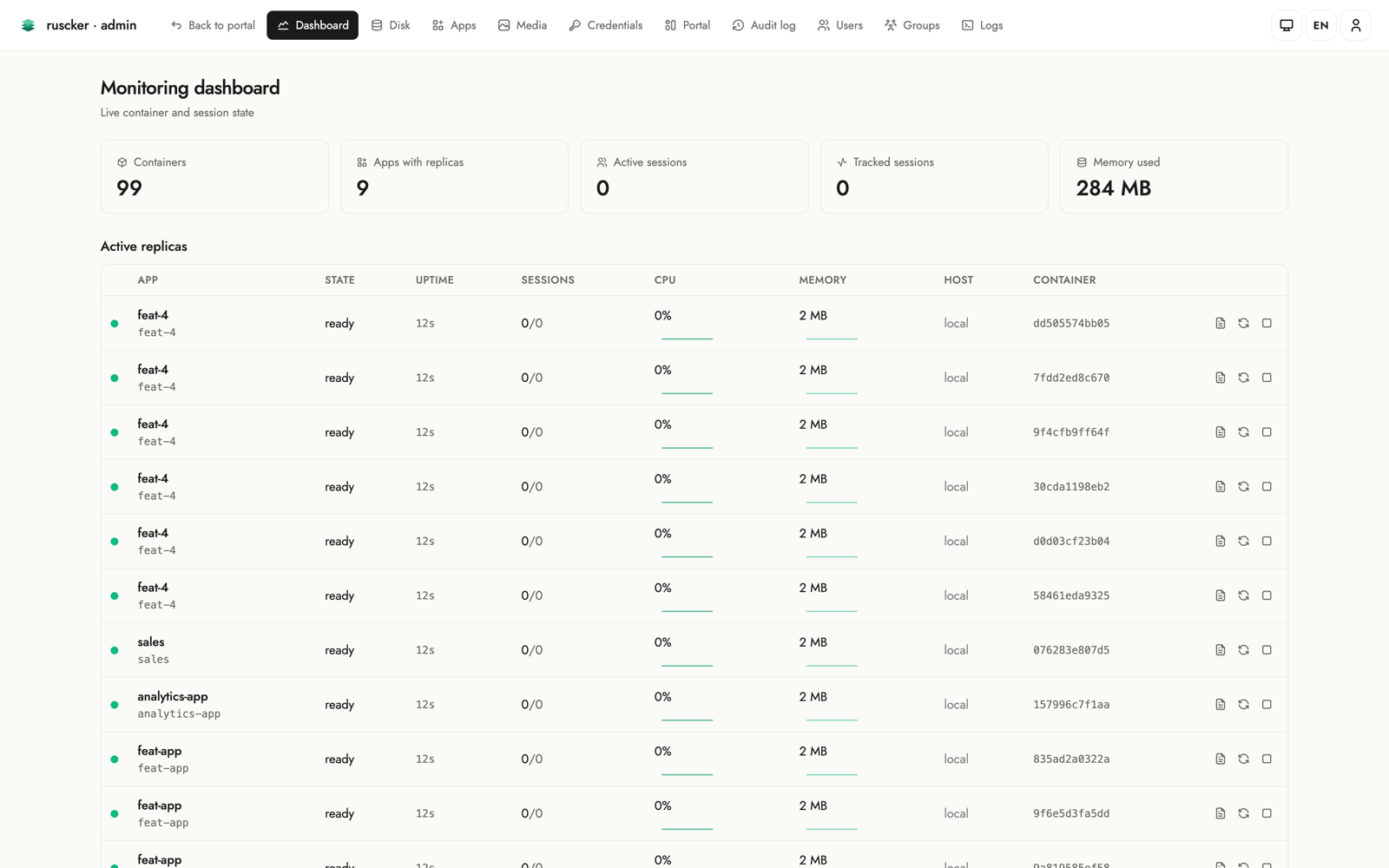
Apps
The list of specs — apps, APIs and external links — with create, edit
and delete. Each row shows the app’s framework logo next to its name,
a colour-coded kind pill, and an Access column with the spec’s
access-group badges (or a globe + “public” when ungated). Each row also
has a featured star next to the actions: click it to toggle whether
the app appears in the landing page’s Featured carousel, inline,
without opening the editor (solid = featured). The Accesses column
pairs the total with a 14-day sparkline; click it to open a full-width
daily chart with 14 / 30 / 90-day periods (hover for the exact count),
served by /admin/specs/{id}/access-series. Both chart endpoints answer
404 for an app outside a scoped Editor’s groups, like every other id
route.
The Actions column also carries an archive toggle and a delete
button. Archiving deactivates the app in place — its card leaves the
public portal but the configuration, history and audit trail stay, and
one more click brings it back. The toggle updates the row right where
it is (no reload, no scroll jump, and the row keeps its position in the
list — archiving doesn’t count as an “update”). Delete asks for
confirmation, stops the app’s containers and is audited; apps defined
in the serve --config YAML stay read-only here.
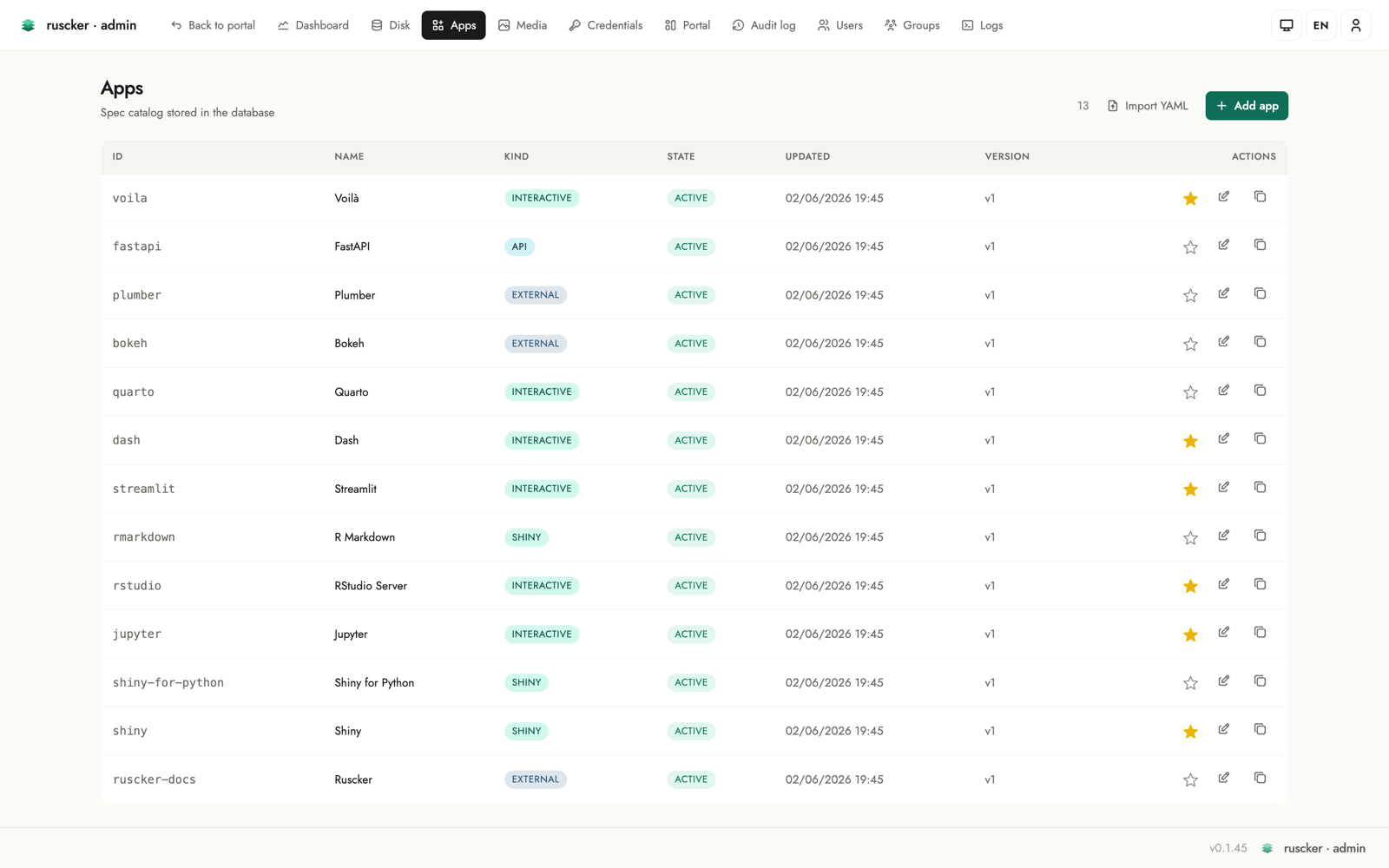
The add/edit form walks down the page in the order you think about an app: Identity (id, name, subject), Kind (app container / presentation / report / package / API / external link), Description, Appearance (card logo via a searchable modal picker over the media library, an accent colour that tints the card, a monogram fallback for logo-less cards, and a solid/gradient cover builder), and Access & scale (a Restricted-access toggle with group/user pickers, an Access-lock toggle, an Autoscaling toggle, and an initial-replicas stepper). A live card preview on the right updates as you type, and a “?” help popover on every field explains what it does.
The two access controls are independent. Restricted access is real enforcement: Ruscker only lets the listed groups/users (and admins) see and open the app. Access lock is purely a label — it closes the card’s padlock to signal that the app authenticates on its own (its own login screen), without Ruscker restricting anything. So an app that’s visible to everyone but asks for its own password gets the Access-lock toggle and no group list.
When you save a brand-new app, a confirmation dialog opens in the centre of the screen: it confirms the app was created and asks where to go next — back to the form to keep editing it, or straight to the apps list. Editing an existing app just saves in place, with no prompt. The dialog is localized in all four interface languages.
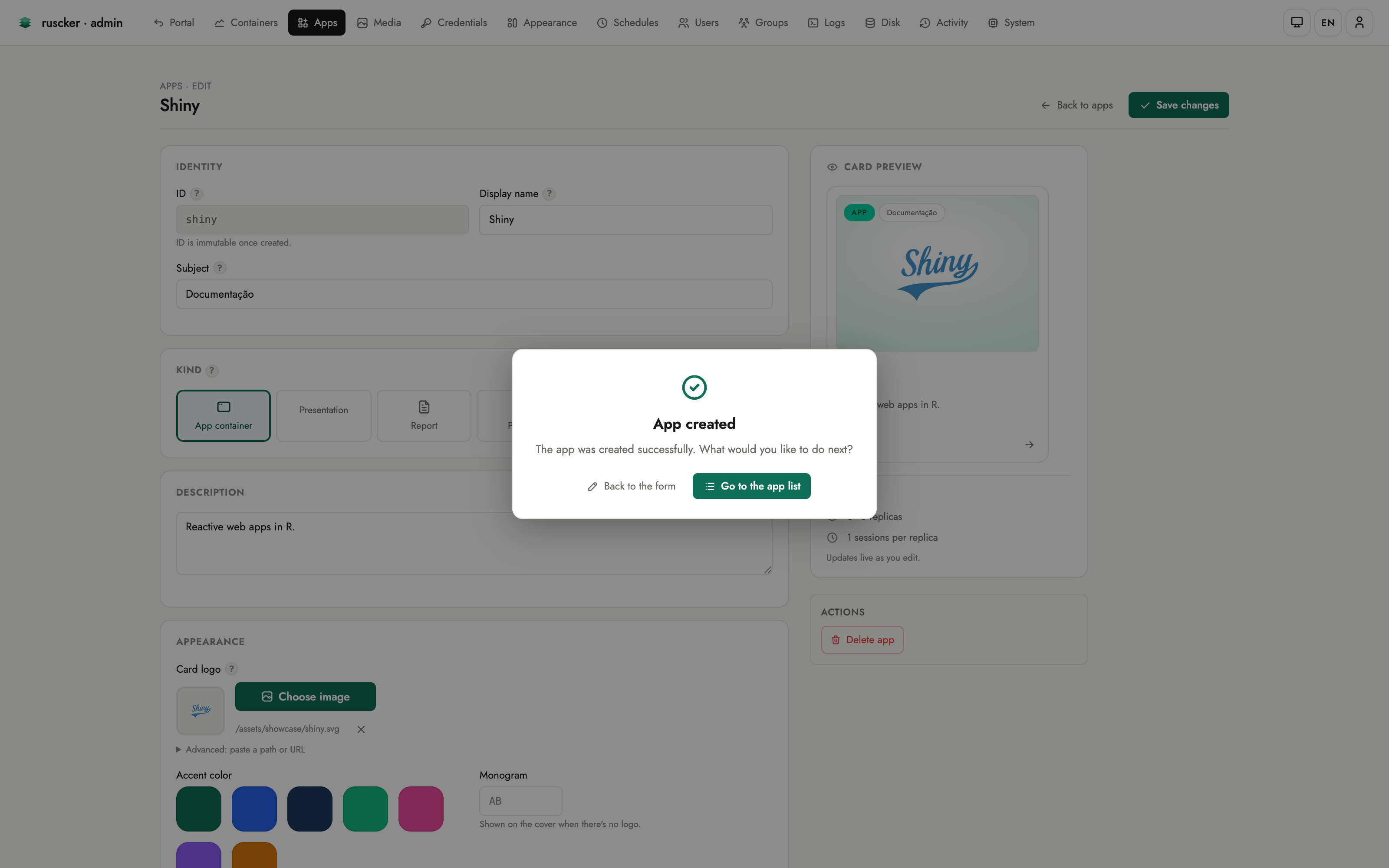
Two editors can have the same app open without trampling each other: the form carries the version it was loaded against, and a stale save is rejected with a conflict banner (your input intact) instead of silently overwriting the other person’s changes.
Private images. Right under the Docker-image field, a Check button reports whether the image is already on the host, and a Pull / Update image button fetches (or re-fetches) it on demand with live progress — handy after re-publishing the same tag (new build, or a corrected CPU architecture). A credential picker sits next to the image field: pick a saved registry credential and Ruscker pulls private images with it. Docker Hub credentials are normalised to the canonical registry address so they apply reliably, and a pull failure names how it authenticated (anonymous vs. the user/registry). If a container crashes on startup, the dashboard and logs show the container’s own error output and exit code — not a generic “no port binding”.
Under the collapsible Advanced band, every remaining spec option is editable too — so an app can be configured end-to-end from the web UI, without touching YAML:
- Runtime — seats per container, session lifetime, inner container port and platform.
- API (for
type: api) — container port, rate limit, docs/health paths, permissive CORS. - Scaling — min/max replicas and concurrent requests per replica.
- Resources — per-container CPU and memory limits.
- Lifecycle — the heartbeat (idle-session) timeout.
Every advanced field is optional; leaving it blank keeps Ruscker’s default, so the section stays out of the way until you need it.
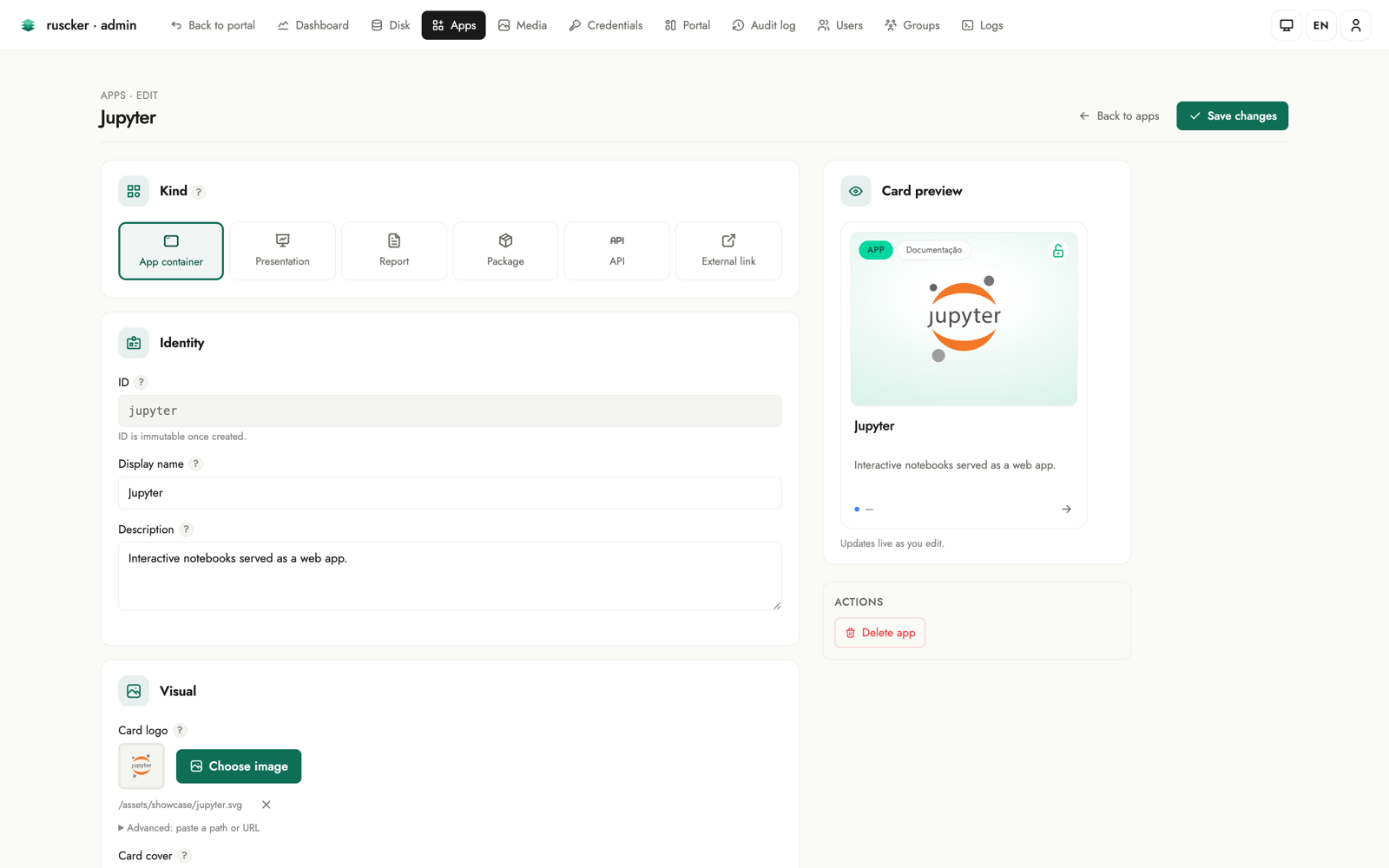
Media
Upload images (PNG/JPEG → WebP), served at /assets/img/<file>. These
are the card logos and covers.
The gallery is a single unified library — built-in logos (brand marks shipped with Ruscker) are seeded here automatically alongside your uploads. Every image can be deleted from the gallery; if it is referenced by any spec logo/cover or landing logo, the entry shows an “in use” badge so you know before deleting.
Uploading a file whose name already exists keeps both images: the
new one is stored under a free name (logo.webp → logo-2.webp) and
the flash tells you the stored name — nothing that references the
original changes. The gallery sorts newest-first, so the renamed upload
is the first tile.
When editing a spec you can open a modal picker (search, browse, drag and drop, or upload inline without leaving the form) to select a logo or cover. A “Choose image” button auto-uploads on file select for a one-click flow; inline uploads auto-select the stored (possibly renamed) file, and every picker tile shows a filename caption, so look-alike images are easy to tell apart.
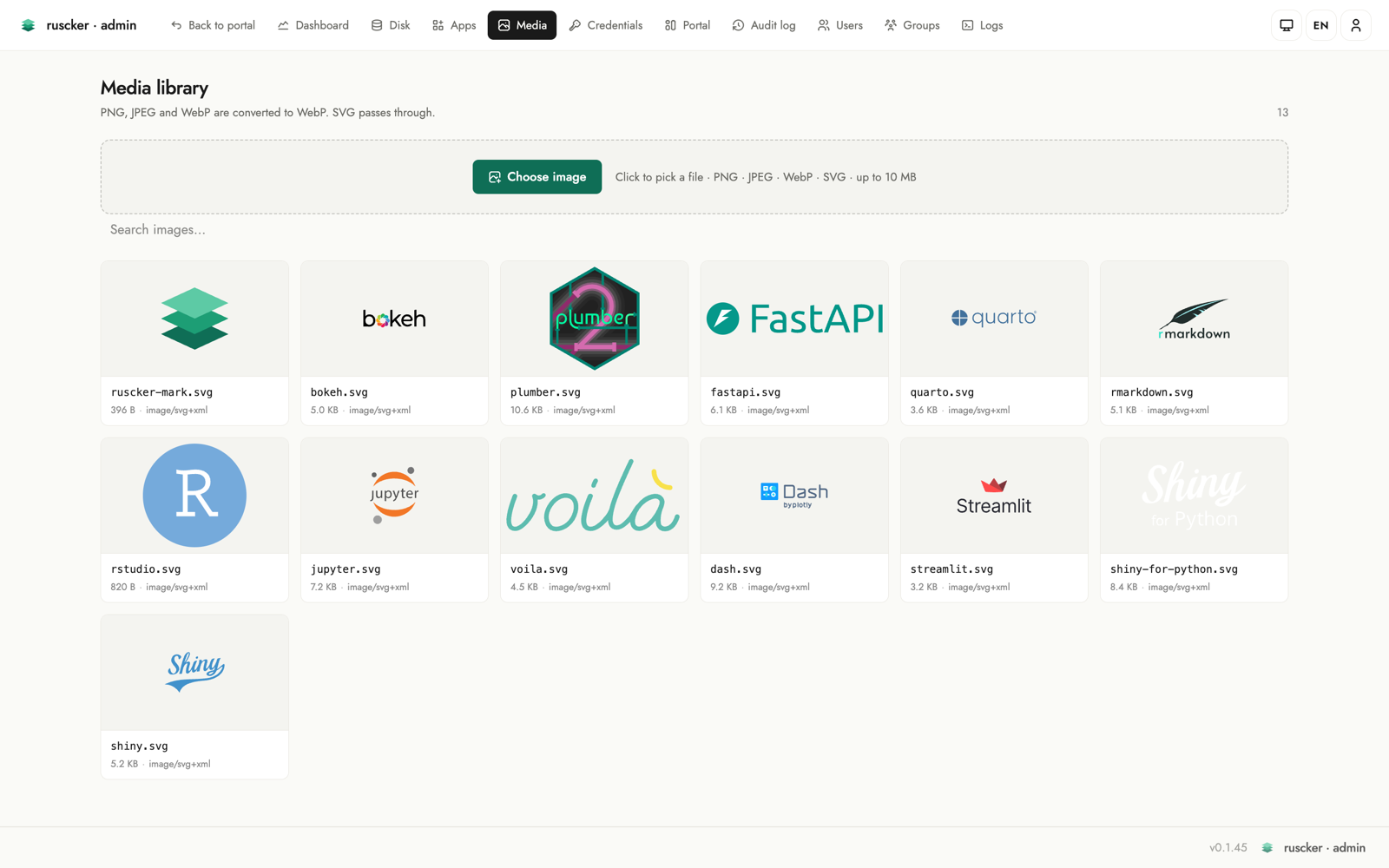
Credentials
A named, AES-256-GCM-encrypted store for registry credentials (needs
RUSCKER_MASTER_KEY). Passwords never appear in the YAML or in the
panel after saving. Each entry accepts either a literal password
(encrypted at rest) or a pure ${VAR} env-ref — stored verbatim and
resolved to the real value only at container pull time.
In the spec form the Registry section is a credential picker: type or select the name of a stored credential and Ruscker resolves it at spawn. There is no need to inline registry passwords in a spec.
Appearance
Customise the public landing without a custom template. Every control is mirrored instantly in a live portal preview on the right — the preview has its own ☀️/🌙 switch so you can inspect both themes without changing the saved default, and the action bar carries a “Restore defaults” button (with confirmation) that resets the styling while keeping titles, logos, texts, SEO, custom CSS and HTML blocks:
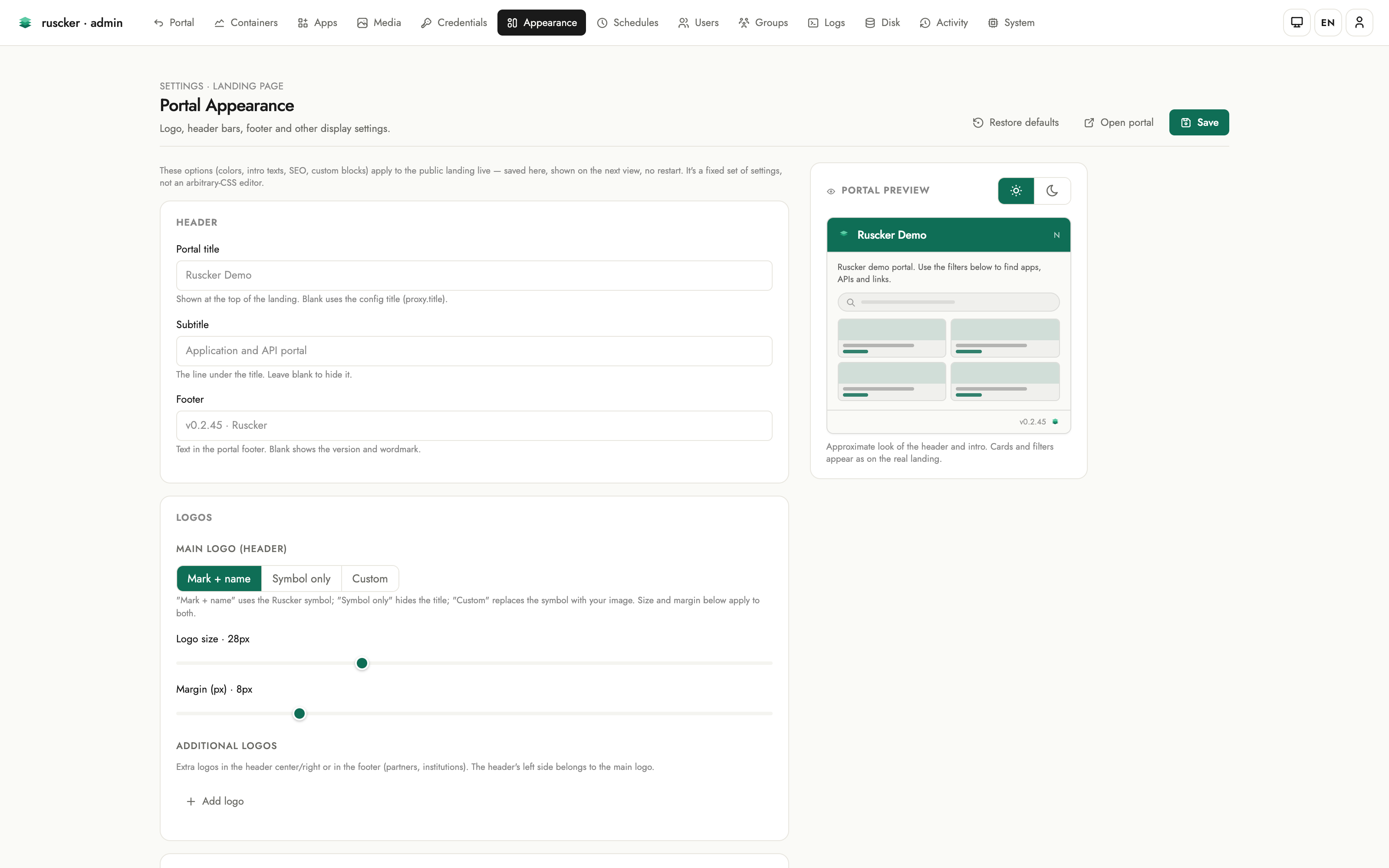
- Header — the portal title, subtitle and footer texts.
- Logos — the main header logo in one place: built-in mark, symbol-only, or a custom image picked right there from the Media library, sized by its own sliders. Additional logos go in the header centre/right or the footer, each with alignment, an optional click-through link and a height.
- Header style — the background is one explicit choice: Preset (flat / soft / bold tints), Solid or Gradient — and the custom modes carry separate light and dark values (dark inherits light until you set it). Text colour is per-theme too.
- Catalog cards — the default cover behind cards that have no cover of their own: Auto keeps each type’s tint colour (zero configuration), or paint a solid / gradient per theme, with a live cover preview, a draggable angle dial and an explicit Inherited ⇄ Own pill on the dark side.
- Theme & colors — the default theme (light / dark / auto) for first-time visitors, brand-colour quick swatches (plus a custom pick), and full light/dark palettes with a live mini-preview of background, text and accent.
- Catalog layout — grid, list or sections as large icon tiles, plus a comfortable/compact density bar.
- Visible sections — toggles for the search box, the filter chips and the Featured carousel.
- Content — a per-locale intro paragraph (rendered full-width and
justified on the portal) and the footer text. The intro understands
an inline slice of Markdown —
**bold**,*italic*and[links](https://…)— never raw HTML; the preview renders it the same way. - SEO & sharing — page title, meta description,
og:image, with a live Google-style search-result preview that updates as you type. The landing<head>emitsdescription+og:*+twitter:card. - Analytics & custom code — pick a provider (GA4 / Plausible / Matomo) and paste just the site key — Ruscker builds the snippet and widens only the landing’s CSP for that provider’s origins. A raw HTML field remains as the escape hatch for anything else. The custom-CSS and analytics/HTML fields are syntax-highlighted code editors (the custom HTML blocks editor too).
Blocks
Custom HTML blocks rendered in the landing top (after the header) and
bottom (after the card grid) slots, edited inline at the bottom
of the Appearance page: “+ New block” (or a row’s pencil) expands the
editor right there — name, a Top/Bottom position switch, a
syntax-highlighted HTML editor, CSP origins for any third-party content
it embeds, and an active toggle. Rows reorder by drag-and-drop or the
↑/↓ buttons, each slot shows a block counter, and after saving you land
back at the blocks section.
Block and analytics HTML is rendered verbatim on the public landing. It’s admin-only input — the intentional escape hatch — so only paste HTML you trust.
Schedules
Cron-scheduled, run-to-completion jobs (Admin-only) — nightly ETL,
report generation, cache warm-ups. Local Docker backend only — the
multi-host backend does not run jobs, so a due schedule there is recorded
as an error. A schedule picks one of your
containerized apps and runs that app’s image with the same
environment, volumes, resource limits and registry credentials a normal
replica gets, optionally overriding the command (one argv element per
line; leave it empty to run the app’s own container-cmd, or the
image’s baked CMD). External apps can’t be scheduled — there is
nothing to run.
Semantics worth knowing:
- No run on creation. A new schedule waits for its next cron occurrence.
- Which clock. Cron expressions are evaluated in
server.timezone(an IANA name likeAmerica/Recifeinruscker.yml), and the next/last run columns are shown in that same zone, labelled with it. Unset ⇒ UTC, the historical behaviour — so0 8 * * *fires at 08:00 UTC until you configure a zone. Setting one shifts existing schedules by your offset; review them afterwards. - Downtime collapses. If the server was down across several occurrences, the schedule fires once on the next tick — ETL semantics, not a message queue.
- Leader-only in HA. With several active-active instances, only the scaler leader fires schedules, and a database claim backstops a split brain so an occurrence never double-fires.
- Timeout. Each run is capped — 1 hour by default, or the per-schedule Timeout (minutes) when set. A run over the cap is killed and recorded as an error.
- History. The Latest runs table shows each run’s status (
ok/failed= non-zero exit /error= couldn’t run), exit code, duration and an expandable log tail. - Alerts. A failed run raises a
job-failedalert through the webhook configured in the System tab (see below).
Groups
Groups (/admin/groups, admin-only) gate which apps a user sees. They’re
derived, not a separate table: a group exists as long as a user belongs
to it or an app lists it under access-groups. The page shows every group
with its members and the apps it gates, and lets you edit them in place:
- Rename a group — the change propagates across every user membership and every app that references it.
- Delete a group — it’s removed everywhere (an app left with no groups becomes open to all).
- Add / remove members inline, and create a group by adding its first member under a new name.
Edits touch the database-managed users and apps. An app defined in the
serve --config YAML stays read-only here (edit the file for those).
Below the groups, Public apps lists every ungated app as a logo chip — the thumbnail sits on the catalog’s per-type tint colour, so the app’s kind reads at a glance — with a globe mark; clicking a chip opens that app’s editor.
Logs
The server log terminal updates in near real time through finite, cursor-based polls. Lines are colour-coded by level, with level chips (info / warn / error), an app filter dropdown, a line counter, and pause/resume + clear controls. Polling stops while the page is paused or hidden and resumes from the last cursor, catching up with lines still in the bounded buffer. A download link grabs the current buffer.
This page deliberately does not use EventSource: every poll completes
and releases its HTTP connection, so an HTTP/1.1 reverse-proxy hop cannot
retain the log response and head-of-line block later admin navigation. The
per-replica container log viewer is separate; its Live button opens an
SSE follow stream only when requested by an operator.
Disk
Storage at a glance (Admin-only). A KPI band (containers, stopped, images, unused images, volumes — the same band the other screens carry) sits above a usage hero showing host disk used / total with a percentage and a stacked bar split into Ruscker images, other used, and free. Below it, two panels list the Ruscker-managed containers and images — each removable, with an “in use” cross-reference so you don’t delete something a running app or the effective catalog needs, plus bulk “prune stopped containers” and “remove unused images”.
The Volumes card lists named Docker volumes with live reference counts
across all host containers. Local Docker backend only — with the
multi-host backend the Disk page reports volumes as unavailable. Volumes created here receive the
ruscker.created label. Removal is offered only when Ruscker created the
volume, no container references it, and no effective catalog spec names it;
the server rechecks all three conditions before asking Docker to remove it.
Activity
The Activity section holds two tables, switched by a pill toggle at the top of the page.
Atividades dos usuários (user activity) lists who signed in and who opened which app:
- a login is recorded when a user signs in with a password;
- an app access is recorded once per new interactive app session — a genuine visit, never counted for a page’s assets, XHR calls or WebSocket frames, and API calls keep only their aggregate access counter. An access with no signed-in user shows as Anonymous.
Filter by event kind, user, app, and time window (last 24 h / 7 / 30 days), with server-side pagination for a long history. The history carries no foreign keys to users or apps, so removing a user or an app doesn’t erase the record of past activity. Events are captured off the proxy’s hot path — a non-blocking enqueue plus a background writer that batches inserts — so activity logging never slows a request. The client IP is not stored in this release (it’s personal data; a future opt-in would come with a retention policy).
Atividades administrativas (administrative audit) records every admin mutation (spec/image/credential/landing/block changes, imports) with actor, action, target and timestamp. Destructive replica stop/restart, schedule changes, MFA enrolment/reset/proof, and break-glass MFA bypasses are recorded too; rows with a change diff expand to show it.
Timestamps are stored in UTC and rendered in your browser’s timezone, so
two operators in different zones each read the local wall clock of the same
event. Hovering a timestamp shows the full date with the zone name. (The Schedules page is
deliberately different: those times are when the server will fire a job,
so they follow server.timezone — see the Schedules section.)
System
A read-only diagnostic of the running server: a KPI band (version, apps, replicas, Docker version, database kind) above the detail table (bind address, base path, Docker and database status, catalog and replica counts, forwarded-header trust, HA leadership), plus one operational control: the alert webhook.
Set a URL there and Ruscker POSTs a JSON payload when something an
operator should know about happens:
spawn-failed— a container failed to start for an app (fires with the same dedup as the log warning, so a crash-looping image doesn’t storm the channel);replica-down— a running container died outside Ruscker’s control (crash, OOM, external stop) and was pruned;saturated— an app is full atmax-replicasand visitors may be turned away;job-failed— a scheduled job exited non-zero or could not run;test— the Send test alert button, for checking the wiring.
The payload:
{
  "event": "replica-down",
  "spec": "sales-dashboard",
  "replica": "d3f2…",
  "message": "human-readable summary",
  "occurred_at": "2026-01-01T12:00:00Z",
  "ruscker": { "version": "x.y.z" }
}
Delivery is best-effort: 5 s timeout, three attempts with a doubling
pause, and a per-(event, app) cooldown of 15 minutes so a stuck
condition re-alerts occasionally instead of continuously. Point it at
anything that accepts a JSON POST — a Slack/Mattermost incoming-
webhook adapter, ntfy, an n8n/Zapier hook, or your own endpoint.
Leave the URL empty to turn delivery off. Changes are audited (the
URL’s value itself is never written to the audit log — it may embed a
token).
Config vs. database
serve --config supplies service settings and any YAML-managed specs. The
admin panel reads and writes the catalog database: SQLite with --db, or
Postgres with --config-db-url. ruscker import can populate either from
YAML. For SQLite, ruscker export --db <file> reconstructs the portable
configuration, including specs, landing customization, SEO/analytics and
custom blocks; credential and MFA secrets are not exported.
Importing card images into the Media library
A spec’s logo/cover is a reference like /assets/img/snap_aurora.png;
the YAML doesn’t carry the image bytes. ruscker import ingests those
binaries into the Media library from a directory, keeping each file’s
original name so the references resolve:
ruscker import application.yml --db ruscker.db \
  --images-dir /etc/shinyproxy/templates/<tpl>/assets/img
When --images-dir is omitted it’s auto-discovered next to the config
just like serve (<config-dir>/assets/img/, then the ShinyProxy
template-path layout). The import is idempotent — files already stored
with identical bytes are left untouched. (Unlike an admin upload, the
import keeps the original format rather than transcoding to WebP, so the
existing references keep matching; re-upload through the Media page to
optimize.) Without a Media copy, logos only render if serve is also
pointed at the same --images-dir (the on-disk fallback).
Deploying in production
This walks through the production pattern Ruscker was designed for:
the .deb on a Docker host, behind nginx, optionally side-by-side
with an existing ShinyProxy.
1. Install and configure
sudo apt install ./ruscker_<version>-1_amd64.deb
Manage your apps, landing page and users in the admin panel at
/admin — the unit runs with --db, so the catalog is live out of the
box. /etc/ruscker/ruscker.yml only carries service settings (every
option is documented inline in the shipped file); put your secrets in
/etc/ruscker/ruscker.env (read by the unit):
RUSCKER_ADMIN_TOKEN=...        # openssl rand -hex 32
RUSCKER_MASTER_KEY=...         # encrypted credentials and MFA secrets
RUSCKER_COOKIE_KEY=...         # keep sticky sessions stable across restarts
DOCKER_REGISTRY_PASSWORD=...   # referenced as ${DOCKER_REGISTRY_PASSWORD} in the YAML
The package generates stable master and cookie keys when they are missing.
Keep RUSCKER_MASTER_KEY backed up: 2FA enrolment returns 503 without it,
and changing it makes existing encrypted credentials and TOTP factors
undecryptable.
Choose the scheduler clock
Scheduled jobs interpret five-field cron expressions in the IANA timezone
configured in ruscker.yml:
server:
  timezone: America/Recife
When the field is absent, cron stays on UTC, so upgrading does not move existing schedules. An invalid name emits a validation warning and also falls back to UTC rather than blocking startup. The Schedules page labels next/last runs in the effective zone, and the startup banner includes that zone. This setting is intentionally separate from historical admin timestamps: Activity, audit, Apps, Credentials, Users and process Logs use the timezone of each viewer’s browser.
Delegate administration by group
Editor memberships are authorization boundaries, not just labels. Editors
can administer open apps, apps whose access-groups overlap their own,
and non-Admin Viewer/Editor accounts and memberships in those groups. Media
is shared across Editors. Admin accounts and the break-glass token remain
global; account deletion, user CSV import, MFA reset, and group
create/rename/delete remain Admin-only. Direct requests for an out-of-scope
app or user return 404, deliberately hiding whether the identifier exists.
2. Enable the container backend
The shipped unit serves landing + admin + proxy but not the --docker
backend. The easy path is the helper, which writes the drop-in for you
(preserving your --bind/--config/--db):
sudo ruscker-enable-docker
Or do it by hand with a drop-in (so upgrades don’t clobber it):
sudo systemctl edit ruscker
[Service]
SupplementaryGroups=docker
ExecStart=
ExecStart=/usr/bin/ruscker serve --config /etc/ruscker/ruscker.yml \
  --docker --db /var/lib/ruscker/ruscker.db
sudo systemctl daemon-reload && sudo systemctl restart ruscker
Adding
rusckerto thedockergroup is effectively root on the host — the same trade-off ShinyProxy carries.
On-demand vs. pre-warmed
By default an app cold-starts: min-replicas defaults to 0, so
no container runs until the first visitor arrives (they see a brief
splash while it spawns), and the auto-scaler reaps it once idle — the
same on-demand behaviour as ShinyProxy and Shiny Server Free, and what
keeps a many-app portal light. To keep an app warm (no cold-start
latency on the first hit), set min-replicas: 1 (or more) on that spec;
the scaler then keeps that many replicas running at all times.
Multiple Docker hosts (Phase 6)
By default Ruscker drives the local Docker daemon. To spread app
containers across several hosts, list them under proxy.hosts — then
Ruscker schedules, routes, monitors and reaps containers on all of
them from the one process:
proxy:
  hosts:
    - id: gpu-1
      address: ssh://ops@10.0.0.11        # Docker over SSH — simplest
    - id: gpu-2
      address: tcp://10.0.0.12:2376       # Docker over TLS
      tls: { ca: /etc/ruscker/ca.pem, cert: /etc/ruscker/cert.pem, key: /etc/ruscker/key.pem }
      max-containers: 40                  # cap; placement won't exceed it
      weight: 2                           # bigger host ⇒ more of the spread
  specs:
    - id: heavy-shiny
      container-image: org/shiny:latest
      placement: spread                   # spread (default) | bin-pack
      anti-affinity: true                 # replicas on distinct hosts
Transports. ssh://user@host[:port] (reuses your SSH keys — no
daemon TLS to set up), tcp://host:port + tls (mutual TLS), or
http://host:port (plain TCP — trusted networks only). SSH is the
least-effort option. Empty hosts keeps the single-local-daemon mode.
Networking — the catch. On a remote host Ruscker publishes each
container’s port on the host’s 0.0.0.0 and proxies to
host:published-port. So the Ruscker box must be able to reach the
app hosts on the ephemeral published ports (roughly 32768–60999).
Put Ruscker and the hosts on a private network and open that range
between them; do not expose those ports to the public — they’re
unauthenticated app backends. (For SSH hosts, the SSH connection is
only the Docker control plane; the data plane is still this direct
TCP path.) This inter-host traffic is plain HTTP by design — if the
link between the machines isn’t trusted, encrypt it at the network
layer (WireGuard or an encrypted overlay), which covers every
published port at once. On a single host none of this applies:
containers publish on 127.0.0.1 and the proxy connects over
loopback, so the traffic never leaves the machine — see the Data
plane section of Security.
Placement. spread (default) distributes replicas (weighted by
weight) for fault isolation; bin-pack fills one host before the
next. anti-affinity: true keeps a spec’s replicas on distinct hosts,
falling back gracefully when every eligible host already runs it.
max-containers caps a host; if all hosts are full a spawn fails and
the scaler retries. The dashboard shows the host inline next to each
replica’s container id, so you can see where each
replica landed.
Validating it. The default crate tests cover weighted spread, bin-pack, capacity caps, anti-affinity fallback, placement-cache accounting and degraded-host reconciliation without a Docker daemon:
cargo test -p ruscker-docker
An additional gated integration test exercises spawn + spread + routed stop against two real daemons:
RUSCKER_IT_HOST1=ssh://ops@10.0.0.11 \
RUSCKER_IT_HOST2=ssh://ops@10.0.0.12 \
cargo test -p ruscker-docker --features multihost-it -- --nocapture
3. nginx
Terminate TLS at your edge / load balancer and forward to nginx with
X-Forwarded-Proto: https. A minimal reverse proxy:
server {
    listen 80;
    server_name portal.example.com;

    # Media-library / card-image uploads. nginx defaults to 1 MB, which
    # silently 413s any larger image before it reaches Ruscker (the admin
    # "upload doesn't work" symptom). Ruscker accepts images up to
    # 10 MB (12 MB request limit, allowing multipart overhead).
    client_max_body_size 16m;

    location / {
        proxy_pass http://127.0.0.1:8090/;
        proxy_http_version 1.1;
        proxy_set_header Upgrade $http_upgrade;       # WebSocket (Shiny)
        proxy_set_header Connection "upgrade";
        proxy_read_timeout 600s;
        proxy_set_header Host              $http_host;
        proxy_set_header X-Real-IP         $remote_addr;
        proxy_set_header X-Forwarded-For   $proxy_add_x_forwarded_for;
        proxy_set_header X-Forwarded-Proto https;
    }
}
Set server.useForwardHeaders: true in the YAML so Ruscker trusts
X-Forwarded-*. This is required for cookies to carry the Secure flag
behind a TLS-terminating proxy — without the flag,
forwarded headers from any client would be spoofable, so Ruscker
ignores them entirely (cookies are then minted as if on plain HTTP, and
per-client API rate limiting keys on the TCP peer, i.e. your proxy).
Both halves are needed: the proxy_set_header X-Forwarded-Proto
above and the YAML flag. ShinyProxy-migrated configs usually carry
the flag already.
The Containers dashboard short-polls
GET /admin/dashboard/snapshot, and the process Logs page short-pollsGET /admin/logs/poll?cursor=…. Both responses are finite and need no buffering exception. Only the per-replica log viewer opens anEventSource, and only after the operator clicks Live. Disable nginx buffering for that explicit follow path:location ^~ /admin/dashboard/logs/ { proxy_pass http://127.0.0.1:8090; proxy_buffering off; proxy_read_timeout 1h; # + the same proxy_set_header lines as above }
/admin/logs/streamis a retired compatibility endpoint that returns204 No Content, which tells pages loaded before a rolling upgrade to stop reconnecting. Do not proxy it as a long-lived stream.
4. Side-by-side with ShinyProxy
To run both during a migration, give ShinyProxy a context path and route by prefix:
    # ShinyProxy under /sp/ (set server.servlet.context-path: /sp in its YAML)
    location /sp/ { proxy_pass http://127.0.0.1:8080; /* + the proxy_set_header lines */ }

    # Ruscker at the root
    location /    { proxy_pass http://127.0.0.1:8090/; /* + the proxy_set_header lines */ }
Cut over by reloading nginx; roll back by restoring the previous
config. Keep a backup of the site file and run nginx -t before every
reload.
4b. Mounting under a base path (subpath)
When you can’t create a subdomain (no DNS governance), serve the whole
portal under a subpath like example.org/apps/. Start Ruscker with
--base-path /apps (or server.context-path: /apps in the config —
ShinyProxy’s server.servlet.context-path is also accepted), and point
nginx at it preserving the prefix (no trailing path on proxy_pass,
so the /apps stays in the forwarded URL):
# Forward both the bare /apps and everything under /apps/ — without an
# nginx-side redirect (Ruscker does its own canonicalization below).
location = /apps  { proxy_pass http://127.0.0.1:8080; /* + proxy_set_header from §3 */ }
location /apps/   { proxy_pass http://127.0.0.1:8080; /* + proxy_set_header from §3 */ }
Ruscker then nests every route under /apps (/apps, /apps/admin/…,
/apps/app/{spec}/…), rewrites the URLs/redirects it emits to carry the
prefix, and injects a small runtime shim so JS-built requests (the live
dashboard poller, fetch, WebSockets, etc.) resolve under /apps too. /healthz and
/readyz stay at the root for load-balancer probes — don’t put them
behind the /apps locations. --base-path is empty by default, so
root-mounted deploys are unaffected.
The canonical landing URL is
/apps(no trailing slash); a request to/apps/308-redirects to it. Keeping nginx as a plainproxy_pass(never redirecting) means that single hop can’t loop.
5. Health checks
Point your load balancer / orchestrator at:
GET /healthz— liveness, always200(no dependencies).GET /readyz— readiness; probes the DB (SELECT 1) and the Docker backend, returns503while draining or when a dependency is down.
On SIGTERM Ruscker flips /readyz to draining, lets in-flight
sessions wind down up to proxy.shutdown-grace-ms, then exits.
Running active-active (HA, Phase 7)
For high availability you can run several Ruscker instances behind a
load balancer, all sharing one Postgres. There’s a runnable harness
(two instances + nginx + Postgres) in examples/ha/ — start
there. These things must be shared by every instance:
--config-db-url postgres://…— the admin catalog (specs, landing, users, credentials, audit) lives in Postgres instead of a per-node SQLite file, so an edit on any instance is seen by all. Runs the same migrations as SQLite;--dbstays the single-node default.--session-store-url postgres://…— one sharedproxy_sessionstable. Each instance reconciles the cluster-wide per-replica session counts, so routing and the scaler agree across the fleet.- the same
RUSCKER_COOKIE_KEYon every instance — the sticky cookie is an HMAC, so a shared key lets any instance validate a cookie another minted. With that, the shared session table, and every instance pointed at the same Docker backend (so they reconcile the same replicas), a session survives the load balancer moving it between instances. - the same
RUSCKER_MASTER_KEYon every instance — all nodes must be able to decrypt stored registry credentials and user TOTP factors. A missing key makes MFA enrolment fail closed.
Scaler leader election is automatic: instances elect one leader via
a Postgres advisory lock; only the leader spawns/reaps replicas, the
rest serve traffic. If the leader dies its lock releases and another
takes over within one scaler tick — nothing to configure. Each instance
logs its role at startup (acquired leadership / standing by).
Use a direct Postgres connection for the leader lock. The advisory lock is session-scoped — it lives on one specific backend connection and is held for the process’s lifetime. Point
--config-db-url(or--session-store-url) at Postgres directly, or through a pooler in session mode only. A transaction-pooling proxy (e.g. PgBouncer in transaction mode) hands the lock-holding connection to other clients between statements, which can break the single-leader guarantee and let two instances scale at once.
App traffic doesn’t need sticky upstreams — proxy sessions are
shared (the sticky cookie is a shared-key HMAC and the proxy_sessions
table is shared), so round-robin is fine for /app and /api. Keep
server.useForwardHeaders: true and pass X-Forwarded-* as in the
nginx section above.
Shared admin sessions (eliminate the sticky-upstream caveat)
By default the sign-in session (the cookie minted at /admin/login)
lives in an in-memory map per process. An admin — or, with per-group app
visibility (access control), any signed-in user —
who logs into instance A and is then round-robined to instance B is
bounced back to the login screen (B doesn’t know the session), and on
the proxy path B would treat them as anonymous (so a restricted app
could 403/redirect even though they’re entitled to it).
Recommended fix: point Ruscker at a shared Postgres for the admin session table (#185):
ruscker serve … --admin-session-store-url postgres://ruscker:pw@pg:5432/ruscker
(or RUSCKER_ADMIN_SESSION_STORE_URL=…). All instances then read and
write the same admin_sessions table. A short node-local TTL cache
(default 5 s) means the hot path — every authenticated request and
every /app proxy guard — keeps serving from memory; the DB is only
hit on cache miss or after a write. Logout propagates to sibling
instances within one cache window (worst case 5 s of “still signed in”
on a peer). The table auto-creates on connect; no migration step is
needed.
This removes the need for a sticky LB. Round-robin (or least-conn) is fine; any node can serve any session-bearing path.
One database, three tables.
--config-db-url(shared spec catalog),--session-store-url(proxyproxy_sessionstable from Phase 7), and--admin-session-store-url(sign-in sessions, #185) can all point at the same Postgres URL — each store creates and owns its own table. No need to provision three databases.
Fallback: sticky upstream
If you can’t host shared Postgres for admin sessions, pin the
session-bearing paths to one instance with a sticky upstream. The
simplest is ip_hash (route by client IP); a cookie-based sticky on
the ruscker_admin_session cookie is more precise if you have nginx
Plus or a similar LB.
# Pin each client to one instance so its sign-in session is found.
upstream ruscker {
    ip_hash;                      # sticky by client IP
    server 10.0.0.11:8080;
    server 10.0.0.12:8080;
}
server {
    # … TLS, proxy headers (see above) …
    location / {                  # landing, /admin, /app, /api
        proxy_pass http://ruscker;
    }
}
Either path — shared store or sticky upstream — keeps no data lost on a failover. The shared store skips the re-login; sticky upstream re-logs in the user only when the pinned node falls over.
With
--config-db-url, the proxy, landing and scaler all resolve specs from the shared Postgres catalog first (YAML is the union fallback for ids not in the DB) — an admin edit on one instance is served live by every instance. Seed a fresh Postgres catalog from YAML withruscker import --config-db-url postgres://…(idempotent, same as the SQLite--dbimport).
Running with Docker instead of the .deb
If you’d rather run the container image, mount your config and the
Docker socket (the --docker backend talks to the host daemon) and
persist the SQLite DB on a volume:
# docker-compose.yml
services:
  ruscker:
    image: ghcr.io/strategicprojects/ruscker:latest
    command: >
      serve --config /etc/ruscker/ruscker.yml
      --bind 0.0.0.0:8080 --docker --db /var/lib/ruscker/ruscker.db
    ports: ["127.0.0.1:8090:8080"]
    environment:
      RUSCKER_ADMIN_TOKEN: ${RUSCKER_ADMIN_TOKEN}
      RUSCKER_MASTER_KEY:  ${RUSCKER_MASTER_KEY}
      RUSCKER_COOKIE_KEY:  ${RUSCKER_COOKIE_KEY}
    volumes:
      - ./ruscker.yml:/etc/ruscker/ruscker.yml:ro
      - /var/run/docker.sock:/var/run/docker.sock
      - ruscker-data:/var/lib/ruscker
    restart: unless-stopped
volumes:
  ruscker-data:
nginx sits in front exactly as above. Mounting the Docker socket grants
the container control of the host daemon — the same root-equivalent
trade-off as the docker group with the .deb.
Backups
State lives in two places:
-
/etc/ruscker/—ruscker.ymlandruscker.env(your tokens). Back these up with the rest of/etc. -
The SQLite DB (
/var/lib/ruscker/ruscker.db) — specs, the image library, encrypted credentials, landing customization and the audit log when you run with--db. Snapshot it consistently with:sqlite3 /var/lib/ruscker/ruscker.db ".backup '/backup/ruscker.db'"The encrypted credentials and MFA factors are unusable without
RUSCKER_MASTER_KEY, so back up the key too — separately.ruscker export --db <file>also writes a YAML snapshot; it does not export credential or MFA secrets.
Upgrading
Build the new .deb, copy it over, and reinstall keeping your config:
sudo dpkg -i --force-confold ruscker_<version>-1_amd64.deb
sudo systemctl restart ruscker
--force-confold preserves ruscker.env (your token) and the config;
the systemd drop-in is untouched. New DB migrations apply on the next
start.
Troubleshooting
/admin returns 503 “RUSCKER_ADMIN_TOKEN is not set”
No admin token is configured. Set RUSCKER_ADMIN_TOKEN (the .deb
generates one — sudo grep RUSCKER_ADMIN_TOKEN /etc/ruscker/ruscker.env)
and restart. The admin pages also need serve --db <file>; without it
or --config-db-url <postgres-url> the editor/list screens return 503.
Card logos don’t show up
The images aren’t being served at /assets/img/. Either pass
--images-dir <dir> pointing at the folder with the image files, or
keep the config next to its template-path’s assets/img/ so Ruscker
auto-discovers it. Check: curl -I http://localhost:8080/assets/img/<file>.
With --db, you can also upload logos in Media and pick them in
the spec form.
Apps don’t start (proxy returns 503 / 502)
503 no container backend— you started without--docker. Add it (and give the service Docker access).502— the container failed to start or pull. Checkdocker logsfor the spawnedruscker-<spec>-<id>container, and verify registry credentials. Private images can use a named credential from Credentials, ordocker-registry-usernameplus an env-backeddocker-registry-password: ${DOCKER_REGISTRY_PASSWORD}.
I removed or restarted a container with the Docker CLI
Ruscker self-heals. If you docker rm -f a managed container, or
docker restart it directly, Ruscker notices and reconciles on its own:
- a removed container is pruned from the registry, its stale sticky
binding dropped, and a replacement is brought up (a browser visit lands on
the “Starting…” splash instead of a persistent
upstream error); - a restarted container is re-adopted into the pool once it’s serving again, without a duplicate being spawned.
A Docker events watcher makes this happen within about a second; the periodic
reconcile (~10 s) is the fallback. You may still see a brief 502 in the
window between the container going away and Ruscker reacting — retry and it
recovers. If it doesn’t recover, the container is genuinely unreachable
(check docker ps and its logs). Recovery only acts on an authoritative
“gone” signal, so an app returning its own 5xx or a momentary Docker daemon
hiccup never causes Ruscker to drop a healthy replica.
2FA enrolment returns 503
RUSCKER_MASTER_KEY is missing (or an existing MFA secret cannot be
decrypted with the configured key). Set one stable 32-byte key, restart
Ruscker, and try Account → 2FA again:
openssl rand -hex 32
Put the result in the service environment, such as
/etc/ruscker/ruscker.env; do not regenerate it on each start. The .deb
generates it automatically when missing. MFA deliberately fails closed,
and the same key is also needed for encrypted registry credentials.
My app no longer receives the logged-in user
Identity forwarding is off by default. Enable it on that spec:
add-default-http-headers: true
identity-claims: [email, setor] # optional
The app then receives X-SP-UserId / X-SP-UserGroups and the selected
X-Ruscker-User-* claims for signed-in users, over HTTP and WebSocket. A
blank profile claim is omitted. Ruscker strips client-supplied reserved
identity headers, so test through Ruscker rather than by calling the
container directly.
My app cannot set a cookie with a Ruscker-looking name
Apps share the portal origin, so response cookies using Ruscker’s reserved
names are dropped to protect login, preference, sticky-session and MFA
state. The reserved set includes ruscker_admin_session, ruscker_theme,
ruscker_locale, __ruscker_session* and __ruscker_mfa_*; app-owned
cookie names are preserved. Rename the conflicting app cookie.
Ruscker also removes the cookie-clearing Clear-Site-Data directives
"cookies" and "*" from app responses, while preserving safe non-cookie
directives. An app must not try to clear all cookies on the shared origin.
An app keeps failing with an old or broken image
You pushed a fixed image to the registry under the same tag, but the app keeps crashing with the old error. That’s not a Docker bug and doesn’t need a daemon restart — it’s the pull-if-missing design: once a tag is on the host, spawns use the local copy and never re-contact the registry (a flaky network must not stop an app whose image is already local).
The fix is one click: Apps → the app’s “Update image” button. It
forces a pull, the daemon fetches the new manifest for the tag, and
the next start uses the fixed image — verified end to end, no
systemctl restart docker involved.
If a forced pull doesn’t help and the registry digest is identical
to the local one (Docker answers “Image is up to date”), you may be
looking at genuine local-cache corruption — rare, and daemon-side. In
that order: docker rmi <image> then Update image again; a daemon
restart is the last resort, not the routine.
A Shiny app loads but the page is broken / no live updates
Shiny needs WebSockets. Make sure your reverse proxy forwards the
upgrade headers (Upgrade / Connection "upgrade") — see the nginx
snippet in Deploying.
The admin shows the wrong / old features after an upgrade
Templates are compiled into the binary, so changes need a rebuild +
reinstall, not just editing files on the server:
sudo apt-get install -y --no-install-recommends ./ruscker_<version>-1_amd64.deb && sudo systemctl restart ruscker.
Confirm both ruscker --version and the local /readyz endpoint before
putting the node back into rotation.
413 Payload Too Large on a Media upload
There are two independent size limits in the upload path; the nginx limit fires first and is the more common culprit.
nginx (most common). nginx’s default client_max_body_size is 1 MB.
Any upload larger than that is rejected by nginx before Ruscker even sees
the request — the admin shows a generic “upload doesn’t work” failure with
no obvious error. Ruscker accepts images up to 10 MB (the request
limit is 12 MB, allowing multipart overhead).
Set a higher limit in your nginx server block:
client_max_body_size 16m;
See the full nginx snippet in Deploying.
Ruscker proxy.max-body-size. A separate cap applies to requests
forwarded to app containers. If a specific API spec rejects large POSTs
with 413, raise proxy.max-body-size globally or as a per-spec override.
429 Too Many Requests from an API
The spec’s api.rate-limit is throttling the caller. The Retry-After
header says when to retry. Behind a proxy, set
server.useForwardHeaders: true so the limiter keys on the real client
IP (X-Forwarded-For) instead of the proxy’s.
Building the .deb fails on a locked-down host
If the host can’t reach crates.io / static.rust-lang.org (only Docker
Hub + GitHub), build the .deb off-box — e.g. in a rust:<ver>
container on a machine with full internet, or in CI — and copy the
artifact over. Docker pulls and the build.rs Tailwind download (from
GitHub) still work from a connected builder.
If crates and the Rust toolchain are already cached but GitHub is unavailable, the admin build script cannot download its pinned standalone Tailwind CLI. Choose one of these explicit offline modes:
# Production/UI build: supply a previously downloaded Tailwind executable.
TAILWIND_BIN=/opt/tailwindcss cargo build --release

# Backend-only development/tests: compile with placeholder, unstyled CSS.
TAILWIND_SKIP=1 cargo test --locked
TAILWIND_SKIP is not suitable for a production admin UI. Without either
setting, a missing download now fails with a concise error explaining these
options instead of a Rust panic.
perl: warning: Setting locale failed during apt/dpkg
Cosmetic — the install still succeeds. It means a locale your SSH
session forwards (commonly LC_CTYPE=UTF-8 from a macOS client via
SendEnv LC_*) isn’t a valid locale name on the Linux host (which has
C.UTF-8 / en_US.UTF-8, not bare UTF-8), so perl-based maintainer
scripts fall back to C.UTF-8. It comes from apt’s own machinery,
not Ruscker’s package scripts. To silence it, either fix the host
locale and stop forwarding the bogus one:
sudo locale-gen en_US.UTF-8 && sudo update-locale LANG=en_US.UTF-8
# optionally drop `AcceptEnv LC_*` from the host's sshd_config,
# or remove `SendEnv LC_*` for that host in your local ~/.ssh/config
or just prefix the install in your deploy/auto-update script:
export LC_ALL=C.UTF-8 LANGUAGE=
sudo apt-get install -y ./ruscker_<version>-1_amd64.deb
Cookies don’t carry Secure behind my TLS proxy
Ruscker only honours X-Forwarded-Proto when
server.useForwardHeaders: true is set (otherwise any client could
spoof it). Behind a TLS-terminating reverse proxy you need both:
the proxy sending proxy_set_header X-Forwarded-Proto https; (or
$scheme) and the YAML flag. Check with
curl -sI -H "Accept: text/html" https://your-host/app/<id>/ | grep -i set-cookie
— the sticky cookie should list Secure.
A Streamlit / Dash / Voilà app is unreachable (connection refused upstream)
The current defaults are 8501 / 8050 / 8866 for
type: streamlit|dash|voila. If the image listens elsewhere, set
container-port explicitly and confirm the process binds to 0.0.0.0
inside the container rather than loopback.
Users bounce between replicas / lose their session after a restart
The sticky-session cookie is signed with RUSCKER_COOKIE_KEY. If you
don’t set it, Ruscker generates a random key on each start — so every
restart invalidates existing session cookies and can scatter users
across replicas. Set a stable RUSCKER_COOKIE_KEY (e.g.
openssl rand -hex 32) in ruscker.env and keep it constant.
The dashboard doesn’t update live (or lags badly)
The Containers dashboard polls GET /admin/dashboard/snapshot; it does not
use SSE. In browser developer tools, check that this request returns 200
every few seconds. Authentication redirects, a wrong base-path mapping or a
slow/unreachable Docker daemon will stop or delay updates. nginx buffering
does not affect the dashboard poll; it matters only for the explicitly
enabled per-replica live log stream described in Deploying.
Admin dates or scheduled-job times look wrong
These use two intentionally different clocks:
- Activity, audit, Apps, Credentials and Users table dates render in the viewer’s browser timezone. Process Logs also show the viewer-local clock. Check the operating system/browser timezone if they are wrong. Hover a table date for the full localized timestamp and zone; process-log hover keeps the original UTC token for correlation with downloaded logs.
- The scheduler evaluates cron in
server.timezone, and the Schedules page labels next/last runs in that zone. With no setting, it uses UTC. Use an IANA name such asAmerica/Recife, not an abbreviation such asBRT.
Run ruscker validate <config> after changing the setting. An invalid name
produces a warning and falls back to UTC without blocking boot. The startup
banner’s timezone field shows the effective scheduler zone.
An Editor cannot find an app or user
This is normally the group scope working as designed. An Editor sees and administers:
- apps with no
access-groupsoraccess-users, plus restricted apps whoseaccess-groupsoverlap the Editor’s groups; - non-Admin users who share at least one of those groups, and memberships in the Editor’s own groups;
- the shared Media library.
An app restricted only by access-users has no group boundary and is
Admin-only. Direct requests for an out-of-scope app or user return 404,
not 403, so a guessed id cannot reveal another team’s resource. Editors
may create Viewer/Editor accounts in their groups and reset their passwords,
but deleting accounts, importing users by CSV, resetting MFA, and
creating/renaming/deleting groups require Admin or break-glass access.
Admin navigation hangs after visiting Logs
Upgrade to a current release. Older builds automatically opened
/admin/logs/stream as an infinite SSE response. On a deployment with an
HTTP/1.1 load-balancer or reverse-proxy hop, an intermediary could retain
that response after browser navigation and then reuse the same backend
connection for another request behind it, causing head-of-line blocking.
Current releases use finite cursor polling. In browser developer tools,
GET /admin/logs/poll?cursor=… should return JSON promptly and repeat while
the page is visible. /admin/logs/stream should return 204 and must not be
configured in nginx as a persistent stream. The per-replica log viewer still
uses SSE only after an operator clicks Live; that endpoint is unrelated
to ordinary admin navigation.
The favicon doesn’t appear in Safari (or shows a stale icon)
Safari caches favicons aggressively and sometimes keeps serving a stale or broken icon long after you upgrade Ruscker. To force a refresh:
- In Safari, go to Settings → Advanced and enable the Develop menu.
- Open Develop → Empty Caches, then reload the page.
- If that isn’t enough, close all tabs pointing at the site and reopen them.
For iOS Safari, a full Safari data clear (Settings → Safari → Clear History and Website Data) removes the icon cache.
This is a browser-side caching behaviour, not a Ruscker bug. Ruscker’s
favicon markup avoids the sizes="any" attribute that can confuse Safari’s
icon selection.
docker pull ghcr.io/strategicprojects/ruscker is denied
A freshly-published image package starts private. Either make the
package public (Packages → the package → Package settings →
visibility), or authenticate: docker login ghcr.io with a token that
has read:packages.
Jupyter or Voilà loads a blank page / 404s on assets
Ruscker uses a strip model: /app/{id} is stripped from the request
path before forwarding, so the container always sees a root-relative path.
The proxy injects a <base href>, rewrites static URLs in HTML responses,
and patches runtime JavaScript via a shim — most apps (Shiny, Streamlit,
Dash, Voilà) need no special configuration.
Voilà — no special setup is required; the generalized runtime shim handles Voilà’s RequireJS bootstrap.
JupyterLab / Jupyter Notebook — the proxy also rewrites the
jupyter-config-data JSON block (where Lab stores baseUrl,
fullStaticUrl, and related paths) so the browser loads its chunks from
under the mount. Because Ruscker strips the mount prefix before
forwarding, the container should serve at root (base_url=/) and let
the proxy do the prefixing. Configure the spec like this:
- id: jupyter
  container-image: quay.io/jupyter/minimal-notebook:latest
  container-port: 8888
  container-cmd:
    - start-notebook.py
    - --IdentityProvider.token=
    - --ServerApp.allow_origin=*
    - --ServerApp.base_url=/
--IdentityProvider.token= disables the login token so the proxy can
forward requests without authentication, and --ServerApp.allow_origin=*
lets the kernel WebSocket connect. Do not set
--ServerApp.base_url=#{publicPath}: under Ruscker’s strip model the
container never sees the mount prefix, so a non-root base_url makes
Jupyter 404 every path. See
Sub-path handling (the strip model)
for why.
Do not set SHINYPROXY_PUBLIC_PATH in container-env either. That
variable is a ShinyProxy convention; Ruscker does not use it, and if a
container reads it to self-prefix URLs it will 404 on every request.
If assets still 404 after configuring the above, check
docker logs <ruscker-container-id> for startup errors and verify the
image’s server is listening on the port you set in container-port
(Jupyter uses 8888; the Ruscker default is 3838, the Shiny Server port).
Inspecting what’s running
systemctl status ruscker
journalctl -u ruscker -f
curl -s localhost:8080/readyz
docker ps --filter label=ruscker.replica_id
FAQ
Can I import my existing application.yml?
Yes — Ruscker reads the familiar YAML schema. Point it at your existing
file and run ruscker validate application.yml --strict-compat to get a
report of any feature Ruscker doesn’t support yet (it refuses to silently
ignore them). See Migrate an existing config.
What does Ruscker need to run?
Just the binary and a Docker host. Ruscker is a single static binary written in Rust — no language runtime, no toolchain, and no application server to manage alongside it. The idle footprint is ~14 MB.
Which app frameworks can it host?
Anything that runs in a container and speaks HTTP or WebSocket. R/Shiny is the reference case, but Streamlit, Dash, Voilà, Gradio, Panel, Bokeh, Plumber, FastAPI, Flask, and plain web services all work. The full list is in What Ruscker can serve.
Does it isolate sessions?
Yes. Stateful apps get one container per session with sticky routing and WebSocket forwarding by default. Stateless APIs are load-balanced across replicas with no sticky cookie.
Do I need Kubernetes?
No. Ruscker drives the Docker daemon. A single Docker host is the
common case; for more capacity it can schedule across several Docker
daemons over ssh:// or tcp:// (see
multi-host scheduling). There’s no Kubernetes
requirement — if you’re all-in on k8s, see
where Ruscker fits.
How does scaling work?
Each spec has a replica pool with min/max bounds. An auto-scaler keeps
min replicas warm, spawns more on sustained saturation, and reaps idle
ones after a grace period. min defaults to 0 — apps cold-start on
the first request and are reaped when idle (set min-replicas: 1 to keep
one warm). Routing is least-connections (interactive) or round-robin
(APIs). It’s all in Configuration.
How does authentication work?
The admin panel has user accounts with Viewer / Editor / Admin
roles (plus a break-glass token). An Editor’s own group memberships are
also their administrative boundary: they can manage open apps, apps whose
access-groups overlap their groups, and non-Admin Viewer/Editor accounts
and memberships in those groups. They can create those accounts and reset
their passwords; account deletion, CSV import, MFA reset, and group
create/rename/delete remain Admin-only. The Media library is shared.
Out-of-scope app and user ids return 404 so guessed identifiers do not
reveal another team’s resources. Admin and break-glass sessions remain
unrestricted.
The same accounts gate per-app visibility: every spec can declare
access-groups / access-users and only matching users see the card and
reach /app / /api (specs with no access keys remain open to anyone) —
see Per-user access.
An app can also set require-mfa: true for a TOTP step-up before its
container starts; each user enrols one factor and each app chooses how
recent the proof must be.
External identity providers (OIDC / SAML / LDAP) for end-user
sign-in are Phase 8; user accounts are managed in
the admin Users page until then.
How does my app receive the signed-in user?
Identity forwarding is opt-in per spec. Set
add-default-http-headers: true for X-SP-UserId and
X-SP-UserGroups. Independently, select identity-claims: [email, setor]
for X-Ruscker-User-Email / X-Ruscker-User-Setor. Ruscker sends values
only for signed-in users, on HTTP and WebSocket, and strips client-supplied
reserved identity headers first. It defaults off; if the app appears to
have “lost” the user after migrating from ShinyProxy, enable it explicitly.
Can proxied apps set their own cookies?
Yes. App-owned cookies pass through. Because apps share the portal origin,
Ruscker drops response cookies that use its reserved session, preference,
sticky or MFA names (including ruscker_admin_session, ruscker_theme,
ruscker_locale, __ruscker_session* and __ruscker_mfa_*). It also
neutralises Clear-Site-Data cookie-clearing directives. Rename a
conflicting app cookie; this boundary prevents an app from overwriting the
portal’s login or MFA state.
Where is configuration and state stored?
By default in a local SQLite database (--db), with YAML as the
import/export format. For multi-instance HA the same admin catalog and the
session store live in shared Postgres (--config-db-url /
--session-store-url). Secrets never go in YAML — use ${ENV_VAR}
interpolation. The named credentials store is AES-encrypted at rest; it
also accepts a pure ${VAR} env-ref as the password (stored verbatim,
resolved at pull time, so the decryption key is never needed for env-based
credentials).
Which timezone does Ruscker use?
Stored instants remain UTC. Historical timestamps in Activity, audit, Apps, Credentials, Users and process Logs render in the viewer’s browser timezone; sortable table dates compare the underlying instant, not the formatted text. Hover a table timestamp for its full localized date and zone.
Cron has no viewer, so the scheduler uses the IANA zone in
server.timezone. The Schedules page labels next/last runs in that zone.
Leaving it unset preserves the historical UTC behavior, so an upgrade does
not move existing jobs. An invalid name warns and also falls back to UTC;
the effective zone is included in the startup banner.
Can I run more than one instance for high availability?
Yes. Several instances share one Postgres for the catalog and session
state, behind a load balancer; a Postgres advisory lock elects a single
auto-scaler leader with automatic failover. There’s a runnable two-node
harness in examples/ha/ — see the
active-active section of the deploy guide.
For the sign-in session, point every instance at a shared
admin-session store (--admin-session-store-url postgres://…); a
sticky upstream for the login paths remains the fallback — see
Sticky upstream for the sign-in session.
Is it production-ready?
The current release includes health probes, graceful shutdown, structured logging, signed multi-arch artifacts and active-active operation with Postgres. Review the release notes and Roadmap, then stage your own workload and failure tests. External identity providers (OIDC / SAML / LDAP) are not yet available; use the built-in accounts when that limitation fits your deployment.
What platforms does it run on?
Ruscker runs on a Linux Docker host — install via the multi-arch Docker
image, a Debian package with a systemd unit, or a static musl tarball.
A Homebrew tap builds it on macOS for local development. The apps
themselves are Linux containers.
An app won’t load behind Ruscker — what now?
Most issues are URL-rewriting, cookie-key, or backend-readiness related. Start with Troubleshooting.
Architecture
The system design below is the same document maintained in the
repository (docs/ARCHITECTURE.md).
Architecture
Ruscker is an Apache-2.0-licensed, lightweight Rust alternative to ShinyProxy and Shiny Server: a portal and orchestrator for container-per-session and container-per-API workloads. This document describes how the pieces fit together.
High-level diagram
All of this is a single Rust process — one static binary, ~14 MB idle,
no JVM. The portal uses Askama templates with HTMX and Alpine.js and has
zero Node build step. Visitors and API clients reach it on one port; it
serves the landing page and admin UI, reverse-proxies /app/{spec} and
/api/{spec} to the right replica (keeping Shiny sessions sticky and
upgrading WebSockets), and drives the Docker daemon to spawn and reap
containers. SQLite is the source of truth for configuration; the live
replica registry and session store live in memory.
Crate map
The workspace is six crates. ruscker-config and ruscker-core are
pure-domain — no I/O, no async (bar the async trait definitions
in core). Everything that touches the network or Docker layers on top,
and the ruscker-cli binary stitches them together.
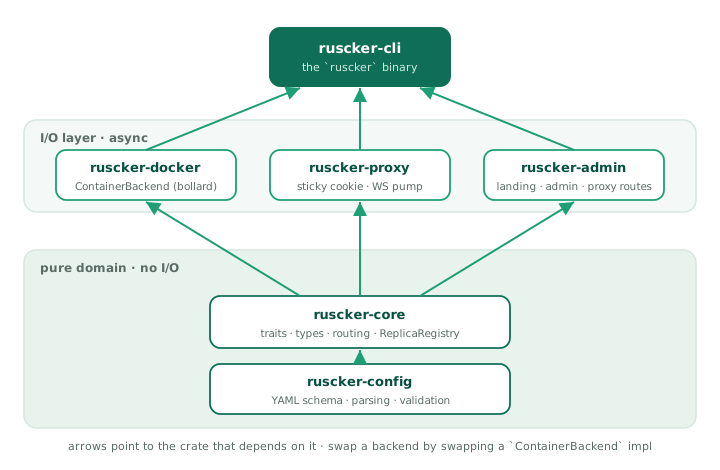
Keeping the backend behind the ContainerBackend trait in
ruscker-core is what made the multi-host backend
(ruscker-docker::MultiHostDockerBackend, Phase 6) a new impl rather
than a rewrite — and leaves the same door open for Kubernetes. The
multi-host impl covers the whole trait surface
(spawn/stop/list, metrics/logs, disk management, image
presence/pull), each operation fanning out across hosts with
degraded-mode tolerance for an unreachable daemon. See
Deployment shapes and docs/adr/.
Request flow
A Shiny session lifecycle
1. Visitor hits  https://portal/app/sales-dashboard/
2. Look up spec 'sales-dashboard' (DB first, YAML fallback)
3. Resolve access identity; enforce ACL and mfa::evaluate before any
   backend access or cold start
4. Read cookie  __ruscker_session_sales-dashboard   (one per app)
5. Cookie missing → resolve_replica:
     a. pick_or_spawn: pick a Ready replica with a free seat
        (least-conn) and reserve the seat atomically
     b. No replica yet → cold-start splash to the visitor while a
        coalesced spawn runs in the background; the splash polls a
        readiness probe and reloads into the app
     c. At max-replicas with no free seat → the splash says "full"
        and keeps polling for a freed seat
     d. SessionStore.touch_or_register(session, spec, R2)
     e. Sign + set cookie  __ruscker_session_sales-dashboard
        (Path={base}/app/sales-dashboard — never sent to other apps)
6. Forward GET /  to  http://127.0.0.1:<R2_port>/   (path strip)
7. Stream response back
8. Browser opens WebSocket  ws://portal/app/sales-dashboard/websocket
9. Proxy connects the upstream WS FIRST (query string preserved,
   subprotocol negotiated); only then answers the client's 101 — a
   dead replica gets a clean 502, not a post-upgrade drop
10. Bidirectional frame pump
11. On heartbeat: SessionStore.touch()
12. Idle timeout reached → Session purged → if last seat, container drained
An API request lifecycle
1. Client hits  https://portal/api/data-api/v1/data
2. Spec.kind() == Api  → no sticky cookie path
3. pick_replica() balances by in-flight request count → R3
4. Bump R3's in-flight gauge, forward request, stream response
5. In-flight gauge drops only after the full body has streamed out
6. No session state, no follow-up — done.
An Api spec has no sticky sessions, so its replicas have no seat
notion to balance on. Instead the proxy keeps a per-replica in-flight
request gauge (routes::proxy::INFLIGHT, a process-global DashMap)
and least-connections routing picks the replica with the fewest
in-flight requests, not the most free seats. An RAII
routes::proxy::InflightGuard bumps the gauge when the forward starts;
crucially it is moved into the streaming response body, so it only
drops once the whole (possibly long) download has been sent to the
client — a large file transfer keeps counting against the replica for
its full duration, and the scaler sees real concurrency rather than a
spike that vanishes the instant headers are written.
Access, MFA, and identity resolution
The proxy resolves a signed-in user’s groups and selected profile claims
once per request when an ACL or identity disclosure needs them. The
IdentityCache in AppState holds groups, e-mail, and department/unit for
30 seconds so an app page’s asset burst does not issue one database query
per request. User/group/profile mutations invalidate the cache with a
generation counter, preventing an in-flight stale read from repopulating
revoked identity data.
Admin-panel authorization keeps identity and row scope separate:
crate::auth answers who the caller is and which role the session carries;
scope::EditorScope answers which Application, User, and Group rows that
caller may see or change. It refetches an Editor’s groups on every request
and fails closed; an out-of-scope target looks absent (404). Admin and
break-glass sessions are unrestricted, open apps are shared by all Editors,
and Media is shared. Account deletion, CSV user import, MFA reset, and group
creation/rename/deletion remain Admin-only.
The request guard then applies these boundaries in order:
Spec::access_allowsenforces per-user/per-group access server-side.- For
require-mfa,mfa::evaluatechecks the user factor and browser grant before the backend, cold-start splash, replica picker, or spawn can run. Interactive visits redirect to enrollment/challenge; APIs fail with401or403; break-glass Admin sessions bypass with an audit record. - The proxy strips the entire client-supplied
X-SP-*andX-Ruscker-User-*namespaces, then adds only the opted-in authoritative values for a signed-in user. The same header list is passed to HTTP and WebSocket upstream connections; absent claims are omitted.
MFA persistence is part of the configuration catalog in both SQLite and Postgres:
| Table | Purpose |
|---|---|
user_mfa | One user-owned TOTP factor; AES-GCM ciphertext/nonce, confirmation state, replay step, and revocation epoch |
user_mfa_recovery | Salted hashes for the one-time recovery codes |
user_mfa_grants | Salted hashes of opaque trusted-device tokens, bound to the user, factor epoch, proof time, expiry, and login-session hash |
Scheduled jobs
jobs::spawn starts one scheduler loop per process when both a catalog DB
and container backend exist (the local Docker backend runs jobs; the
multi-host backend does not, so a due schedule there records an error).
Every 30 seconds it loads enabled schedules; only the LeaderElector
winner may fire in HA. Cron expressions are evaluated against the IANA wall
clock named by server.timezone; when it is absent, the historical UTC
behaviour is preserved. An invalid name also falls back to UTC with a
validation warning. The Schedules page calls the same next_occurrence
function and renders firing times in that operational zone.
db::schedules::mark_fired atomically advances last_run_at before
execution, so a split-brain second runner loses the claim and a crash does
not double-fire the occurrence.
A new schedule anchors at created_at (no fire-on-create). If downtime spans
several cron occurrences, the next tick collapses them to one firing. The job
uses the spec’s image, platform, resolved environment, volumes, limits,
network, labels, and registry credentials, with an optional command override,
and runs to completion outside the interactive replica registry. A
per-schedule timeout defaults to one hour in the backend. Results, duration,
exit code, and log tail land in schedule_runs; failures enqueue the
job-failed alert webhook.
These are deliberately two different time models. Stored instants remain
UTC. Ordinary admin tables emit those instants as <time datetime="…Z">;
the shared layout converts them in the browser to the viewer’s timezone and
keeps UTC as the no-JavaScript fallback. Schedules stay on the configured
operational clock because their timestamps explain when cron will fire.
Changing server.timezone on an installation with existing schedules can
produce one extra run on the switch-over day, so operators should review
their next-run values after adopting a zone.
Aggregated access counter
access_counter::AccessCounter keeps the proxy hot path free of database
writes. It synchronously increments an in-memory (spec_id, UTC day) delta
for each API request, new sticky app session, or external-card click. One
supervised task flushes touched buckets every two seconds into spec_access
with additive UPSERTs. Failed flushes merge deltas back for bounded
exponential-backoff retries, and graceful shutdown attempts a final flush.
Proxying an app under /app/{spec}/ — the strip-and-rewrite model
A containerised app expects to live at the host root: it emits
/lib/jquery.js, opens WebSocket('/websocket'), redirects to /lab.
Ruscker serves it from a sub-path (/app/sales-dashboard/). Two halves
reconcile that gap.
On the way in, the proxy strips the mount prefix. forward()
matches /app/{spec}/{*rest} and forwards only the *rest portion to
the container, so a request for /app/sales-dashboard/lib/x reaches the
upstream as /lib/x — the container believes it is at the root and
never has to know its public path. (This is the opposite of ShinyProxy’s
no-strip model; apps should be configured to serve at root, not to
self-prefix.) The proxy also stamps X-Forwarded-Prefix /
X-Script-Name / X-RStudio-Root-Path with the public mount so apps
that do build their own absolute URLs (RStudio, Jupyter) emit correct
links — see routes::proxy::apply_smart_routing_headers.
On the way out, the proxy rewrites the response so the browser sends
follow-up requests back under the mount. This lives in
routes::rewrite (inject_base_href) and runs only on the
/app/ route family, only for HTML responses:
<base href="/app/{spec}/">is injected at the top of<head>, so relative URLs (foo.css,./img/x.png) resolve under the mount.- Root-absolute attribute URLs (
<script src="/lib/x">,<link href="/...">,<form action="/...">, …) are prefixed with the mount via a streaminglol_htmlpass over a narrow selector set. A skip-list (/admin/,/assets/,/app/, …) avoids double-prefixing Ruscker’s own chrome; notably/api/is not skipped, because under the mount it is the app’s own namespace (Jupyter’s REST + kernel WebSocket live there). - A runtime JS shim is prepended before any page script. It
monkey-patches
fetch,XMLHttpRequest.open, andWebSocketto prefix absolute paths built at runtime. The shim was generalized to also patch the resource-loading property settersHTMLScriptElement.prototype.src,HTMLLinkElement.prototype.href, andHTMLImageElement.prototype.src(plusiframe/audio/video/sourceandElement.setAttribute). Those are the browser’s own fetches — never visible to the fetch/XHR wrappers — so patching them covers RequireJS/webpack chunk loading and runtime-set images generically. - A redirect
Locationheader that points at a root-absolute path (an app’s302 → /lab) is prefixed the same way, so the redirect stays inside the app instead of escaping to a Ruscker 404.
The generalized shim retired the old Voilà-specific rewrite: Voilà’s
RequireJS bootstrap assigns its static URLs to script.src at runtime,
which the patched src setter now prefixes without a bespoke pass.
The rewriter needs uncompressed HTML: nothing between
the container and the rewriter decompresses bodies, so when the
transform is enabled the upstream request carries
Accept-Encoding: identity (ShinyProxy does the same) — an app that
gzips its HTML (Dash behind flask-compress, nginx-fronted) would
otherwise stream compressed bytes straight past inject_base_href.
Defense-in-depth: a response that still arrives with a
Content-Encoding passes through untouched rather than being
corrupted. The /api/ family and inject-base-href: false specs are
never transformed and keep end-to-end compression.
JupyterLab is the one app that still needs a special case
(rewrite::rewrite_jupyter_config). Lab is served with base_url=/ and
reports baseUrl: "/" in its jupyter-config-data JSON; its bootstrap
then builds absolute, same-origin API and static URLs from that
config and injects <script src=…> for its lazy chunks. Because those
URLs are absolute strings baked into a config object — not relative paths
the browser resolves against <base href>, and not paths a root-relative
shim can intercept — Ruscker rewrites the baseUrl and full*Url fields
of that JSON to carry the mount before the HTML pass.
The base-path mount (Ruscker itself served under, e.g., /apps) is the
inverse rewrite and is handled separately: templates emit {{ base }}-
prefixed URLs directly, so the chrome no longer needs a per-request body
rewrite — only the redirect Location header (prefix_base_path).
Module boundaries
Pure layer (no I/O, no async)
ruscker-config::schemaruscker-config::envruscker-config::validateruscker-core::replica(types only — incl. the seat accounting onReplicaRegistry; the replica-picking logic lives next to the proxy inruscker-admin::routes::proxy::{pick_replica, pick_accepting}, where the seat reservation has to be atomic)- the trait definitions in
ruscker-core(ContainerBackend, …) are pure; the asyncSessionStoretrait + its in-memory/Postgres impls live inruscker-admin::sessions
I/O layer (async + tokio)
ruscker-docker— talks to Dockerruscker-proxy— sticky-cookie + WebSocket helpers (a library; it owns no socket)ruscker-admin— builds the single axum router (landing + admin + proxy routes). Proxy selection, access/MFA/identity guards, and response filtering live inroutes::proxy; persistent MFA operations live indb::mfa/db::mfa_grants; background subsystems live injobs,scaler, andaccess_counterruscker-cli— owns the one TCP listener and the tokio runtime, servingruscker-admin’s router
State and persistence
Three sources of state, ranked by authority
- SQLite (admin DB) — source of truth for spec configurations, images, credentials, users/groups, MFA factors and grants, schedules and run history, per-day access totals, landing-page sections, and audit log. Always write here first. Postgres implements the same catalog for HA.
- Live in-memory —
ReplicaRegistry(in proxy),SessionStore(in proxy, in-memory by default). Reflects the running state of containers and sessions. - Docker — actual containers and their state. Source of truth for “is this thing alive”. The proxy queries Docker on startup to rebuild the registry.
The YAML file is NOT the mutable source of truth in production — it is
the service bootstrap plus import/export format. ruscker.yml is the
canonical service-config filename; application.yml remains the compatible
ShinyProxy import/fallback name. Once imported, live catalog edits reside in
SQLite or the HA Postgres catalog.
State transitions
- First boot, no DB: Bootstrap from the selected service config
(
ruscker.ymlby default, withapplication.ymlas fallback) if present; otherwise create an empty DB. - Subsequent boots: Load from DB. The YAML is optional.
Concurrency model
- One tokio runtime, multi-threaded by default.
- The proxy accepts connections on one task per connection, handlers
use
towermiddleware stack. - Container spawns are direct
ContainerBackendcalls, serialized per spec by a coalescing mutex (state.spawn_locks) so concurrent visitors to a cold app produce one container, not N. - The auto-scaler runs as a periodic task (every 10s). Apps default to
min-replicas: 0(cold-start — spawn on the first visit, no pre-warm); it scales up on sustained saturation, retires idle replicas after a grace window, then waits out a post-drop cooldown (~60s) before it will respawn on saturation, so a single-seat long session can’t flap a replica up and down. Setmin-replicas: 1+ to keep an app warm. - The session-purger runs as a periodic task (every 5s).
- The leader-only job scheduler checks cron schedules every 30s and detaches
each run-to-completion job so long ETL work cannot block later ticks. It
evaluates cron on the
server.timezonewall clock (UTC when unset). - The access-counter drain batches in-memory deltas every 2s instead of writing on every proxy request.
DashMapbacks the replica/in-flight state and the short-TTL identity/spec caches (lock-free reads, sharded writes).
Security boundary
Trust levels
- Untrusted: visitors. They can hit
/app/*and/api/*only. Admin paths require an authenticated session. - Privileged: signed-in users. Authentication uses per-user passwords
and three roles — Viewer (portal access only; no admin section),
Editor (dashboard plus group-scoped Applications, Users, and Groups;
open apps and Media are shared), Admin (unrestricted) — enforced
server-side. A break-glass
RUSCKER_ADMIN_TOKENbootstraps the first account and is also unrestricted. Seedocs/SECURITY.md§2. - Operator: filesystem access (the person running Ruscker). Can edit YAML, restart the process.
Secrets at rest
- Docker registry passwords: stored encrypted in
credentials.password_encvia AES-GCM with a master key fromRUSCKER_MASTER_KEYenv var. - User TOTP secrets: stored as AES-GCM ciphertext and nonce in
user_mfaunder the same master key; recovery and trusted-device tokens are stored only as salted hashes. - Session cookie signing: HMAC-SHA256 with key from
RUSCKER_COOKIE_KEYenv var (randomized per process when unset — set it explicitly to keep sessions across restarts and across HA instances). - TLS: terminated by the reverse proxy in front (Ruscker never
terminates TLS itself — see
docs/SECURITY.md§7/§9).
Deployment shapes
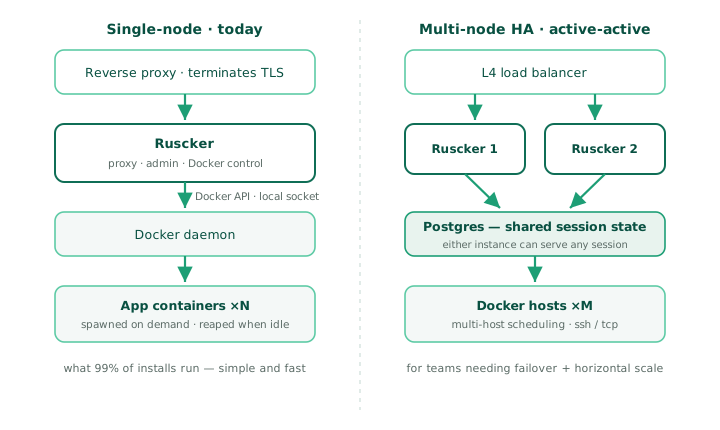
Single-node (default)
A reverse proxy terminates TLS in front of a single Ruscker, which talks to the local Docker daemon over its socket. This is what 99% of installs run — simple, fast, easy to operate.
Multi-node HA (active-active, since Phase 7)
Two or more Ruscker instances behind an L4 load balancer share a Postgres config catalog and session store, so either can serve any session. Exactly one instance holds leadership at a time via a Postgres advisory lock; standbys serve traffic and reconcile counts but skip the scaler and scheduled-job firing loops. The sticky cookie is an HMAC over a shared key, so any instance can validate any other’s cookie. See the deployment guide’s “Running active-active” section for the runnable example.
Multi-host Docker (since Phase 6)
Orthogonal to HA: one Ruscker instance can drive several Docker
daemons (proxy.hosts — ssh / tcp+TLS / unix), placing replicas by
weighted spread or bin-pack with optional anti-affinity. The proxy
reaches each container directly at host:published-port, so keep the
hosts on a private network. Combine with HA freely — the placement map
is per-instance, rebuilt from container labels on list().
What’s not covered here
- The admin UI internals — see the
ruscker-admincrate (cargo doc --open). - The proxy’s WebSocket handling — see the
ruscker-proxycrate. - Specific algorithm choices — see
docs/adr/. - The YAML schema — see
docs/YAML_SCHEMA.md.
Security
The threat model and hardening notes below are the same document
maintained in the repository (docs/SECURITY.md).
Ruscker — Security & Threat Model
Status: living document. Tracks the Phase 5 security audit
(issue #14). Each control is marked [implemented],
[accepted limitation], or [deferred]. File references use
crate/path:symbol so they survive line-number drift.
Scope. A single-operator install: Ruscker behind a TLS-terminating reverse proxy, Docker on one or more hosts. The model below reflects the current security audit. External identity-provider integration (OIDC, SAML, LDAP) remains Phase 8 work.
1. Threat model
Assets
| Asset | Why it matters |
|---|---|
RUSCKER_ADMIN_TOKEN | break-glass Admin login + first-account bootstrap — full access |
| User passwords (DB) | per-user login; stored as argon2id hashes; policy on set/reset: ≥ 8 chars with upper + lower + digit + special |
RUSCKER_MASTER_KEY | decrypts registry credentials and enrolled TOTP factors |
RUSCKER_COOKIE_KEY | forges sticky-session cookies |
| Registry credentials (DB) | pull access to private images |
| Running app sessions | per-visitor app state inside containers |
| The Docker daemon | full host compromise if reachable |
Attackers
- Network attacker — can reach the bound port. Mitigated by binding to localhost / private network + reverse proxy.
- Malicious visitor — hits
/app/*//api/*without admin rights. Should never reach admin surfaces or other visitors’ sessions. - Curious operator-adjacent user — has some network access, tries to brute-force the admin token or forge cookies.
- Compromised app image — a container Ruscker spawned that tries to escape its limits or reach the host/other containers.
Non-goals (explicitly out of scope for MVP)
- Defending against a hostile operator (they own the host + Docker daemon + all keys).
- External identity providers (OIDC/SAML/LDAP). Database-backed users, coarse RBAC, per-spec user/group ACLs, and per-app step-up MFA exist.
- Isolating untrusted, third-party app code from the admin on a shared origin. Apps are assumed first-party; multi-tenant hosting of hostile apps needs origin separation (§6.1, roadmap #878).
- TLS termination (delegated to the reverse proxy).
2. Authentication & authorization
-
[implemented] User accounts (#107) — per-user login (
username+password) backed by theuserstable; passwords stored only as argon2id PHC hashes (db::users, never plaintext).verify_loginruns a decoy hash on unknown usernames so timing doesn’t reveal whether an account exists. Roles (viewer/editor/admin) are per-user. -
[implemented] Break-glass admin token —
auth::AdminAuth::matches_token→ct_eq(XOR-fold, length- checked; time depends only on the public length).RUSCKER_ADMIN_TOKENalways grants an Admin session and bootstraps the first account (token login on a fresh install → forced setup). It’s the recovery path so an operator can never be locked out; treat it as a break-glass secret. The oldRUSCKER_EDITOR_TOKEN/RUSCKER_VIEWER_TOKEN(the #101 MVP) are removed — Editor/Viewer are DB accounts now. -
[implemented] Login rate limiting —
auth::LoginRateLimiter(global sliding window, default 10 failures / 60 s). Saturated →429+Retry-After. Wired inroutes::admin::login_submit. Global, not per-IP: behind a reverse proxy the peer IP is the proxy, and a per-IP key would trust a spoofableX-Forwarded-For. A global cap can’t be evaded by rotating source addresses. -
[implemented] Self-service password change revokes the account’s other sessions (#739) — changing your password is the natural response to a suspected compromise, so every other live session (including an attacker’s) dies; the requester is re-issued a fresh session so they stay signed in. The admin-initiated reset has done this since #544.
-
[implemented] Operational replica actions are audited (#745) — dashboard stop/restart write
replica.stop/replica.restartrows (with the acting user) to the sameaudit_logconfig mutations use. -
[implemented] User activity is recorded (#1021) — a
user_activitytable logs successful password logins and new interactive app sessions (username or “anonymous”, app id, timestamp) for the Admin-only Activity page. It is data minimizing by default: the client IP is not stored, API calls are not logged per-request (only the aggregate counter), and the table has no foreign keys so deleting a user or app is not blocked by it. Read access is Admin-only. -
[implemented] HA admin-session cache is bounded (#738) — the Postgres-backed session store caches a negative entry per looked-up session id (anti-hammer); an amortized sweep now evicts expired entries, so an unauthenticated client spraying random cookie values can no longer grow the node’s memory without bound.
-
[implemented] Admin cookie is
HttpOnly+SameSite=StrictSecure(under TLS, see §7) —routes::admin::login_submit.
-
[implemented] Opaque server-side sessions (#77) — the cookie carries a random 244-bit session id (
auth::AdminSessionStore), never the token. Logout and server restart revoke it; a stolen cookie never exposes the token. The store is in-memory by default (InMemoryAdminSessionStore); for HA, point Ruscker at a shared Postgres via--admin-session-store-url(#185) so sessions survive a load-balancer hop. -
[implemented] Per-app TOTP step-up MFA (#1005) — a factor belongs to the user, not an app. The user enrolls it once under Account → 2FA by scanning a local QR code with Google Authenticator, Microsoft Authenticator, Authy, 1Password, or another compatible app, then receives one-time recovery codes that are shown once. Each spec independently opts in with
require-mfaand selects the acceptable proof age withmfa-validity-days(seven days by default, session-only at0, capped at 30). One successful proof satisfies every protected app whose freshness policy accepts it. -
[implemented] Trusted-device grants use an opaque,
HttpOnlycookie; only a salted token hash and a one-way login-session binding are stored inuser_mfa_grants. Grants are bound to the factor confirmation time and security epoch. Password change/reset, MFA reset, user deletion, Forget this device, and Forget all devices revoke the applicable grants; a zero-day policy also requires the current opaque login session. -
[implemented] The MFA guard (
mfa::evaluate) runs on/appand/apibefore backend access, cold-start handling, replica selection, or spawn. Unenrolled/unproven interactive-app visits redirect to enrollment or a challenge without starting a container; protected APIs return401when the caller is not signed in and403when the factor proof is unsatisfied. WebSocket upgrades are guarded before the upstream handshake. -
[implemented] TOTP secrets are AES-256-GCM encrypted at rest with
RUSCKER_MASTER_KEY; enrollment and TOTP verification fail closed with503when the key is unavailable. Secrets and recovery codes never appear in logs, audit diffs, or configuration exports. The factor, recovery-code, and grant tables work with SQLite and Postgres/HA. Admins see only whether 2FA is configured and may perform an audited reset; they cannot retrieve a factor secret or recovery code. -
[implemented]
RUSCKER_ADMIN_TOKENbreak-glass sessions bypass the user factor so recovery cannot deadlock. Every bypass emits a warning and a cooldown-deduplicatedmfa.break_glass_bypassaudit row. Reserved__ruscker_mfa_*cookies are consumed by Ruscker and stripped before HTTP or WebSocket proxying, so device and enrollment bearers never reach an app. -
[implemented] Role-based access control (#101/#107/#990). The nav reflects the matrix below, but hiding a link is only UX. Coarse section access is enforced server-side by
AdminSession/RequireEditor/RequireAdmin; handlers for group-scoped Apps, Containers, Users and Groups then applyEditorScopeto the authoritative database row.Session Admin-panel trust boundary Viewer Portal user only; no admin-panel section. Editor App-config-trusted but group-scoped. May operate open apps and apps/replicas sharing one of the Editor’s exact, case-sensitive groups; may administer non-Admin users and membership within those groups. Media remains a shared Editor resource. Admin account Unrestricted across the panel and all catalog rows. RUSCKER_ADMIN_TOKENbreak-glassUnrestricted Admin session even when the account database is absent or damaged. A role denied at the section guard receives
403. Once an Editor is admitted to Apps, Containers, Users or Groups, a missing or out-of-scope target receives the same404; this is deliberate non-disclosure, so guessed identifiers cannot reveal that another team’s app, account, group or replica exists. Scope is fetched on every request rather than copied into the session, so membership removal takes effect on the next request and lookup failure fails closed.The #990 integration tests lock down the privilege-escalation invariants: an Editor cannot grant a group they do not have, cannot view or mutate an Admin account, cannot assign the Admin role, and cannot change their own role or groups through delegated user management. An Editor update replaces only memberships inside their scope; out-of-scope groups survive unchanged. Account deletion, CSV user import, MFA reset, and group create/rename/delete remain Admin-only. The last-admin guard still refuses to delete or demote the only remaining Admin. Audit entries record the acting username (or
tokenfor break-glass). -
[implemented] Identifier charset validation (#429 / #423) — a username (
db::users::is_valid_username) and a stored-credential name (routes::admin::credentials::is_valid_credential_name) must be non-empty and made only of identifier-ish chars (letters, digits,_ . -, plus@for e-mail logins). Both land un-encoded in a per-resource admin action URL path segment (/admin/users/{username}/...,/admin/credentials/{name}/delete), so a/,?,#, or space would make the account/credential impossible to edit or delete from the UI — the validation keeps every row manageable (and therefore deletable). Rejected → the form re-renders with an error, no row written. -
[implemented] Password fields are write-only in the admin forms (#430) — the user form and the spec-form Registry section never pre-fill or render a stored password; a blank field keeps the existing value, and the input is masked so a shoulder-surfer can’t read a freshly-typed secret. Server-side, a blank password on edit is a no-op, not a wipe.
-
[implemented] Bind-mount
volumesare Admin-only (#302). A spec’svolumesmap to DockerHostConfig.binds— i.e. host filesystem /docker.sockaccess — so an Editor (who can otherwise create/edit apps) cannot set or change them: the spec-form field is hidden for non-Admins and, server-side,into_speckeeps the base spec’s volumes when the actor isn’t Admin. Treat Admin as host-trusted and Editor as app-config-trusted. -
[accepted limitation] Login lockout can be triggered by a flood of bad attempts (the global limiter’s trade-off). Self- heals within the 60 s window.
3. Credentials & secrets
- [implemented] Registry passwords encrypted at rest with
AES-256-GCM —
crypto::MasterKey::{encrypt,decrypt}. A fresh random nonce per encryption, stored alongside the ciphertext; never reused (new nonce on everyupsert). - [implemented] Unified credential store, two storage modes (#351) —
db::credentials::upsertaccepts either a literal password (AES-256-GCM at rest, as above) or a pure${VAR}env-ref (stored verbatim, never encrypted, flagged by an empty nonce — a real GCM nonce is 12 bytes, never empty — and resolved from the environment only at pull time). The env-ref branch is gated onruscker_config::env::is_pure_env_ref: the value must consist entirely of valid${VAR}/${VAR:-default}tokens (whole-token only). A value with any literal text — e.g.prefix${VAR}or a malformedabc${def— is not kept verbatim; it’s treated as a literal secret and AES-encrypted. This is the #422 fix: a loosecontains("${")test would have stored such a literal in cleartext at rest. Either way the DB never holds resolved cleartext. - [implemented] Master key held in
Zeroizing<[u8; 32]>inside anArc— wiped on last drop. Cookie key likewise (ruscker_proxy::sticky::CookieKey). - [implemented] DB credential store wired to image pulls —
db::credentials::resolvedecrypts only at pull time, in the spawn path, never echoed to the UI. - [implemented]
${VAR}secrets stay literal end-to-end (#260) —docker-registry-password(and any [env::SECRET_KEYS] key) is not interpolated at parse: the${VAR}placeholder is preserved throughimportinto the DB and throughexportoutput, and resolved only at the point of use (creds_from_spec, right before a pull). So the resolved secret never lands in the config DB or an export. The admin spec form treats the password as write-only — never pre-filled or rendered; a blank field keeps the stored value.docker-registry-credential(the named store — AES literal or a verbatim${VAR}env-ref, see above) is preferred for new flows; the spec-form Registry section is now just the picker for a stored credential.container-envvalues get the same treatment (#272): a${VAR}in acontainer-envvalue is preserved literal at parse and resolved only at spawn (Spec::resolved_env_pairs), so an app secret passed via${VAR}never lands in the DB either. A missing env var fails the pull/spawn with a clear message rather than passing a literal${VAR}— both for the registry password (#273) and forcontainer-envvalues (#300). - [legacy] A spec imported by an older build may hold a resolved
password in its
config_json. Re-import the YAML (which now preserves the literal) or rotate the secret to the credentials store; thescan_raw_textvalidator still flags inline cleartext in YAML. - [implemented] Plaintext secrets never logged: pull path
logs
with_creds=<bool>+ registry host, not the password; audit-log inserts carry action/target, not secret values. - [accepted limitation] Cookie key and master key are
separate, undrived keys. Deriving both from a single
RUSCKER_ROOT_KEYvia HKDF is a possible ergonomic improvement, not a security need. - [deferred] Confirm bollard never logs the auth header on
pull at its own
debuglevel (we run it atinfo+ in prod).
4. Image uploads
- [implemented] 10 MB pre-decode cap —
images::MAX_UPLOAD_BYTES, checked before any decode (defends against decompression-bomb-style payloads). - [implemented] MIME sniffing via
infer::get— PNG/JPEG/ WebP recognized by magic bytes, not the client-supplied filename/Content-Type. - [implemented]
X-Content-Type-Options: nosniffon served responses (§7) so a polyglot upload can’t be reinterpreted as active content. - [implemented] SVG script neutralization at serve time.
Uploaded SVGs are still stored as-is, but
/assets/img/*responses (routes::assets::serve_dynamic) carryContent-Security-Policy: default-src 'none'; style-src 'unsafe-inline'; sandbox+X-Content-Type-Options: nosniff. Even if a malicious SVG is opened directly or embedded via<object>/<iframe>, its<script>/<foreignObject>can’t execute. The common<img src=…>use is unaffected (scripts never run in<img>context). The global page-header middleware usesentry().or_insertso it does NOT clobber this stricter per-asset policy. [deferred] content-level sanitization (usvg) if we ever need SVG in an active context. - [implemented] Path traversal guard on
/assets/img/{file}rejects/and.., with tests for encoded variants (%2F,%2e%2e, backslash) — all 400 / 404, never a file read.
5. SQL & database
- [implemented] All queries parameterized — no string
interpolation into SQL (
grep format!.*SELECTacrossdb/is empty). Dynamic filters indb::audit::listuseQueryBuilder::push_bind, not concatenation. - [implemented]
journal_mode = WAL+foreign_keys = ON—db::open/db::open_memory(db.rs). - [accepted limitation] No automated backups — the operator owns the SQLite file’s backup schedule. Documented in §8.
6. Proxy
- [implemented] Hop-by-hop header strip —
routes::proxyHOP_BY_HOPcovers RFC 7230 §6.1 tokens + the dynamicConnection:token list.X-Forwarded-Proto/-Portare stripped before forwarding upstream. - [implemented] Open-redirect closed —
routes::same_origin_pathreduces aRefererto a same-origin path; used by/__set/*and the login redirect. - [implemented] CSRF defense — admin cookie is
SameSite=Strict, so a cross-site POST can’t carry it, and a server-side guard (csrf_guard, #259) rejects state-changing chrome requests that aren’t same-origin: it trustsSec-Fetch-Site(same-origin/noneonly) when present, else falls back to anOriginvsHostcheck. Requests with neither header (curl, the break-glass token POST) pass — they aren’t browser CSRF. - [implemented] Ruscker cookies are stripped before forwarding
upstream (#258) —
strip_ruscker_cookiesremoves the admin session, every sticky cookie (matched by the__ruscker_sessionprefix, so per-spec and legacy names are both covered), and the theme/locale prefs from the upstream-boundCookieheader so an app container never sees them (the admin session id is a bearer). The WebSocket handshake path applies the same filter. - [implemented] Reserved-cookie response filtering (#1010) — apps share
the portal origin, so the proxy inspects every upstream
Set-Cookieand drops cookies whose names belong to Ruscker (admin session, preferences, sticky sessions, and MFA), while preserving the app’s own cookies. It also neutralizes thecookiesand*directives in app-suppliedClear-Site-Data; safe non-cookie directives such ascacheandstoragemay remain. A same-origin app therefore cannot overwrite or bulk-clear the user’s portal, sticky, or trusted-device cookies through its response. - [accepted limitation — needs origin separation] Admin and apps
share one origin by default. A script inside an untrusted app
served at
/app/{spec}is genuinely same-origin with/admin, so neitherSameSite=Strictnor the same-origin CSRF guard can stop it from issuing credentialedfetch('/admin/...')calls. The cookie strip (#258) stops the app from reading the session, but a same-origin request from the browser still carries it. Trusted, first-party apps on one origin are fine; for untrusted / third-party apps, see §6.1 Hosting untrusted apps — the host-safety backstops below (#871/#889/#894) bound the blast radius regardless. - [implemented] Per-app sticky cookies (#731) — the
sticky cookie is named
__ruscker_session_{spec}and scoped withPath={base}/app/{spec}, so it is only ever sent to its own app: two apps in one browser can’t fight over a session, and the cookie never travels cross-app at all. A lingering legacy global cookie (Path=/) is actively expired. The embeddedsession.spec_id == spec.idcheck stays as defense-in-depth against a copied/forged cookie (routes::proxy::resolve_replica). - [implemented] Sticky cookie integrity — HMAC-SHA256
truncated to 16 bytes (128-bit forgery resistance) over the
signed payload (
ruscker_proxy::sticky). 128 bits is far past brute-forceable within a session window. - [accepted limitation] The upstream is always a
Ruscker-spawned container’s published port —
127.0.0.1:<port>on the local daemon, orhost:<port>for a configuredproxy.hostsentry — never an operator-typed URL, so it isn’t an SSRF vector. - [accepted limitation] Container labels (
ruscker.spec_id, …) are trusted bylist(). A manually-created container could forge them; acceptable because the operator owns the host. - [implemented]
proxy-connection(legacy HTTP/1.0) is in the hop-by-hop strip list. - [implemented] WS pump isolation — each direction runs as an independent task (a slow client only backpressures its own producer), with an idle watchdog and a drain grace on close. A 30-second per-frame send timeout closes a persistently blocked connection instead of dropping stateful frames; structured events identify the app, replica, close origin/code/reason, frame count, and timeout policy (#933).
- [implemented]
X-Forwarded-Foris normalized on the forward (#744) — in trusted mode (§7) the real peer IP is appended to the inbound chain; untrusted, the spoofable client value is replaced with the peer. Upstream apps never see a forged chain.X-Forwarded-Proto/-Portare stripped and re-set authoritatively. - [implemented] The per-client API rate limiter is bounded (#737)
— an amortized sweep evicts
(spec, client)windows whose newest hit aged past the largest configured window, so rotating source addresses (one IPv6 /64 is 2^64 of them) can’t grow the map without bound.
6.1 Hosting untrusted apps (same-origin)
Ruscker routes by path on a single origin: the portal at /, the
admin at /admin/*, and proxied apps at /app/{spec}/* all share one
scheme://host:port. A container’s web UI is author-controlled code;
when it runs in the browser it is the same origin as /admin, so its
JavaScript can issue credentialed fetch('/admin/...') requests (the
browser attaches the admin session cookie on same-origin requests) and
read same-origin responses. The SameSite=Strict cookie and the
csrf_guard only stop cross-origin requests, and a synchronizer token
wouldn’t help either — same-origin script can simply read it. Only a
separate origin truly isolates an app from the admin.
This matters only for untrusted apps. If every app is first-party (authored by your team), there is no hostile script and a shared origin is fine — this is the supported posture and what the reference deployments use.
If you must host untrusted / third-party apps, the options today, strongest first:
- Don’t. Keep untrusted workloads on a separate Ruscker instance (its own host/origin, its own admin) from the one serving your first-party catalog. Two processes, two origins — full isolation, no new code.
- Operational hygiene on the shared instance: administer from a separate browser profile (or after logging out of every app), so no live admin session exists in the browser that opens apps. The attack needs a logged-in admin session in the same browser.
- Rely on the backstops. The Disk panel enforces Ruscker ownership and fails closed (#871/#889/#894), spec edits are audited, and sensitive chrome (credentials, users, volumes) is Admin-only — so a same-origin admin call has a bounded, logged blast radius. This is defense-in-depth, not isolation.
Not enough on its own: simply pointing a second hostname at the same Ruscker via nginx does not separate the origins, because Ruscker (path-based) emits app links and
base hrefrelative to the request origin — the portal cards and the app’s own rewritten URLs would still resolve back to a single origin. Real separation needs Ruscker to route apps by Host and emit absolute app-origin URLs.
Roadmap (#878): a first-class app origin — serve /app/* (or a
subdomain per app, {spec}.apps.example.org) on a distinct hostname,
routed by Host, so the browser’s same-origin policy isolates apps from
the admin and from each other. The design must account for the
context-path / --base-path mount, the forwarded-header trust gate
(§7), and the per-spec sticky cookie scoping (§6) — which is why it’s a
deliberate feature, not a config flip.
7. TLS, headers & network
- [implemented] Security response headers on Ruscker’s own
surfaces (landing/admin/prefs/assets), NOT on proxied
/app/*,/api/*—lib::security_headers:X-Content-Type-Options: nosniff,X-Frame-Options: DENY,Referrer-Policy: same-origin, and aContent-Security-Policy(default-src 'self'; … frame-ancestors 'none'; base-uri 'self'; form-action 'self'). - [implemented]
Securecookie flag under TLS — admin + sticky cookies setSecurewhenauth::request_is_httpsis true. That readsX-Forwarded-Protoonly under the trust opt-in below, and takes the rightmost entry of a chained list (the one appended by the proxy closest to Ruscker — the leftmost slot is client-controlled whenever a proxy appends). Off on plain-HTTP dev so the browser doesn’t drop the cookie.
Data plane: proxy → app containers
Where the traffic between Ruscker and the containers it spawns actually flows, and why it is deliberately not TLS:
- Single host (the default and every current deployment): each
container publishes its port on
127.0.0.1and the proxy connects over loopback — the bytes never leave the machine, so there is no network path for an eavesdropper that doesn’t already own the host. End-to-end encryption with the user is complete: browser —TLS→ reverse proxy —loopback→ Ruscker —loopback→ container. - Multi host (
proxy.hosts): the data plane crosses the network (host:published-port), so the deployment requirement is a private network between the Ruscker box and the app hosts, with the ephemeral published-port range opened only between them and never exposed publicly (the backends are unauthenticated). If the link between hosts isn’t trusted, encrypt at the network layer (WireGuard / an encrypted overlay) — that protects every port at once and needs no per-container certificates. - [accepted limitation / by design] Ruscker does not do TLS or mTLS to the app containers: apps (Shiny, Streamlit, Jupyter, Plumber) serve plain HTTP by default, and per-container certificate issuance/rotation would add real complexity against a threat the loopback / private-network requirement already removes. This mirrors ShinyProxy and the rest of this class of tool.
- Identity-header trust boundary (#1001): an app may trust the
X-SP-*/ reservedX-Ruscker-User-*identity namespaces only when its container port is reachable exclusively through Ruscker — loopback on a single host, or the private app network in a multi-host deployment. Exposing a container’s published port lets a caller bypass the proxy and forge those headers directly. Ruscker strips inbound claims and injects authoritativeX-SP-UserId/X-SP-UserGroupsand explicitly selectedX-Ruscker-User-Email/X-Ruscker-User-Setorclaims only on opted-in specs and only for signed-in users. The same stripping and injection rules apply to HTTP and WebSocket handshakes; a selected claim with no value is omitted. Ruscker cannot protect a separate network path around the proxy. E-mail and department/unit values are PII; operators should enable each claim only for apps that need and are trusted to process it.
Forwarded-header trust model
One switch — server.useForwardHeaders: true (or a
forward-headers-strategy other than none) — gates every
read of client-suppliable X-Forwarded-* headers:
| Surface | Trusted (useForwardHeaders: true) | Untrusted (default) |
|---|---|---|
X-Forwarded-Proto → cookie Secure flag | honoured (rightmost entry) | ignored — cookies never carry Secure |
X-Forwarded-For → API rate-limit client key | rightmost parseable address | TCP peer |
X-Forwarded-For → forwarded upstream to apps | peer appended to the inbound chain | inbound value replaced with the peer |
The default is untrusted because honouring these headers from
arbitrary clients lets anyone spoof their identity (rate-limit
evasion) or flip cookie flags. If a reverse proxy terminates TLS in
front of Ruscker, you must set useForwardHeaders: true (and make
the proxy set X-Forwarded-Proto, §9) or cookies will be minted
without Secure. ShinyProxy-migrated configs already carry the flag.
- [accepted limitation] Ruscker does NOT terminate TLS — expects a reverse proxy (see §9).
- [deferred] CSP currently allows
'unsafe-inline'for script/style because the landing + dashboard use inline<script>/<style>. A nonce-based CSP that dropsunsafe-inlineis the hardening follow-up.
8. Logging & observability
- [implemented] Default
tracinglevel (info) logs paths, spec ids, replica ids — operational metadata, no secrets, no PII. - [implemented] User identity data is minimized at the app boundary: identity forwarding is per-spec and off by default, optional profile claims are individually selected, and blank claims are omitted. Usernames, groups, e-mail addresses, and department/unit values are PII and should not be enabled for an app without a need.
- [opt-in] Prometheus
/metrics(proxy.metrics-enabled, off by default). When enabled it’s served unauthenticated — it exposes operational gauges (replica counts/states, per-spec sessions, per-replica CPU/memory), no secrets. Only enable it where the endpoint is reachable solely by your scraper (private network / firewall / bound behind the reverse proxy); don’t expose it to the public alongside the landing page.
9. Recommended production configuration
Reverse proxy (terminates TLS, forwards scheme)
Minimal Caddy:
portal.example.org {
    reverse_proxy 127.0.0.1:8080 {
        header_up X-Forwarded-Proto {scheme}
    }
}
Minimal nginx:
server {
    listen 443 ssl;
    server_name portal.example.org;
    # ssl_certificate ... ssl_certificate_key ...;
    location / {
        proxy_pass http://127.0.0.1:8080;
        proxy_set_header X-Forwarded-Proto $scheme;
        proxy_set_header Host $host;
        proxy_http_version 1.1;            # WebSocket support
        proxy_set_header Upgrade $http_upgrade;
        proxy_set_header Connection "upgrade";
    }
}
X-Forwarded-Proto: https is what flips the Secure cookie flag on
(§7) — and it is only honoured when the YAML sets
server.useForwardHeaders: true. Behind a TLS-terminating proxy you
need both (the header on the proxy, the flag in the YAML);
without them Ruscker assumes plain HTTP and omits Secure.
Binding
Bind Ruscker to localhost so only the reverse proxy reaches it:
ruscker serve --bind 127.0.0.1:8080 ...
Secrets (env vars — never in YAML)
export RUSCKER_ADMIN_TOKEN=$(openssl rand -hex 32)   # 256-bit — break-glass admin
export RUSCKER_MASTER_KEY=$(openssl rand -hex 32)    # AES-256 key
export RUSCKER_COOKIE_KEY=$(openssl rand -hex 32)    # sticky HMAC key
On first run, log in with RUSCKER_ADMIN_TOKEN and you’ll be prompted
to create the first admin account (username + password). After
that, everyone signs in with their account; the token stays as a
break-glass / recovery path. Manage further accounts (Viewer / Editor /
Admin) at /admin/users.
- Set
RUSCKER_COOKIE_KEYexplicitly in prod — without it the sticky key is randomized per process, invalidating all sessions on restart. - Rotate
RUSCKER_ADMIN_TOKENif it may have leaked (it is a break-glass bearer). The admin cookie never contains the token — it carries an opaque server-side session id (§2), revocable by logout or restart.
Backups
Snapshot the SQLite DB (the --db file) on your own schedule;
Ruscker does not back it up. With WAL, copy *.db, *.db-wal,
*.db-shm together, or use sqlite3 .backup.
10. Audit checklist status (issue #14)
Blocking-for-prod (all done):
- CSP + security headers on admin (§7)
-
Securecookie flag under TLS (§7) - Login rate limiting (§2)
Non-blocking follow-ups:
- SVG script neutralization (CSP+sandbox at serve time) (§4)
- Encoded path-traversal tests for
/assets/img(§4) - Opaque server-side admin sessions — cookie no longer holds the token; logout revokes server-side (#77)
- Operator CSP origins (blocks/analytics) sanitized before use (#82)
-
proxy-connectionin hop-by-hop strip (§6, #84) - WS pump backpressure: independent tasks + idle/send watchdogs, structured close diagnostics, and no stateful frame drops (§6, #81, #933)
-
audit_log.diff_jsonverified to record metadata only — never a password/token/cookie (regression test indb::credentials) - Automated
cargo auditin CI (.github/workflows/security.yml, weekly + on dependency changes) and as a blocking release gate. The remainingRUSTSEC-2024-0436unmaintained warning is visible but non-fatal:pasteis only present throughimage’s optionalraviflockfile edge, while Ruscker enables onlypng,jpeg,webp, andrayon. Re-evaluate this exception whenever theimagefeature set changes. - Nonce-based CSP, drop
unsafe-inline(§7) -
semgrepin CI (cargo-audit is wired; semgrep deferred)
Roadmap
Phases 0 through 7 are done: the proxy is production-ready and horizontally scalable, a full bug / security / UX audit shipped as v0.2.5 (every finding fixed), and the v0.2.x series since then has been an operator-driven polish loop — short releases, each validated live on a real deployment before the next. Phase 8 (external auth) is the main optional, demand-driven work left. For what changed in each release, see the release notes.
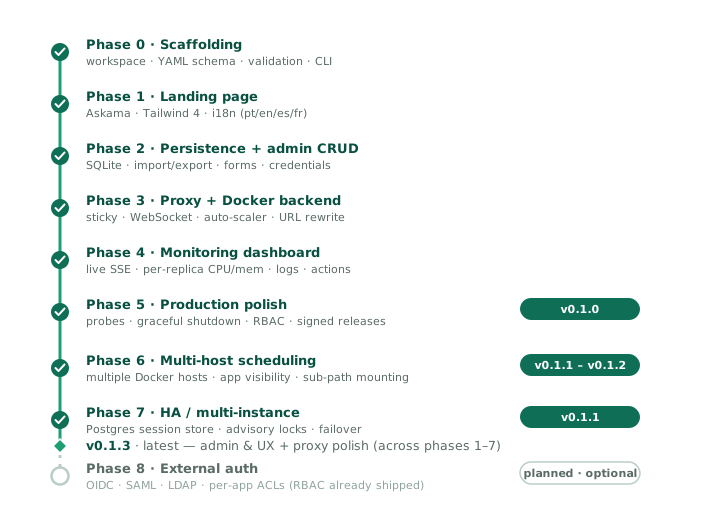
Shipped
Phase 0 — Scaffolding
The Cargo workspace, the ShinyProxy-compatible YAML schema, env-var
interpolation, two-phase validation, and the ruscker validate /
show / inspect CLI.
Phase 1 — Landing page
The public portal rendered from config with Askama + Tailwind 4 (no Node toolchain), full i18n in pt-BR / en-US / es-ES / fr-FR, theme and locale cookies, and the kind-tinted card grid with filters.
Phase 2 — Persistence + admin CRUD
SQLite as the source of truth (sqlx, embedded migrations),
ruscker import / export to round-trip YAML, and the admin panel:
apps list + spec form, image/media library (WebP conversion), an
AES-256-GCM credentials store, the landing-page editor, and an audit
log.
Phase 3 — Proxy + Docker backend
HTTP forwarding, sticky sessions (HMAC-signed cookie), WebSocket proxying, the Docker backend (spawn / stop / stats / logs via bollard), per-spec replica pools, the auto-scaler (scale-to-min, scale-up on saturation, scale-down on idle with hysteresis), the session tracker + heartbeat sweeper, absolute-URL rewriting so unmodified Shiny/Streamlit apps work behind a sub-path, and per-container CPU/memory limits.
Phase 4 — Monitoring dashboard
A live dashboard over Server-Sent Events: aggregate cards,
per-replica state / uptime / sessions / CPU + memory (with
sparklines), one-shot and live-follow logs, per-replica
stop / restart, and a Prometheus /metrics endpoint.
Phase 5 — Production polish → v0.1.0
/healthz + /readyz probes, graceful shutdown (session drain),
structured JSON logging, per-API rate limiting + CORS, request
body-size limits, validate --strict-compat migration pre-flight,
role-based access control (Viewer / Editor / Admin with per-user
password accounts), smart-routing headers (X-Forwarded-Prefix …),
and distribution: a multi-arch Docker image, a Debian package
with a hardened systemd unit, static musl tarballs, a curl | sh
installer, a Homebrew tap, and cosign-signed release artifacts.
Production milestone. Ruscker’s idle footprint is ~14 MB — the JVM-based proxy it replaced, on the same machine serving the same apps, sat at ~540 MB. A real 31-spec config migrated with no unsupported features.
Phase 6 — Multi-host scheduling → v0.1.1 / v0.1.2
A MultiHostDockerBackend that talks to several Docker hosts, with
bin-pack vs spread placement and per-spec anti-affinity (“replicas on
different hosts”) — behind the existing ContainerBackend trait, no
proxy changes. Shipped alongside per-group / per-user app visibility
(access-groups / access-users) and sub-path mounting
(server.context-path / --base-path).
Phase 7 — HA / multi-instance → v0.1.1
A Postgres SessionStore and a shared config catalog so several Ruscker
instances behind an L4 load balancer can share state and any instance
can serve any session; one scaler leader via Postgres advisory locks,
with failover. A runnable 2-instance compose harness lives in
examples/ha/. See Deployment shapes.
Post-phase polish → v0.1.4 – v0.2.5
Incremental improvements shipped after Phase 7 — culminating in the v0.2.x series: the admin redesign to the new visual language (dashboard, Apps editor, the Appearance tab, Logs, Disk), and the v0.2.5 audit release (18 fixes across proxy correctness, security hardening, reliability and admin UX — see the release notes).
Demo app images. The Dash, FastAPI, and Quarto showcase cards now
point to dedicated milkway/ruscker-*-demo images on Docker Hub.
The Quarto demo is a static nginx image (~67 MB); Dash and FastAPI serve
at the root without needing SHINYPROXY_PUBLIC_PATH. Demo forks for
Shiny, Streamlit, and Voilà are backlog — those cards still point to
upstream images.
URL-rewrite modernization. The runtime shim that rewrites relative
asset paths under /app/{id}/ is now generalized to patch
script.src, link.href, img.src, and setAttribute, which retired
the Voilà-specific rewriter. The Jupyter-config rewriter (rewrite_jupyter_config)
is kept: JupyterLab builds absolute same-origin API URLs from
PageConfig.baseUrl that a root-relative shim cannot intercept. A
full absolute-URL Path B rewrite (handling apps that hard-code
window.location.origin) is deferred — the current shim covers all
validated app types.
Credentials. The named-credential store now accepts a pure
${VAR} env-ref in addition to an AES-256-GCM literal, resolved only
at container pull time. The spec form’s Registry section is now a
credential picker; inline domain/user/password fields remain as
back-compat.
Media library. Built-in logos are seeded into the unified media library (deletable, with an “in use” badge). The spec-form image picker supports inline upload. Gallery pages are paginated with search.
Portal logos. The landing editor supports per-slot logos (header / footer) with alignment (left / center / right), an optional link, and a per-logo height.
Performance. gzip/br compression on admin and landing responses;
?v=<version> immutable cache headers on bundled CSS/JS; ETag on media
assets; WebP thumbnails; bounded Docker stats fan-out with a
configurable metrics-interval.
Security fixes. API routing uses in-flight count (not seats);
charset validation on usernames and credential names; admin password
fields are write-only in the UI; ${VAR} resolution returns an error
when the variable is unset (names the missing variable).
Disk management & admin polish (v0.1.32–v0.1.33). A new Disk panel reclaims space: remove containers, prune every stopped one (label-scoped, never touching a non-Ruscker container), and remove unused images — individually or all at once. Deleting an app now reaps its containers instead of leaving orphans. New accounts must change their password on first login. A one-line startup banner (version, bind, base path, Docker, database, spec count) shows in the admin Logs tab at the default log level. The Portal logos editor reuses the spec form’s image gallery picker.
Docker-by-default & Portal branding (v0.1.34–v0.1.35). serve
auto-connects to Docker when the daemon socket is reachable (pass
--no-docker for landing-only); showcase demos seed with
min-replicas: 0 so a fresh install no longer pre-spawns every demo
container. The Portal gains per-theme colours (independent
background/text/accent for light and dark) and logos that integrate
into the chrome — a header-left logo replaces the Ruscker mark,
header-right trails the buttons, footer-right trails the version, and a
center logo is centred within the bar; each takes an optional margin.
The landing editor is reorganised into labelled section cards with a
sticky Save bar, logos are edited as cards with segmented
position/alignment pickers, and the live preview mirrors the real portal
chrome. The social-share og:image auto-defaults to the header logo
(else the Ruscker mark) and gets a gallery picker. Finally, the live
dashboard streams through reverse proxies (X-Accel-Buffering: no), so
new containers appear in real time even behind nginx on a subpath mount.
The design-handoff sprint (v0.2.6 – v0.2.13). A rapid, live-tested series that brought the whole admin to the design handoff and fixed what real operation surfaced, in days:
- Apps list — archive / restore an app in place (the card leaves the public portal, nothing is lost) and delete with confirmation, right from the table; toggles update the row without a reload or a scroll jump.
- Appearance, end to end — one Logos section with an inline main-logo picker; the header background as an explicit Preset / Solid / Gradient choice; per-theme (light / dark) values for the header, the default card covers and the palettes — with a draggable angle dial, Inherited ⇄ Own pills, layout tiles, a light/dark switch on the live preview, and a confirmed “Restore defaults”. The HTML-blocks editor gained inline editing.
- Landing content — the intro paragraph fills the row (justified, hyphenated per locale) and understands inline Markdown (bold, italic, links — escape-first, never raw HTML).
- Media — same-name uploads keep both images (the new one is renamed and announced), and picker tiles show filename captions so look-alikes can’t be confused.
Private-image & deploy robustness (v0.2.14 – v0.2.19). Driven by an operator bringing a private Plumber2 app online: Docker Hub credentials are normalised so they apply reliably, the credential picker moved beside the image field, a force re-pull (“Update image”) handles a re-published tag, and a boot crash now surfaces the container’s own error + exit code instead of a generic “no port binding”. Plus catalog cards expand their description on hover, and the dashboard’s stop/restart actions show in-progress feedback.
Migration fidelity, performance and citation (v0.2.20 – v0.2.44).
Bringing a real ShinyProxy catalog across drove import fidelity
(container-volumes, logos ingested into the Media library) and a
performance audit whose sharpest finding was the live dashboard: it held an
SSE connection open, which starved the browser’s per-origin connection pool
where a reverse proxy served Ruscker beside another app on one hostname, so
it moved to polling a snapshot endpoint. Apps also became cold-start by
default, the Admin panel gained scheduled, run-to-completion ETL jobs with
run history, log tails and failure alerting, and the project became citable
with a DOI archived per release.
Reliability and identity (v0.2.45 – v0.2.49). Step-up two-factor
authentication can be required per app, with recovery codes and
trusted-device grants. The scaler learned to self-heal when a container
changes outside Ruscker — an external docker rm -f or an OOM kill no
longer leaves a dead app behind — reconciling from an authoritative
liveness check rather than assuming absence means stopped. A new Activity
section records who logged in and who opened which app, captured off the
proxy’s hot path.
Timezones and delegated administration. Cron is no longer read on the
UTC clock: server.timezone names the IANA zone the scheduler evaluates
expressions in, and the Schedules page labels firing times in that same
zone. Leaving it unset preserves the historical UTC behaviour, so upgrading
never moves an existing job. Other persisted admin timestamps stay in UTC
and are converted in the browser to each viewer’s own zone.
Editor delegation is row-scoped from current group memberships across
Applications, Users, and Groups. Open apps remain available to every
Editor, Media is shared, and an out-of-scope target returns 404.
Admins and the break-glass token remain unrestricted. Account deletion,
CSV user import, MFA reset, and creating, renaming, or deleting a group
remain Admin-only.
Planned (optional)
Demand-driven — Ruscker is complete and useful without it.
Next up (small, operator-driven)
Tracked in the GitHub issues; picked up as real usage asks for them:
- “System” tab in the admin — a read-only diagnostic view of the effective server configuration (issue #766, decision pending).
- Personal highlights — let each visitor pin their own favourite apps (cookie for anonymous visitors, DB for signed-in ones, issue #519).
- Markdown in app descriptions — the intro already supports the inline subset; extending it to card descriptions is deferred until there’s a concrete need (issue #812).
- First-party demo images — fork the remaining showcase demos
(Shiny, Shiny for Python, Streamlit, Voilà, R Markdown) into
milkway/ruscker-*-demoimages that serve at the root (issues #389–#397). - Hardening follow-ups — live end-to-end validation of the WebSocket arc on Shiny/Streamlit (validated against Jupyter today). (The post-drop scale-down cooldown that tamed the seats=1 long-session flap has since shipped.)
Phase 8 — External auth
OIDC (Keycloak / Auth0 / Google), SAML, and LDAP. Per-app access lists and the Viewer / Editor / Admin model already ship, including group-scoped Editor delegation across Applications, Users, and Groups. This phase is only the federated-identity layer on top.
Explicitly out of scope
- Kubernetes backend — possible as a future
ContainerBackendimpl, but not a committed phase until there’s demand. - App-ecosystem features (pause/resume, snapshots) — these are ShinyProxy Pro territory.
- Multi-tenancy / billing and a public app marketplace.
What “done” means
After Phase 5, Ruscker can drop in where ShinyProxy runs today:
ruscker import application.yml --db /var/ruscker/ruscker.db- Stop ShinyProxy.
- Start Ruscker on the same port.
- Verify with the same browser URL.
Phase 8 is for organisations with federated-identity or fine-grained per-app access needs. Progress is tracked in the GitHub issues.
Release notes
What changed in each release. Ruscker follows semantic versioning; while
on 0.x the API and YAML schema stay backward-compatible (new fields are
optional), and breaking changes are called out here.
Downloads (binaries, .deb, container image — all cosign-signed) are on
the GitHub releases page.
v0.2.52 — 2026-09-18
Six admin-panel requests from the operators, each reviewed by an independent code reviewer before merging (#1053–#1058).
-
Recovery codes you can actually keep. The one-time 2FA recovery codes now show grouped as
ABCDE-FGH23, numbered, with the digits tinted soB/8andS/5read apart, and they are accepted with or without the dash. Download (.txt) and Copy all buttons are built in the browser — the server never re-emits the codes, and “Copied” only appears when the copy really happened. The 2FA page shows how many codes remain (only a count is knowable; the database holds salted hashes), warns at two or fewer, and offers Generate new codes behind your password. Regeneration is compare-and-set: re-submitting the same form after a refresh, or from a second tab, is refused instead of silently invalidating a set you already saved. -
Export users to CSV (Admin-only, like the import): all accounts, or exactly the rows the current search matches across every page. Same columns as the import, with an always-empty
passwordcolumn, so the file re-imports once you fill that in; values a spreadsheet would read as a formula are guarded with a leading', which the importer strips again. Every export writes an audit row (scope, term, row count — never the rows) and is refused if that row can’t be written. -
KPI band on Disk and System, the two screens the standard band had not reached. Each Disk card shows
—when its own inventory failed, so a Docker outage never reads as “nothing here”. -
Charts you can expand. The Apps list’s 14-day access sparkline opens a full-width daily chart with 14 / 30 / 90-day periods. The Containers page finally draws the CPU and memory history it always collected — a sparkline per replica — and a chart button opens the last 30 minutes, live while open. The 5 s dashboard poll ships only the sparkline’s tail; the full window is fetched for the one replica you open. A transient
docker statsfailure no longer erases a replica’s history. -
Filters, sort and paging without reloading on Users, Audit and Activity: the table region is fetched and swapped in place as you type, the URL stays in sync (reload or share a link and you get the same view), the Back button steps through the history, keyboard focus and horizontal scroll survive a swap, and KPI bands follow the filter. Sorting Users by user, role or created date is now server-side, so it orders the whole result rather than the visible page.
-
Also: the MFA page’s “forget device” buttons had no styles since the MFA epic (they rendered as bare text) — fixed; the 2FA “configured since” time now renders in your own timezone like every other admin timestamp.
v0.2.51 — 2026-07-29
-
Admin timestamps now read in your own timezone. Every date in the panel — the audit log, user activity, apps, credentials, users and the Logs tab — used to render the stored UTC wall clock, so an operator three hours behind UTC read every event three hours in the future. The values were always stored correctly; only the display lacked a conversion. Timestamps now render in the viewer’s browser timezone, keeping each screen’s existing format, and hovering one shows the full date with the zone name. Two operators in different zones each read the local time of the same event. The date column also sorts by instant now, instead of by day-of-month.
-
Scheduled jobs can follow a real clock. The scheduler evaluated cron expressions against UTC, so
0 8 * * *fired at 08:00 UTC rather than 08:00 where the operator lives. The newserver.timezonekey inruscker.ymltakes an IANA zone name (America/Recife,Europe/Lisbon, …); the Schedules page then shows next and last run in that zone, labelled, and the cron field’s help names it so nobody has to open the YAML. Zone names carry the historical daylight-saving rules, so “08:00 local” keeps meaning that across a transition — a spring-forward gap fires at the transition instant instead of being skipped, and a fall-back repeat fires only once.Unset means UTC, exactly what every install did before, so upgrading never moves an existing schedule. Setting the key deliberately shifts them by your offset, and the switch-over day can fire one extra run of a job that already ran; disable the schedule around the restart if a re-run would hurt. An unparseable name (
BRTis an abbreviation, not a zone) falls back to UTC with a startup warning rather than failing the boot, and the effective zone now appears in the startup banner. -
Editors can be delegated their own teams. An Editor’s group membership now scopes what they administer: they see and operate apps whose
access-groupsoverlap their groups, and manage the users and memberships of those same groups. Apps with no access list stay open and global to every Editor, and the Media library stays shared. An Editor may create Viewer or Editor accounts inside their own groups and reset those users’ passwords; deleting accounts, importing users from CSV, resetting MFA, and creating, renaming or deleting a group remain Admin-only. Admin accounts and the break-glass token session are never narrowed. A target outside an Editor’s scope answers404, so a guessed identifier can’t reveal that another team’s app or account exists, and memberships belonging to other groups survive an Editor’s edit.Before upgrading: give every Editor account at least one group. Previously an Editor operated the whole catalog; a group-less Editor now reaches only open apps. Startup warns and names any such account.
v0.2.50 — 2026-07-26
- Group cards stay compact — even with hundreds of members. On the Groups page, a long member or app list now collapses to a ~3-row preview with a soft fade and a localized “Show all (N)” / “Show less” toggle, instead of one group ballooning while its neighbours sit half-empty. The collapse is measured, not assumed: a list that happens to fit the preview (short names, wide card) renders in full with no fade and no toggle. Cards flow in a clean responsive grid, each only as tall as its own content.
v0.2.49 — 2026-07-21
- The process Logs page no longer strands an infinite HTTP/1.1
response. Its automatic
EventSourcefeed has been replaced with finite, cursor-based polling, preventing a reverse proxy or load balancer from retaining the stream and head-of-line blocking later admin navigation. The initial tail and cursor are captured atomically, polling pauses while the tab is hidden, and the retired SSE endpoint returns204so clients loaded before a rolling upgrade stop reconnecting. Explicit container-log live follow and finite image-pull event streams are unchanged.
v0.2.48 — 2026-07-21
- A consistent KPI band across the admin. Every management screen now opens with the same at-a-glance metric strip already used on the dashboard, so counts are where you expect them. Applications (total / active / archived / public / restricted), Users (total / admins / editors / viewers / password-change pending), Groups, Credentials, Media, the audit and activity logs, and Schedules each lead with their own headline numbers.
- Self-healing keeps the host tidy: stopped orphan containers are now
reaped. A managed container that exits outside Ruscker’s control — an
external
kill, an out-of-memory stop, or an old replica replaced by a fresh one — used to linger as a stopped shell until someone pressed Remove stopped on the Disk panel. The reconcile loop now sweeps those orphans and removes them automatically once they are past the restart grace window, using Docker’s ownFinishedAttimestamp. Only Ruscker-managed containers are ever touched; a container still tracked in the registry, still within the grace window, or of unknown age is always left alone. - Per-app container startup timeout. The
container-wait-timereadiness budget can now be set per application (advanced form, beside the heartbeat timeout) instead of only globally underproxy. Slow- starting apps get a larger startup budget without loosening the feedback for everything else; blank or0inherits the global value. - Admin polish. On the Disk panel the Volumes card now sits above the images/containers pair. The Groups cards flow freely (masonry) with a capped, scrollable member/app list, so a group with many members no longer balloons while its neighbours sit half-empty. The user creation form no longer nudges the Initial password field out of alignment with the rest of the row.
v0.2.47 — 2026-07-20
- User activity: see who logged in and who opened which app. A new
admin-only page, Atividades → Atividades dos usuários, lists user
logins and interactive app accesses with identity — a companion to the
administrative audit log, reachable from the same section via a two-tab
switcher.
- What’s recorded: a successful password login, and each new interactive app session (one row per visit — never per asset, XHR, or WebSocket, and API calls keep only their aggregate counter). An access with no signed-in user shows as “Anonymous”. The history has no foreign keys to users or apps, so it survives a user or app being deleted.
- Filter and page: narrow by event kind, user, app, and time window (last 24 h / 7 / 30 days), with server-side pagination for a long history.
- Off the hot path: events are captured with a non-blocking enqueue and written in batches by a supervised background task, so activity logging never slows down a proxied request. Works on SQLite and Postgres/HA. Client IP is not recorded in this release (it’s personal data — a future opt-in with a retention policy). New migration 0031.
v0.2.46 — 2026-07-20
- Self-healing when a container changes outside Ruscker. If an
operator removes or restarts a managed container directly with the
Docker CLI, Ruscker now reconciles its view immediately — no admin
action needed.
docker rm -fno longer leaves a dead app behind. Before, a force-removed container lingered as “Ready” in Ruscker’s registry until the next housekeeping pass, so requests kept hitting the vanished upstream (upstream error) and the phantom still counted against the app’s replica ceiling. Ruscker now authoritatively detects the removal, drops the stale sticky binding and its sessions, and brings up a replacement — a page navigation lands on the familiar “Starting…” screen instead of a 502.docker restartno longer orphans the container. A container restarted from the CLI is re-adopted once it is serving again (after the same readiness check used on a fresh spawn), with no duplicate started during the restart window and nothing left running but invisible to the dashboard.- Near-instant, even for idle apps. Ruscker watches Docker’s event stream, so an external change is reconciled within about a second — not only when a request happens to arrive. A request that does hit a just-removed upstream recovers on the spot.
- Safe on multi-host and during daemon hiccups. Recovery acts only
on an authoritative “gone” signal: a transient Docker error, an app
returning its own
5xx, or an unreachable host in a multi-host deployment never causes Ruscker to drop a live replica. The periodic reconcile remains the fallback for anything missed.
v0.2.45 — 2026-07-18
- Two-factor authentication for selected apps (step-up MFA). A spec
can now require a second factor: set
require-mfa: true(with an optionalmfa-validity-days) on the app, or flip “Exigir 2FA” in its form. Users enrol a TOTP factor once — Google/Microsoft Authenticator, Authy, 1Password and the like — by scanning a QR code on their own Account → 2FA page, and get one-time recovery codes shown once. The factor belongs to the user, so one proof satisfies every protected app; each app decides how recent that proof must be (mfa-validity-days, default 7;0= only within the current login session). Enrolment establishes the first proof, so a user who just set up 2FA flows straight into the app.- Enforced at the proxy, before anything starts: an unenrolled or
unproven visit to a protected
/appis redirected to enrolment or the challenge without waking or spawning a container; a protected/apifails closed with401/403. Break-glass (RUSCKER_ADMIN_TOKEN) sessions bypass the factor so an operator can’t be locked out — every bypass is logged and audited. - Device trust with real revocation: a successful challenge
remembers the browser (an opaque, hash-only,
HttpOnlycookie) within the app’s window. Changing/resetting a password, resetting the factor, deleting the user, or “Forget devices” on the account page all revoke the remembered device immediately; a normal logout keeps it. TOTP replay is blocked, and the trusted-device cookies never reach an app container. - Secrets are encrypted at rest with
RUSCKER_MASTER_KEYand never appear in logs, the audit trail, or config export; recovery codes are stored only as salted hashes. Admins see only “2FA configured” and an audited reset — never the QR code or secret. Works on SQLite and Postgres/HA. Migrations 0029 + 0030.
- Enforced at the proxy, before anything starts: an unenrolled or
unproven visit to a protected
- Hardened cookie boundary for hosted apps. Because apps share the
portal’s origin, a compromised app’s HTTP responses could
previously overwrite or clear the user’s Ruscker cookies (session,
sticky, the new MFA device cookie). The proxy now strips reserved
Set-Cookieheaders from app responses and neutralises cookie-clearingClear-Site-Datadirectives, while leaving the app’s own cookies and non-cookie directives untouched.
v0.2.44 — 2026-07-17
- Identity headers for apps (ShinyProxy compat). Apps that need to
know who is using them can now receive the authenticated identity
per request. Setting
add-default-http-headers: trueon a spec (or its toggle in the app form’s Access section) forwardsX-SP-UserIdandX-SP-UserGroups— the ShinyProxy contract, so migrated apps that attributed writes to a user work again. Unlike ShinyProxy, Ruscker defaults this off: upgrading never silently discloses identity to an app that wasn’t already trusted with it. - Extra identity claims, opt-in per app. A Ruscker-native
identity-claims: [email, setor]list (checkboxes in the same form section) additionally forwardsX-Ruscker-User-Email/X-Ruscker-User-Setor. Data minimization throughout: each app gets only the claims it declared, a claim with no stored value is omitted (never sent empty), and the claims work with or without the X-SP pair. Anonymous visitors and token sessions carry no identity. - Spoofing-proof by construction. The whole
X-SP-*andX-Ruscker-User-*namespaces are stripped from every incoming request — HTTP and WebSocket alike — before Ruscker injects its own authoritative values, so an app can trust what it receives (see the trust-boundary note in the security guide: the container port must only be reachable through Ruscker). Accented values (Gestão) arrive as clean UTF-8. No extra database work per asset: identity is resolved once per request through a short-lived cache that admin edits invalidate immediately. - Users page scales.
/admin/usersnow paginates server-side (50 per page) with a server-side search over username, groups and the profile fields — a large user base (big CSV imports) no longer renders thousands of rows per view. Search is accent-tolerant on both SQLite and Postgres. - Clearer module titles. Every admin screen’s title/subtitle was standardized to state what the module is for (“Gestão de X” + purpose line, per the design doc): the nav now says Containers (was Painel) and Atividades (was Auditoria), the Logs tab is titled “Auditoria de Logs”, and technical notes (media formats, CSV import details) moved from subtitles into in-context helper text. The Groups subtitle no longer claims the page is read-only — it hasn’t been since groups became editable.
v0.2.43 — 2026-07-13
- Scheduled jobs (cron). A new Schedules page in the admin runs
a spec’s image to completion on a cron — the ETL/report case: same
image, environment, volumes and credentials as the app, with an
optional command override per schedule. Semantics built for ETL:
a new schedule waits for its first occurrence (no fire-on-create),
downtime over several occurrences collapses to one firing, and in HA
only the leader fires (with an atomic claim so nothing double-runs).
Each run lands in a history with status, exit code, duration and the
log tail; a failing job raises the
job-failedalert through the notification webhook. Per-schedule timeout (default 1 h). Job containers never linger — removed on every exit path, and invisible to the replica machinery. - Named-volume management. The Disk panel gained a Volumes card: list named Docker volumes with live reference counts (any container on the host counts), create them (labelled as Ruscker-created), and remove — offered only for volumes Ruscker created, with zero references and no catalog spec mentioning them; third-party data is never removable from the panel, and the daemon’s no-force refusal backstops everything.
- Refresh button on the Apps list — reload rows, states and counts without hunting for F5.
- Docs. The admin guide caught up with the recent releases (consolidated user editing, password policy and generator, the corrected Viewer role, sections following the new tab order); a new Data plane section in Security states the proxy→container encryption story explicitly (loopback on a single host; private network / WireGuard for multi-host); and Troubleshooting explains the one-click fix when an app keeps failing with an old cached image (the Update image button — no Docker restart involved).
v0.2.42 — 2026-07-13
- Password policy. New passwords (creating a user, admin reset, first-admin setup, changing your own, CSV import) must now have at least 8 characters with 1 uppercase, 1 lowercase, 1 digit and 1 special character. Existing passwords are untouched — the rule applies when a password is set or reset (and admin-assigned passwords already force a change at first login). Error messages and form hints state the full rule in all four languages.
- Random password generator. A new button beside the password
field (user create and reset forms) fills in a strong 14-character
password — generated in the browser with cryptographic randomness,
policy-compliant by construction, without look-alike characters
(no
0/O,1/l), and revealed so you can read what you’re about to hand over. No moreteste123. - Admin tabs reordered by workflow. Daily drivers first (Dashboard, Apps, Media, Credentials, Appearance), then people (Users, Groups), with diagnostics and maintenance at the end (Logs, Disk, Audit, System) — Disk no longer sits between Dashboard and Apps. An Editor’s visible tabs now form one contiguous block, so Editor and Admin share the same nav geography.
v0.2.41 — 2026-07-13
A large batch: ten issues closed, including the whole config-model epic.
- Alert notification webhooks. Set a URL in the admin System tab
and Ruscker
POSTs a JSON payload when something an operator should know about happens: an app’s container failing to start, a running replica dying outside Ruscker’s control, or an app saturated atmax-replicas(visitors being turned away). Delivery is best-effort with retries and a per-(event, app) cooldown so a stuck condition doesn’t storm the channel; a Send test alert button checks the wiring. Payload contract documented in the guide (§ admin/System). ruscker.ymlis the canonical service config. The service’s own settings (bind, subpath, forwarded-header trust, timeouts, metrics) now live in a fully self-documented/etc/ruscker/ruscker.yml— every option commented with its default.application.ymlremains as the ShinyProxy import format (same schema, and still accepted as--config);servewithout--configfindsruscker.ymlfirst and falls back silently. Upgrades migrate automatically: an editedapplication.ymlfrom an older package is copied overruscker.ymlonce, while the latter is still the pristine example — nothing to do by hand. Changing the port or the subpath no longer ever requires editing the systemd unit (the--bindflag leftExecStart; the README gained a complete no-systemd subpath recipe).- Consolidated user editing. Each row in Users now has an Edit button opening a dedicated page — role, groups and profile in one form with a single save (atomic, with the last-admin guard rolling back all fields), and password reset alongside.
container-wait-timenow works. The field parsed but was never consumed — the readiness wait was hardcoded at 60 s. It now drives the spawn readiness budget (both single and multi-host), and failure messages name the configured value.- Per-spec access counting no longer writes per request. API access counts aggregate in memory and flush in batches (one UPSERT per spec/day bucket every couple of seconds, with retry and a final flush on shutdown) — under load, thousands of calls become one write.
- Browser-tab title honours your title. The page
<title>/og:titleused to skipproxy.title; it now follows the same chain as the header (SEO title → Appearance title →proxy.title→ default). - Docs: ShinyProxy → Ruscker field map. A new guide page lists every documented ShinyProxy 3.x option with its status here (supported / warned-and-ignored / planned / out of scope) and the Ruscker equivalent — the field-by-field companion to the migration guide. The Configuration chapter now opens with the four-layer model (service YAML × secrets env × portal DB/admin × ShinyProxy import).
- Live WebSocket e2e for Shiny + Streamlit. A new gated test suite drives the real demo containers through the proxy — cold spawn, URL rewriting, and both directions of the WebSocket pump — closing a validation gap open since the proxy phase.
v0.2.40 — 2026-06-25
- Citation metadata + DOI. Added a
CITATION.cffat the repo root so GitHub shows a “Cite this repository” button (APA/BibTeX) and Zenodo archives each release with a permanent DOI. No code changes — this is the first release archived to Zenodo. Cite Ruscker with the concept DOI shown on the repository page.
v0.2.39 — 2026-06-18
- Apps no longer pre-warm by default. An app with no
min-replicasset now defaults to 0 (cold-start) — the container starts when the first visitor arrives and is reaped once idle, matching ShinyProxy and Shiny Server Free. Previously every containerized app defaulted to 1, so importing a large config (e.g. a 24-app ShinyProxy setup) lit one idle container per app at boot. To keep an app hot, setmin-replicas: 1(or more) on it explicitly. The autoscaling ceiling is unchanged, so cold-start apps still scale on demand. No re-import is needed — only the effective default changed; existing specs keep their saved values. (The spec form’s “Initial replicas” hint and summary now read 0 to match.)
v0.2.38 — 2026-06-18
- Favoriting a card updates the Featured rail instantly. Clicking the star on a portal card now adds it to (or removes it from) the “Destaques” rail live — no page reload. The rail appears the moment you favorite your first card and hides again when you clear the last one.
v0.2.37 — 2026-06-18
- The live dashboard no longer holds a connection open. It used a persistent SSE stream; behind a reverse proxy that serves Ruscker and a side-by-side app (e.g. ShinyProxy) on one hostname over HTTP/1.1, that long-lived connection could starve the browser’s ~6-per-origin pool and stall every request to that host — freezing both apps until the stream dropped. The dashboard now polls a JSON snapshot every few seconds (each request returns and frees the connection), so opening the monitoring panel can’t wedge the origin. The live logs view and the image-pull progress keep their short-lived streams. (HTTP/2 at the TLS edge remains the broader fix and also helps any other app on the host.)
v0.2.36 — 2026-06-18
Portal/admin UX + a big icon-loading win.
- Icons appear instantly. The bundled Tabler icon font shipped the full set — ~447 KB woff2 + ~209 KB CSS — even though the app uses ~95 glyphs, so on a cold visit the icons “popped in” only after that download. Subsetted to just the used glyphs (10.7 KB woff2 + 4 KB CSS), and fonts now carry an ETag + a day-long revalidated cache, so repeat visits don’t re-download them.
- Favorite star tidied. Logged-out visitors no longer see an empty white circle on cards; the “Destaques” carousel drops the star entirely; the un-favorited star is a softer grey.
- CSV user import is clearer. Instead of two look-alike buttons, you see “Choose CSV file” first; once a file is picked it becomes a single primary “Review import: «file»” button (plus a discreet “change file”), so the choose → review flow is obvious.
- Fixes (#910): a transient DB error no longer lets a must-change user skip the password prompt, and duplicating an app won’t suggest an id that shadows a YAML-defined one.
v0.2.35 — 2026-06-17
Two small correctness fixes (#910).
- A DB blip no longer lets a must-change user skip the prompt. The forced-password-change guard’s per-session cache (v0.2.34) treated a transient DB error as “no change needed” and pinned it for the cache window. A DB error is now never cached — the next request re-checks, so the user is caught as soon as the database recovers.
- Duplicating an app won’t shadow a YAML-defined one. The suggested copy id now checks the full effective catalog (DB + YAML), so it can’t land on an id already used by a config-only spec.
v0.2.34 — 2026-06-17
Admin correctness + performance, from a navigation-focused audit.
- DB-only apps survive a restart (#907). A spec created in the admin (not in the YAML) had its running container reconciled after a restart with a seat cap of 0, so it read as permanently full — wrong routing and scaling until it was re-touched. Reconcile now resolves seat caps from the effective catalog (DB + YAML), not the YAML alone. Same root cause fixed for Duplicate: duplicating a YAML/config-only app no longer 404s.
- Admin tab navigation is lighter. The effective spec catalog is now cached behind a cheap signature (#902) instead of being rebuilt — and re-deserialized — on every Apps/Disk/Media/Groups/System page load; the Disk panel fetches its Docker/DB inputs concurrently instead of one after another (#904); and the forced-password-change guard no longer does a DB lookup on every admin request (#903). The cache is never stale (any spec write moves the signature) and HA-safe.
If admin navigation felt slow on an older build, the bigger win is v0.2.31’s dashboard-SSE fix (#852) — it stopped a live monitoring tab from holding an HTTP/1.1 connection and stalling other tabs.
v0.2.33 — 2026-06-17
Admin & portal UX polish, all operator-requested.
- Apps action column — grouped buttons. The action icons are now clustered into logical groups (marker · manage · operate) with thin dividers, and the destructive Delete is set apart so it’s never clicked by mistake.
- “Update image” shows live progress. The per-row re-pull now shows the current Docker pull step inline (Pulling → Downloading → Extracting → done) instead of just a spinner, so you can follow it.
- Users CSV import — localized file picker. The native file input rendered the browser’s own “Choose file” text in the browser language; it’s now a styled, localized control matching the YAML import, with the chosen filename shown and the submit gated until a file is picked.
- Dashboard replica logos fall back to the monogram. When a logo file isn’t present on the host, the Active Replicas grid now shows the app’s monogram initial instead of a blank tile.
- Portal public/private filter removed. With the decorative access lock gone (v0.2.31), the filter no longer distinguished anything a visitor could see (restricted apps are hidden from non-members), so the chips were dropped. Real access enforcement and visibility are unchanged.
v0.2.32 — 2026-06-17
Disk host-safety hardening — the follow-ups that make “remove unused images” safe to click on a host that runs other containers (a side-by-side ShinyProxy) and can’t re-pull from the registry.
- Image removal is now provenance-aware (#894). The Disk panel only ever removes images Ruscker has managed — a ref recorded when a spec referencing it is saved, or when it’s explicitly pulled, in a durable table that survives spec deletion. A neighbour’s idle image (e.g. ShinyProxy’s) shows a “not managed” badge and is never deletable; the per-row remove also enforces this server-side. Dangling images stay the job of the host-safe “Reclaim space” button. Backfilled from the current catalog on upgrade.
- Multi-host fails closed (#897). When a clustered host is unreachable, the in-use signal now fails the call instead of returning a partial inventory — so the panel enters its usage-unknown mode rather than mislabelling an image backing a container on the down host as “unused”.
- Multi-host disk fan-out is parallel with a per-host timeout (#895). Several hosts or one slow daemon no longer sum their latencies onto the admin page; a timed-out host is skipped where tolerant and fails closed for the in-use signal.
ruscker import --images-dirmatches its help (#891 follow-up): an empty value or a missing directory skips media import instead of auto-discovering or aborting; now covered by tests.- Docs:
SECURITY.mdgained actionable guidance on hosting untrusted apps on a shared origin (#878) — what isolates them and what doesn’t.
v0.2.31 — 2026-06-17
A migration-and-operations release: the bits that mattered when moving a real ShinyProxy install onto Ruscker side by side, plus the host-safety hardening that a shared host (ShinyProxy next door) demands.
ShinyProxy migration fidelity.
- Import reads the
container-volumeskey (#886). A real ShinyProxy config authors bind mounts undercontainer-volumes(likecontainer-env/container-cmd/container-network); the schema had named itvolumeswith no rename, so importing silently dropped every mount. The ShinyProxy key is now read; the barevolumesstays as an alias for older Ruscker configs. - Import card images into the Media library (#887). A spec’s logo is a
reference like
/assets/img/snap_aurora.png; the YAML never carried the bytes, so a migrated catalog had no logos in the library.ruscker import --images-dir <dir>(auto-discovered beside the config likeserve) now ingests every image, keeping each file’s original name so the references resolve. Idempotent;--images-dir ""skips, a missing dir warns and skips (#891). - Per-spec
container-network(#850) and customlabels(#851) — create-and-attach a Docker network, and stamp extra labels on the container.
Host-safety on a shared host. The Disk panel can now run next to a ShinyProxy (or anything else) without ever touching its containers or images:
- Backend enforces Ruscker ownership (#871).
remove_containerre-inspects and refuses anything without theruscker.replica_idlabel; the in-use cross-reference is computed against every host container, so a non-Ruscker image is never flagged “unused”. - Fail closed when Docker can’t be queried (#889). If the container listing fails, every image now reads as in-use (no remove, no prune, warning banner) instead of assuming the host runs nothing — which could otherwise delete an in-use image that can’t be re-pulled.
- “Reclaim space” button (#869) — prunes only dangling images + the build cache, never a tagged image or any container.
Admin features.
- Read-only System diagnostics tab (#766) — version, Docker, DB, paths at a glance (restart shown as a command, not a button).
- Bulk user import from CSV with a preview (#862), all-or-nothing per row (#875); optional profile fields — sector / e-mail / phone (#856).
- Viewer is a portal user, not a panel operator (#857) — Viewers land on the portal and see the cards their groups allow; per-user favorite star on cards (#858).
max-containersis an always-visible field (#854) and rejects0at save (#877); “Update image” re-pull in the Apps list (#855), with the pull stream now bounded and concurrent pulls capped (#874).- Validation warnings for labels + network (#892) — an invalid label
key, a reserved
ruscker.*key, or a malformedcontainer-networkare flagged byvalidateand the spec form.
Fixes. Dashboard shows the app logo in the replica grid (#870); the last-admin guard is atomic at the DB (#872); an image rename rolls back if the image vanished (#873); link cards are labelled “Links” (#876); the admin lands on Apps and pauses dashboard SSE when the tab is hidden (#852).
v0.2.30 — 2026-06-15
- Dashboard mobile: the app name no longer overlaps the replicas column (#847). In the Active Replicas grid on a phone a long app name spilled over the next column; it now ellipsizes cleanly and the columns keep their room and alignment as the grid scrolls inside its card.
v0.2.29 — 2026-06-15
- Mobile fixes: icon-only landing header and aligned table columns (#845). The public landing header now shows the sign-in control as an icon (no text label) on phones, matching the rest of the chrome. And the admin tables now scroll inside a wrapper while staying real tables, so their columns always line up instead of the first column overlapping the second on narrow screens.
v0.2.28 — 2026-06-15
- Mobile portal cards: full width and full description (#843). On phones the app cards were a narrow fixed-width column with empty space either side, and the description stayed clamped to two lines because the reveal is hover-only. Now the cards fill the screen width and the whole description shows up-front on touch devices. Desktop is unchanged.
v0.2.27 — 2026-06-15
- Mobile polish: icon-only nav and no sideways scroll (#841). On phones the admin top nav now shows just the icons (labels stay available to screen readers) on their own row that scrolls horizontally, and the wide data tables + dashboard replica grid scroll inside their own boxes — so no admin page (or the public portal) pushes the page wider than the screen. Desktop is unchanged.
v0.2.26 — 2026-06-15
- A decorative “requires login” lock, independent of access lists (#839). The restricted-access toggle only stuck when a group or user was listed, so turning it on while leaving the app public silently reverted on save. There’s now a separate Access lock toggle that closes the card’s padlock to signal that the app authenticates on its own — without restricting anything in Ruscker (the app stays visible to everyone and reachable; its own sign-in does the gating). The real group/user restriction stays as its own control. Localized in pt/en/es/fr.
v0.2.25 — 2026-06-14
- The post-create confirmation is centred on screen (#835). v0.2.24’s
success dialog rendered low and partly hidden — the admin shell’s
animated
<main>was acting as its positioning container. It now teleports to the page body, so it sits centred in the viewport.
v0.2.24 — 2026-06-14
- Creating an app now confirms the save and asks where to go (#835). Saving a brand-new app used to drop you silently onto its edit form, with no sign the save took. It now shows a success dialog that confirms the app was created and offers a clear choice: stay on the form to keep editing, or jump to the apps list. Localized in pt/en/es/fr.
v0.2.23 — 2026-06-13
- The card description also collapses smoothly (#834). The hover reveal eased open but snapped shut; now it eases closed too, so the open and close are symmetric.
v0.2.22 — 2026-06-13
- The card hover reveal is smooth again (#833). v0.2.21 fixed the clipping but, while measuring the text height, made the expansion snap open. It now eases open over its full, comfortable curve — full text, any length, smoothly revealed.
v0.2.21 — 2026-06-13
- The hover reveal shows the whole description (#832). v0.2.20’s smoother animation capped the height, so longer descriptions were cut off. The card now expands to the exact length of its text — any size, no clipping — while keeping the smooth ease.
v0.2.20 — 2026-06-13
- Smoother card-description reveal on hover (#831). The expansion used to snap open; it now eases in and out over a comfortable duration, with a small delay so a quick pass of the mouse doesn’t trigger it.
v0.2.19 — 2026-06-13
Fixes for two v0.2.18 features that didn’t quite land in real use.
- Featured carousel: hover expands only the card under the cursor (#828). A description expanding on hover used to stretch every card in the rail to match; now just the hovered one grows.
- Stop/restart progress feedback now actually shows (#828). The busy state (dimmed row, disabled buttons, spinner) was applied but the navigating form POST made the browser skip painting it. The action now runs without a page navigation, so the feedback appears and stays for the whole operation.
v0.2.18 — 2026-06-13
Landing
- Card descriptions expand on hover (#825). A description clamped to two lines now reveals its full text when you hover the card — it grows downward without disturbing its neighbours.
Dashboard
- Stop/restart now show progress (#827). These actions take a few seconds (drain, signal, and a respawn for restart) and the page used to look frozen with no feedback. The replica row now dims, its action buttons disable (no accidental double-fire) and the clicked one shows a spinner until the action completes.
v0.2.17 — 2026-06-12
Images
- Force a re-pull of an already-present image (#824). The app form’s Pull button only appeared when the image was missing, so a locally-cached image couldn’t be refreshed from the UI. It now also shows when the image is present, as “Update image” — re-pulling from the registry. Use it after re-publishing the same tag with new bytes (or a corrected CPU architecture); the next launch runs the freshly-pulled image.
v0.2.16 — 2026-06-12
Diagnostics
- A container that crashes on boot now says why (#823). When an app container dies during startup — a bad config, an unreachable database, a missing mounted file, or an image built for the wrong CPU architecture — Docker drops its port bindings, and the spawn used to fail with the cryptic “no port binding for 8000/tcp”. The error now names the exit code and appends the container’s own log tail (the app’s stack trace), so the cause is right there in the dashboard logs; a container that’s still running but isn’t listening on the expected port is reported as exactly that.
v0.2.15 — 2026-06-12
Private images
- A picked registry credential now applies to the on-demand Pull immediately (#822). The credential selector wasn’t bound to the form’s live state, so the editor’s “Pull” button used an empty credential until the app was saved and reloaded — a private image pulled anonymously and failed with “404: pull access denied”, then worked after a save. The selector is now bound, so the chosen credential is used right away. The Pull error line also names how it authenticated (anonymous vs. the user/registry), matching the launch-time pull.
v0.2.14 — 2026-06-12
Private images
- Docker Hub credentials now apply reliably (#820). The stored
credential’s registry field was handed to the Docker daemon verbatim
(
docker.io, or empty) — but daemons match credentials against the canonicalhttps://index.docker.io/v1/address, and on a mismatch silently pulled anonymously, so a private image failed with “404: pull access denied” despite a valid credential. Hub aliases are now normalized to the canonical address on every pull; other registries pass through unchanged. - Pull errors say how they authenticated. A failed spawn pull now reads “pull image (authenticated as user @ registry)” — or “(anonymous)” — so a missing, ignored or wrong credential is diagnosable straight from the error message.
- The registry credential picker moved next to the Docker image field in the app form (it used to hide under Advanced).
v0.2.13 — 2026-06-12
Media & pickers
- Same-name uploads keep both images, visibly (#815). Uploading a
file whose name already exists stores it under a free name
(
logo.webp→logo-2.webp) — the existing image and everything referencing it stay untouched. That was already the behaviour; what was missing was telling them apart afterwards: the image-picker tiles (app form and Appearance) now show a filename caption, so the renamed upload is unmistakable next to its look-alike. Inline uploads keep auto-selecting the renamed file for you.
v0.2.12 — 2026-06-12
Public landing
- The intro paragraph understands inline Markdown (#812):
**bold**,*italic*and[links](https://…)— in the default text and in every per-locale variant. It is intentionally tiny and safe: input is HTML-escaped before the rewrites, so raw HTML always renders as visible text; unmatched markers stay literal, which keeps every existing plain-text intro rendering exactly as before; links are restricted to http(s). The Appearance preview renders the same subset live as you type, and the page meta description uses the marker-free reading.
v0.2.11 — 2026-06-11
Groups page
- Public apps render as logo chips (#809). Each open app shows as a rounded chip — its logo on a square tinted with the catalog’s per-type colour (the same palette the portal cards use), the app name and a green globe. Clicking still opens the app’s editor.
v0.2.10 — 2026-06-11
Live-testing round on the portal content tools.
Public landing
- The intro paragraph now fills the row (#805) — justified, with
per-language hyphenation — instead of capping at a narrow column and
ragging right. It also gained a stable
.landing-introclass as the hook for operator CSS.
Appearance editor
- HTML blocks reach the handoff layout, with inline editing (#806). The blocks card matches the other cards: slot headings with count badges, rows with drag handle / active pill / arrows / pencil / trash, dashed empty states — and the pencil (or “+ New block”) opens the editor right there: name, a Top|Bottom position segment, the dark HTML editor, CSP origins, an active switch, delete and Done. No more navigating away.
- Block actions return you to the blocks section (#808) instead of the top of the page, and the card sits in the form column at the same width as its neighbours.
- Custom CSS card follows its mockup: the caution note above the dark editor.
v0.2.9 — 2026-06-11
The Appearance editor reaches the design handoff, end to end — built card-by-card with the operator reviewing each screen live.
Appearance editor, handoff layouts
- Catalog layout (#794): Grid/List/Sections as large icon tiles (active outlined in the brand teal) with the density control as a full-width high-contrast bar.
- Catalog cards (#796, #800): one high-contrast mode bar — Auto (type colour) | Solid | Gradient. Auto explains itself and shows the real per-type tints; Solid/Gradient open per-theme panels with a live cover preview, a draggable angle dial and handoff-style colour stops. The dark panel carries an explicit Inherited ⇄ Own pill — inherit shows just the preview and a note; own opens the controls (your work is kept when toggling).
- Theme & colors (#798): full-width default-theme bar, large brand swatches (check on the active one, a “+” tile for a custom accent applied to both themes) and per-theme palette panels with a live mini-preview of background, text and accent.
- The Featured-carousel toggle moved into Visible sections — it is a portal section like search and filters.
Fixed
- Initial colour states now tell the truth (#792): empty pickers no longer contradict their placeholders; dark-side pickers show the light value they inherit; the brand swatch matching the effective accent starts selected. Also fixes colour pickers that could render black when a value was cleared.
v0.2.8 — 2026-06-11
Second round of v0.2.7 field-testing feedback.
Apps list
- Archiving no longer reloads the page (#787). The archive toggle now updates the row in place (state pill + icon) — no navigation, so the page keeps its scroll position.
Appearance editor
- Per-theme default card cover (#790). The catalog’s default cover (solid or gradient) can now differ between the light and dark themes, dark inheriting light when unset. The portal switches covers instantly with the visitor’s theme toggle.
- Theme switch on the Portal preview (#790). A ☀️/🌙 toggle on the preview pane lets you inspect both themes without changing the saved default theme — every preview control follows it.
- The “Card covers: Tinted | Gradient” control was removed (#789). It only toggled a subtle overlay on tinted covers and was confusing next to the default-cover builder. Saved values keep rendering as before; “Restore defaults” clears them.
v0.2.7 — 2026-06-11
Polish from v0.2.6 field testing — four operator reports, all fixed.
Apps list
- Archiving no longer reorders the table (#780). The archive toggle used to stamp the app’s “updated” time, so the row jumped to the top of the list (which sorts by recency). Archiving is a visibility flip, not an edit — the row now stays exactly where it was. Version history and auditing are kept (with distinct archive/unarchive audit actions).
Appearance editor
- Header background is now one explicit choice (#782): Preset, Solid or Gradient. Previously a custom background silently overrode the flat/soft/bold presets, making them look broken. Picking Preset clears the custom background (and remembers it, in case you switch back); the preview reacts immediately.
- Per-theme header colours (#784). The light and dark themes can now each have their own header background (solid or gradient) and text colour — before, one value served both. Leaving the dark side blank inherits the light values, so existing setups render unchanged. The portal switches instantly with the visitor’s theme toggle.
- “Restore defaults” button (#783). One click (with confirmation) returns the portal to its original look — colours, theme, header style, covers and layout. Titles, logos, intro texts, SEO, custom CSS and HTML blocks are preserved.
v0.2.6 — 2026-06-11
Admin usability release: faster app management from the Apps list and a clearer Appearance editor.
Apps list (#775)
- Archive / unarchive an app in one click. The Actions column gained an archive toggle: an archived (inactive) app keeps its configuration, history and audit trail, but its card leaves the public portal until it’s reactivated. No more opening the editor just to hide an app.
- Delete from the list, with a confirmation dialog. Same behaviour as the editor’s delete: the app’s containers are stopped and the action is audited. Apps defined in the YAML config remain read-only (the file is their source) — deleting a database app whose id also exists in the YAML brings it back as a read-only config row, by design.
Appearance editor (#776)
- One “Logos” section. The main header logo (mark / symbol-only / custom) now carries its own inline image picker — previously the “Custom” mode had no picker and the image had to be configured in a separate “Header/footer logos” section that silently fed it. The modes are now truthful: switching away from Custom really brings the built-in mark back, and switching back restores the picked image. Additional logos (header center/right, footer) live right below.
- Header style in one place: preset (flat/soft/bold), background colour or gradient, and text colour together — they were split across two sections.
- Catalog cards in one place: cover style + the default cover builder.
- Theme & colors in one place: default theme, brand-colour quick picks and the light/dark palettes together.
Fixed
- Duplicated logo in the Portal preview (#777). With a custom header logo set, moving the logo-size slider made the built-in mark reappear next to it (“two logos in the top-left”). The preview now removes the mark outright when a logo is shown, and mirrors the real portal’s rendering exactly.
v0.2.5 — 2026-06-10
Audit release. A full bug / security / UX audit of the codebase (issues #730–#746 + #758) — every finding fixed, 18 PRs. Highlights, by area:
Proxy correctness
- One sticky-session cookie per app. A single global cookie meant two interactive apps open in the same browser fought over one session: opening app B silently dropped app A’s session (orphaning its seat — users landed on the “full” splash for a seat they held) and broke stickiness for multi-replica apps. The cookie is now per-spec and scoped to the app’s own URL path; lingering old cookies are expired automatically.
- Compressed upstream HTML no longer bypasses the URL rewriter. Apps
that gzip their HTML (Dash behind flask-compress, nginx-fronted apps)
served pages with no
<base href>and broken assets; the proxy now asks such upstreams for uncompressed HTML, ShinyProxy-style. - WebSocket upgrades keep the request’s query string (Jupyter kernel
channels use
?session_id=), echo the negotiated subprotocol on the 101 (required by RFC 6455 — newer jupyter-server broke without it), and a dead replica now yields a real 502 instead of a silent drop.
Reliability
- A spawn that fails after the container was created (slow boot, crash)
now removes that container — it used to linger, spawn duplicates and
even be adopted as
Readyafter a restart. - The scaler’s crash cleanup also releases the dead replica’s tracked sessions (graceful shutdown no longer waits out the full grace window).
- Multi-host: the disk panel, image indicator / Pull button and the scaler’s crash cleanup now work across all hosts (they silently did nothing on multi-host deployments before).
- HA / shared Postgres catalog: migrations 0017–0021 were never
ported to Postgres, so the landing and the whole Appearance editor
were broken on
--config-db-urldeployments since v0.1.90. Ported, plus a guard test so the two migration sets can’t drift again.
Security
- Forwarded-header trust unified behind
server.useForwardHeaders:X-Forwarded-Protois no longer trusted from arbitrary clients (it could flip a cookie’sSecureflag), and the real client IP is now appended toX-Forwarded-Forfor upstream apps. Deployments that terminate TLS in a reverse proxy must setuseForwardHeaders: truefor cookies to carrySecure— ShinyProxy-migrated configs already do. - Changing your own password now signs out every other session for the account (the admin-initiated reset already did).
- Two unbounded-memory fixes: the per-client API rate limiter and the HA admin-session cache now sweep stale entries (the latter was a pre-auth memory-DoS vector).
Admin & UX
- Dashboard stop/restart confirmation actually works again — the live-updated rows carried a broken inline handler, so destructive actions fired with no confirmation at all. Confirmations across the whole admin now use a single robust mechanism that survives any translation (the French strings used to break it), enforced by a new template lint.
- The dashboard’s live updates no longer steal keyboard focus every second; sortable tables and audit rows are keyboard-accessible.
- Editing the same app in two tabs no longer silently overwrites the other editor’s changes (a conflict banner asks to re-submit); creating an app with a taken id fails cleanly under concurrency; replica stop/restart actions are written to the audit log.
- The landing editor’s image picker got the same dialog accessibility as the app form’s; assorted i18n fixes (subject suggestions now come from your own catalog instead of a fixed list).
Configuration
servenow runs validation at startup and logs every warning — and ShinyProxy fields that parse but have no effect in Ruscker (server.secure-cookies,proxy.hide-navbar, …) each warn instead of being silently ignored.type: streamlit | dash | voilawithoutcontainer-portnow forwards to the framework’s well-known port (8501 / 8050 / 8866) instead of Shiny’s 3838.${VAR}edge cases: a nested default (${A:-${B}}) is refused loudly instead of corrupting the value, andcontainer-envplaced as the first key of a spec no longer exempts the spec’s other fields from interpolation.
v0.2.4 — 2026-06-09
Logo picker is now a searchable modal. The app form’s inline logo
thumbnail grid didn’t scale — with a large media library the tiles
overflowed and overlapped (an SVG with a big viewBox got no height from
aspect-ratio and blew up its cell). It’s now a compact control (current
logo thumbnail + “Choose from library”) that opens the shared image-picker
modal with search, the full library, and inline upload. Tiles got a
min-height fallback so a failed aspect-ratio can’t overflow them, and
logos render contain (no crop).
v0.2.3 — 2026-06-09
Gradient card-cover preview fix. A gradient default card cover didn’t
show in the Appearance preview (the mock cards stayed grey) when the
Card covers: Gradient toggle was on — the preview emitted two
background-image declarations, so the subtle overlay clobbered the
colour gradient. The preview now shows an explicit cover as-is, mirroring
the public landing. Also: the gradient builders now seed from the saved
value (gradientParse), so reopening shows the saved stops and editing a
saved gradient modifies it in place instead of silently resetting it to
the default palette.
v0.2.2 — 2026-06-09
Card-cover preview fix. Selecting the Solid card-cover mode only flipped the editing mode and left the value empty, so the live preview didn’t change until the colour picker was dragged — it read as “the cover adjustment isn’t reflecting”. Switching to Solid now seeds a starting brand colour, so the mock card updates immediately and the picker edits it live. Applies to both the Appearance default-cover builder and the per-app cover builder in the spec form.
v0.2.1 — 2026-06-09
Apps editor + Appearance polish. Four operator-reported fixes:
- Current logo reads as selected in the inline logo gallery. The
match was an exact path compare, which missed a stored value carrying
a base-path prefix (
/box/assets/img/…); it now compares by filename. - Card cover drops the “Image” mode. A logo renders on top of the cover, so an image cover + a logo painted two overlapping pictures on one card. Cover is now tint / colour / gradient only; a legacy image cover degrades to the kind-tint/accent fallback.
- Environment-variable rows are laid out one clean line each
(
KEY · = · value · ✕) instead of the inputs stacking full-width. - Default card cover in Appearance. A new Auto / Solid / Gradient
builder in the Background section sets one catalog-wide default cover
for cards without their own
cover/accent(which still win), so the default is no longer editable only per app (migration 0021).
v0.2.0 — 2026-06-09
Apps editor redesign complete + per-app accent & monogram. The
final piece of the editor rework: each app can now set an accent
colour (tints the card cover when no cover is set) and a monogram
(1–2 chars shown on the cover when there’s no logo) — both stored in
template-properties, no migration. The editor’s Appearance section
gains a swatch row and a monogram field, and the live preview reflects
them. This closes the editor redesign that also brought the handoff
section structure, the inline logo gallery, and the Access & scale
section (v0.1.98–0.1.99).
v0.1.99 — 2026-06-08
Apps editor — Access & scale. The old “Metadata” section is now Access & scale, matching the design: a Restricted access toggle (off = public, and turning it off clears the group/user lists), the Initial replicas stepper surfaced alongside access, and an Autoscaling toggle (in Advanced) that gates the replica ceiling and thresholds. (Still to come: accent colour + monogram.)
v0.1.98 — 2026-06-08
Apps editor — closer to the design. The Edit-application form now follows the handoff structure: Identity (ID + Name side-by-side, Subject) → Kind → Description (its own section) → Appearance → Container → Metadata. The Appearance section gets an inline logo gallery — pick an app logo straight from the media library (or upload via the last tile) instead of opening a modal. (More of the editor — access/scale toggles, accent colour, monogram — lands next.)
v0.1.97 — 2026-06-08
Logs spacing fix. The log lines gave the app column a fixed width, so lines without an app (most infra events) showed a large empty gap between the level and the message. The column now collapses when empty, so the message sits right after the level.
v0.1.96 — 2026-06-08
Logs tab — colour-coded event stream. The Logs view rendered every line in flat grey because the parser expected a log format the server doesn’t emit. It now colours each level (INFO blue, WARN amber, ERROR red), shows the app name and a millisecond timestamp, and the toolbar matches the design: a Pause button, Info/Warn/Error level chips, an “All apps” filter, a live line count, clear, and download — in one card.
v0.1.95 — 2026-06-08
Logo controls behave as expected. Three appearance-editor logo behaviors that read as bugs are fixed:
- The Logo size / margin sliders now resize a custom header logo too, not just the built-in mark.
- A custom header logo in any position (left/center/right) now hides the built-in Ruscker mark — no more mark-plus-logo “two logos”.
- The mark is always brand-colored; a custom header background no longer turns it grey.
v0.1.94 — 2026-06-08
Portal no longer cached + clearer header labels.
- The public portal is now served
Cache-Control: private, no-cache, so appearance changes (catalog layout, colors, …) show on the next load instead of being masked by a browser or proxy cache — and a shared cache can no longer replay one visitor’s access-filtered view to another. Bundled assets stay cached as before. - Renamed two header controls that read alike: the preset is now Header style (was “Portal header”) and the explicit color is Custom background color (was “Background color”), with a note that the custom color overrides the preset.
v0.1.93 — 2026-06-08
Appearance editor fixes. Two follow-ups from testing the editor:
- Image picker on screen. The “Choose image” modal could open
centered in the (tall) editor page instead of the viewport — often
below the fold, hidden. It now teleports to
<body>so it always centers on screen. - Live preview reflects every control. The editor’s portal preview used to mirror only a few fields; it now reacts to the per-theme palette and default theme (the whole frame repaints light/dark), logo mode/size, header preset, card-cover style, catalog layout (grid/list/sections) and density, and the visible-section toggles.
v0.1.92 — 2026-06-08
Appearance — catalog “Sections” layout + editor card order. The catalog-layout picker gains a third option, Sections: the portal catalog grouped by app type, each group under a heading that hides itself when the live filters (search / access / status / type) empty it. Grid and List are unchanged. The appearance editor’s cards are also reordered to match the design handoff (logo controls grouped together, default theme ahead of catalog layout).
v0.1.91 — 2026-06-08
Appearance — analytics provider picker. The appearance editor’s Analytics section now offers a provider picker (Google Analytics 4, Plausible, or Matomo) plus a site-key field; the portal builds the standard snippet from provider + key and opens the matching CSP origins. The raw analytics-HTML field stays as an escape hatch for anything else.
v0.1.90 — 2026-06-08
Appearance editor rebuilt toward the design handoff, plus a Disk-tab polish.
Appearance editor (the admin “Portal” tab is now Appearance, to free “Portal” for the back-to-portal link)
- Footer text is editable; blank keeps the version + wordmark lockup.
- Default theme (light/dark/auto) for a first-time visitor; their own toggle still overrides it.
- Visible sections: toggle the portal search bar and access filters.
- Brand color swatch row sets the accent in one click.
- Logo: header brand mode (mark+name / symbol-only / custom) with size and margin.
- Background: header preset (flat/soft/bold) and card cover style (tinted/gradient).
- Catalog layout: grid or list, comfortable or compact density.
Disk tab
- The table search boxes get a proper inset + search glyph, and the images / containers panels size to their own content (no blank space under the shorter table).
v0.1.89 — 2026-06-07
Reliable cold starts for scale-to-zero interactive apps (#686).
Fixes
- A
min-replicas: 0interactive app (e.g. an IDE withseats-per-container: 1) could fail to open: the scaler reaped the replica it had just spawned for the arriving visitor before they finished the cold-start splash and claimed a seat, leaving them on a dead/again-cold app. A freshly-ready replica is now exempt from idle scale-down for a short grace, so the visitor reliably lands on it. Single-user IDEs can still pinmin-replicas: 1to stay warm.
v0.1.88 — 2026-06-07
A spurious “upstream error” on the first open of an interactive app is fixed (#683).
Fixes
- Opening RStudio Server (or any interactive app) could show a bare “upstream error” on the first navigation, then work on a retry. Cause was a hyper connection-pool race: app servers close idle keep-alive connections quickly, and the proxy could dispatch a request onto a socket the app had already closed. The proxy now evicts idle pooled connections promptly and retries an idempotent (GET/HEAD) forward once on a fresh connection, so the first open just works.
v0.1.87 — 2026-06-07
The redesign’s perceived-speed primitives are now live (#623).
UI
- Top navigation progress bar — a thin teal bar grows while a page
navigation (or form submit) is in flight, across the admin and the
public portal. Honors
prefers-reduced-motion. - Content reveal — admin pages fade in as they load, and the portal card grid cascades in with a small per-card delay.
- Shimmer skeletons — a replica’s CPU/memory cell shows a shimmer while its first live reading is pending, instead of a bare dash, so a loading value reads as loading rather than empty.
These wire up the perceived-speed primitives the #623 handoff defined, completing the Design System pass.
v0.1.86 — 2026-06-07
Web apps pack more sessions per container by default.
Behaviour
seats-per-containernow defaults to 10 for web-framework apps (Shiny, Streamlit, Dash, Voilà) — they serve many concurrent sessions from one process, so a container per visitor was wasteful (the demo Shiny showed “1/1”). APIs keep 100. Single-user IDEs (RStudio, Jupyter) are the exception: setseats-per-container: 1on those so each visitor gets an isolated container, with concurrency frommax-replicas.- The app-editor’s greyed hints now match the real defaults (sessions/container 10, min-replicas 1, max-replicas 5).
v0.1.85 — 2026-06-07
Apps auto-scale to a few independent containers by default.
Behaviour
- A container app that doesn’t set
max-replicasnow defaults to 5 (was effectively 1). So a single-seat interactive app (RStudio, Jupyter, Shiny) serves up to 5 concurrent visitors — one isolated container each, started on demand — instead of locking everyone out after the first. Setmax-replicasper app to raise it (busier app) or lower it (constrained host);Externalapps are unaffected.
v0.1.84 — 2026-06-07
Tell visitors when an app is full instead of an endless “Starting…”.
Interface
- When an app is at its replica ceiling with every seat taken, a new
visitor used to see the same “Starting…” page and wait forever, as if
the container were perpetually booting. The waiting page now detects
this: while the app can still scale it shows “Starting…” as before, but
at capacity it says “
<app>is full right now — this page opens automatically as soon as one frees up.” Both keep polling, so the visitor is let in the moment a seat frees.
v0.1.83 — 2026-06-07
Fix runaway session counts on single-seat interactive apps.
Fixes
- A single browser visit to a
seats: 1app (RStudio, Jupyter) could inflatesessions_activeto 7–9 and climbing, filling the seat and trapping the visitor (and any second visitor) on the starting splash. An app’scrossoriginscript bundles and credential-less requests arrive without the sticky cookie, and each was being counted as a new session. Now only a real visit — a top-level page navigation — opens a session and takes a seat; subresources ride the existing replica without counting. This also makesmax-replicasscale-out behave: N concurrent visitors now map to N containers instead of one visit spawning several.
v0.1.82 — 2026-06-07
Fix single-seat apps (RStudio, Jupyter) getting stuck on the starting splash.
Fixes
- A
seats: 1interactive app could trap the visitor on the “Starting…” splash forever, even with the container up: the first request reserved the app’s only seat for that session, so the app’s own follow-up navigation (RStudio → its sign-in page, Jupyter → its lab) re-entered the splash gate, found no free seat, and was shown the splash again — waiting on the seat it already held. The splash now lets a session that already holds a seat on a ready replica proxy straight through.
v0.1.81 — 2026-06-06
The hi-fi design system reaches every admin screen, plus a new live YAML import editor.
Interface (#623)
- Disk — a usage hero (host disk used / total with a stacked bar) over two side-by-side panels for the Ruscker-managed container images and containers, each with inline prune actions and an “in use” cross-check.
- Apps — a sticky filter toolbar (search + kind chips with live counts
- a sort cycler). Access-group badges now use a fixed palette so the
canonical roles always read the same colour across Apps, Users and
Groups;
publicapps show in teal.
- a sort cycler). Access-group badges now use a fixed palette so the
canonical roles always read the same colour across Apps, Users and
Groups;
- App editor — boolean options became switch toggles; replicas a
−/+ stepper; CPU and memory sliders (with the text field still the
source of truth); environment variables an add/remove
KEY = valuerepeater; access groups a pill picker (custom names still allowed); and the live card preview gained a resources/scale summary. - Appearance editor — flatter section headers and live character counters on the SEO title/description.
- Dashboard — a pulsing “Live” badge and a filter band (search + Ready/Starting/Draining/Stopped chips) over the grouped replica view.
- Users / Groups — the user list moved to the shared rounded table; Groups gained a “Public apps” rail listing every app open to everyone.
- Media — the gallery search is now the rounded search pill.
- Audit log — a sortable table with coloured actor avatars and colour-coded actions; the change diff stays available as an expandable row.
- Logs — a “Live” badge on the server log, and the per-replica container tail now shares the terminal styling.
- Import YAML — a live two-pane editor: edit or paste YAML on the left and watch the parsed apps (each marked new or update, selectable) refresh on the right as you type. Parse errors show inline; nothing is written until you confirm.
Fixes
- The Groups “Public apps” rail no longer lists apps that are gated to specific users as public.
- Restored a few status colours that weren’t rendering (the warning/ok accents behind the SEO over-limit counter, the disk high-usage figure, reclaimable-row tints and in-use badges).
- The app-editor summary now shows the heartbeat timeout in minutes, and the CPU/memory sliders no longer write a spurious zero when dragged fully left.
- The import editor’s empty-state hint no longer breaks under French.
v0.1.80 — 2026-06-06
Fix interactive apps getting stuck on the starting splash.
Fixes
- A container that exited unexpectedly could leave a stale replica behind that blocked new launches of that app and trapped visitors on the “Starting…” page — most visibly on single-seat apps like RStudio and Jupyter. The scaler now prunes replicas whose container is no longer running each tick, freeing their seats.
v0.1.79 — 2026-06-06
The redesign reaches the Apps table and the dashboard.
Interface
- The admin Apps table now shows each app’s framework logo next to its name and an Access column with colour-coded group badges (or “public”) (#623).
- The monitoring dashboard’s collapsed app rows now summarise sessions, CPU and memory with little meters, and a toolbar adds an expand/collapse-all control (#623).
v0.1.78 — 2026-06-06
Fix a cold-start splash that could loop.
Fixes
- A single-seat interactive app (e.g. RStudio) whose seat was already taken could trap a new visitor in a reloading “Starting…” splash. The readiness probe and the splash gate now use the same check, so the page advances exactly when the app can accept the visitor (#582 follow-up).
v0.1.77 — 2026-06-06
The UX redesign reaches every admin screen.
Interface
- The Appearance live preview now shows a search bar and mock cards tinted with the configured accent colour, not empty boxes (#623).
- Each Groups card has a colour-coded accent bar (matching its badge colour elsewhere), and each Credentials row shows a key-icon tile (#623).
v0.1.76 — 2026-06-06
Disk usage at a glance; a proper log viewer.
Interface
- The disk panel opens with a usage hero — total used / capacity, a percentage, and a stacked bar split into Ruscker images, other used and free (real host figures) (#623).
- The server-logs tab is now a colour-coded live terminal: lines are tinted by level, with level and free-text filters and a pause/resume control (#623).
v0.1.75 — 2026-06-06
More UX-redesign polish.
Interface
- Admin action confirmations now appear as floating toasts that dismiss themselves (#623).
- The SEO editor shows a live Google-style search-result preview that updates as you edit the title and description (#623).
v0.1.74 — 2026-06-06
More of the UX redesign.
Interface
- Users page: each account shows a coloured avatar with its initials, and its groups render as coloured badges (#623).
- Restyled form controls — range sliders (teal thumb), the featured-carousel toggle (an on/off switch) and the YAML-import checkboxes (#623).
v0.1.73 — 2026-06-05
Cold-start apps spawn again; syntax-highlighted code editors.
Fixes
- An app with
min-replicas: 0(cold start) and nomax-replicascould never start a container — the default resolved tomax-replicas: 0, so the on-demand spawn was a no-op and the booting splash hung. The default now floors at 1 for containerized apps (#623/#582).
Interface
- The Appearance custom-CSS / analytics-HTML editors and the custom HTML blocks editor now have VS Code-style live syntax highlighting (#623).
v0.1.72 — 2026-06-05
Fix a cold-start splash that could hang.
Fixes
- The “container is booting…” page could poll forever on a busy single-seat app even after the container was up and serving, leaving the visitor stuck. The readiness probe now advances as soon as the app is ready, regardless of seat occupancy (regression from v0.1.66; #582).
v0.1.71 — 2026-06-05
Dashboard redesign: replicas grouped by app.
Interface
- The monitoring dashboard now groups replicas into one expandable card per app instead of a flat table. Each card’s header shows the app, its replica count, the worst replica’s state, and total sessions; expand it to see the per-replica detail and the restart/stop/logs actions. The headline KPIs were restyled to match (#623).
v0.1.70 — 2026-06-05
First slices of the UX redesign.
Interface
- The public portal’s search and filters now stay pinned to the top while the catalog scrolls under them (#623).
- The monitoring dashboard’s headline numbers count up to their value on load (honoring reduced-motion) (#623).
- Groundwork for the redesign: shared shadow tokens and
perceived-performance primitives (top progress bar, shimmer skeletons,
content reveal), and the high-fidelity design handoff vendored under
docs/design-handoff/for reference (#623).
v0.1.69 — 2026-06-05
Lighter image and asset serving.
Performance
- Card images: a warm thumbnail hit and an ETag revalidation no longer re-read the full source blob from the database/disk — the content hash is remembered per file (#592).
- The bundled CSS/JS are brotli/gzip-compressed once at startup instead of being re-encoded on every request; clients get the precompressed variant they accept (#593).
v0.1.68 — 2026-06-05
Manage groups from the admin.
Admin
- The Groups page (
/admin/groups) is now editable: rename or delete a group (the change propagates across user memberships and app access-groups), add or remove members, and create a group by adding its first member (#540).
v0.1.67 — 2026-06-05
Close the seat over-admission race.
Fix (from the code audit)
- Completes #582: the proxy reserves a seat atomically when it picks
a replica, so two concurrent first-requests can’t both grab the last
free seat of a
seats-per-containerreplica. Combined with the scale-out in v0.1.66, a burst of new sessions now spawns up tomax-replicas(one per seat) instead of over-packing a single one.
v0.1.66 — 2026-06-04
Honor seats-per-container under load.
Fix (from the code audit)
- When every replica of a seat-based app is full, the proxy now spawns
another replica (up to
max-replicas) instead of oversubscribing a full one — soseats-per-containeris honored under concurrent load. Only at the replica cap does it fall back to overloading the least-loaded replica (#582, structural part).
v0.1.65 — 2026-06-04
Audit fixes, batch 6 (hot-path cache).
Performance (from the code audit)
- The proxy caches the resolved spec for each request for a short window (1s) instead of querying the database on every request — including every subresource of a page load (#587).
v0.1.64 — 2026-06-04
Audit fixes, batch 5 (Docker backend).
Fixes (from the code audit)
- The Docker backend distinguishes a real image-not-found (404) from a daemon error, rebuilds replica uptime from the container’s real creation time after a restart, and maps container state by matching the API enum directly (#586).
- The disk panel’s “unused images” detection cross-references the real running containers instead of an unreliable per-image count, so an image in use is no longer flagged as reclaimable (#585).
v0.1.63 — 2026-06-04
Audit fixes, batch 4.
Reliability (from the code audit)
- The auto-scaler now refuses to spawn past
max-replicas, re-checked under the spawn lock — a defensive cap against races and split-brain HA leaders (#581).
v0.1.62 — 2026-06-04
Audit fixes, batch 3.
Performance & docs (from the code audit)
- WebSocket binary/ping/pong frames forward zero-copy instead of copying each frame (#595).
- The HA deploy guide now documents that the scaler leader lock needs a direct (non-transaction-pooled) Postgres connection (#596).
v0.1.61 — 2026-06-04
Audit fixes, batch 2 (DB performance).
Performance (from the code audit)
- The Apps-list trend query is now index-backed instead of full-scanning
spec_accesson every render (#589). featuredis a real spec column, so the Apps list no longer deserializes every spec’sconfig_jsonjust to know which cards are featured (#588).
v0.1.60 — 2026-06-04
Audit fixes, batch 1.
Fixes (from the code audit)
- Config: a
${VAR}reference that appears only in a trailing inline comment (port: 3838 # uses ${VAR}) no longer hard-fails parsing (#584). - WebSocket: close frames now forward the real close code and reason to the peer instead of an empty close (#583).
v0.1.59 — 2026-06-04
FAQ cleanup + a Media spacing fix.
Docs & admin
- The FAQ questions were reworded to describe Ruscker directly rather than compare it to other systems (finishing the docs pass).
- The Media library’s search/filter toolbar no longer touches the drag-drop upload zone above it.
v0.1.58 — 2026-06-04
Docs: lead with Ruscker.
Documentation
- The introduction, README and the former “Ruscker vs. alternatives” page (now “Where Ruscker fits”) were rewritten to describe what Ruscker is and does rather than compare it against other systems — the feature-comparison table and competitor framing are gone, while the useful Ruscker-specific guidance (sub-path strip model, secrets via env-var) stays.
v0.1.57 — 2026-06-04
Consistent Media filter styling.
Admin
- The Media library’s search box and type filter now use the same look as the other admin controls (they were previously unstyled / a mismatched pill).
v0.1.56 — 2026-06-04
Filter the Media library by type.
Admin
- The Media gallery gains a type filter next to the filename search. Its options come from the formats actually present (typically SVG and WebP — raster uploads are re-encoded to WebP), and it combines with the text search.
v0.1.55 — 2026-06-04
Media filename management.
Admin
- Uploading an image whose name already exists no longer silently
overwrites it — the upload is kept under a free name
(
logo.webp→logo-2.webp) and the toast says it was renamed. - New rename action on each Media tile. The new name keeps the original extension, a taken name is refused, and every card logo/cover and landing logo that referenced the old name is rewritten to the new one — so nothing breaks.
v0.1.54 — 2026-06-03
Clearer user-account form.
Admin
- Creating a user no longer fails silently. The username and password
inputs now enforce their rules in the browser — at least 8
characters for the password (create and reset), and letters,
digits and
_ . @ -only for the username — instead of letting a bad value through to a vague “invalid input” message. The field hints and the error message spell out the rules.
v0.1.53 — 2026-06-03
Searchable, sortable admin tables.
Admin
- Every data table in the admin (Apps, Users, Credentials, both disk-panel tables) now has a search box that filters rows as you type and clickable column headers to sort ascending/descending (numeric-aware, so version/access/size sort as numbers). The Actions column stays inert.
- The spec form no longer shows the Advanced section for external Link/Package cards — there’s no image or container to tune, so only the external-link card remains for those kinds.
v0.1.52 — 2026-06-03
Friendlier YAML import.
Admin
- The import dialog now has a drag-and-drop zone in place of the bare
file input. Drop an
application.ymlonto it or click to browse; the prompt is localized (the old native “Choose file” button always showed in the browser’s language, never the panel’s). - After a selective import, the result message now reports how many credentials and images were pulled in alongside the apps — e.g. “… 3 credential(s) and 12 image(s) imported” — so the logo→Media and password→credential-store moves are visible, not silent.
v0.1.51 — 2026-06-03
Media import + safe deletion.
Admin
- Importing a ShinyProxy
application.ymlnow copies each selected app’s local logo into the Media library, so it shows up in/admin/mediaand not just on the card. Logos that are URLs, data URIs, empty or traversal-looking are skipped. - Inline Docker registry passwords in an imported config are moved into the named credentials store (encrypted at rest), de-duplicated, and the spec is rewired to reference the credential — the password never lands in the spec config.
- Deleting a Media image that is in use no longer breaks the card. The apps using it fall back to the default Ruscker logo (a cover image is cleared), and the confirm dialog spells this out before you delete.
v0.1.50 — 2026-06-03
Selective YAML import.
Admin
- Importing a ShinyProxy
application.ymlnow shows a preview list of the apps it contains — each marked New or Updates, with a checkbox — so you confirm which to import instead of taking the whole file. Only the checked apps are imported; the landing and settings are left untouched.
v0.1.49 — 2026-06-03
Access-counter follow-ups.
Admin
- The Accesses column now shows a small daily-usage sparkline (last 14 days) next to each total.
- API specs are counted too — one access per call (they aren’t session-based, so each request is the access).
v0.1.48 — 2026-06-03
A built-in access counter.
Admin
- An “Accesses” column in the Apps table shows how many times each
card/app has been used. App visits are counted once per session (not
per request), and external-link cards are counted too — clicks now
route through the portal so Ruscker can see them. Direct
/app/{id}URLs that skip the landing still count. No external analytics needed.
v0.1.47 — 2026-06-03
Better diagnostics when an app won’t start.
Proxy / Docker
- When a spawned container crashes on startup (e.g. an app that halts
because it can’t reach its database), Ruscker now fails fast —
reporting
exited (code N) during startupinstead of waiting out the full 60s readiness timeout — and attaches the tail of the container’s logs to the failure. The real cause (a DB connection error, a missing env var, a crash) is visible in the warn log and the admin Logs tab without re-running the container by hand.
v0.1.46 — 2026-06-02
Admin catalog on by default, plus a session-revocation fix.
Packaging
- The Debian/systemd unit now runs with
--dbenabled by default, so a fresh.debinstall has the admin panel live out of the box and seeds the showcase apps on first boot — no YAML editing. The Docker backend stays opt-in (sudo ruscker-enable-docker).
Security
- Changing a user’s role, deleting them, or resetting their password now revokes their live admin sessions immediately, instead of leaving the old (possibly elevated) role valid until the session expired.
Docs
- Configuration is reframed around two layers — portal content
(managed in the admin panel) vs deployment settings (CLI flags / env),
with the YAML schema as the migration reference — and the quickstart
now leads with the
--dbshowcase seed. Screenshots throughout the site and the README.
Landing
- The Featured carousel is now centered on the page, with the prev/next chevrons in the side gutters outside the cards (rather than overlaid on them), vertically centered.
v0.1.44 — 2026-06-02
A refreshed Featured carousel.
Landing
- New carousel controls. The prev/next chevrons are now circular buttons overlaid on the card row, vertically centered on the left and right edges (Material-Tailwind style), instead of a pair of buttons in the section header. They stay pinned to the visible cards whether 1, 2 or 3 fit, and disappear when everything fits on one page.
- Fixed a hover clip. A featured card’s dark top border no longer gets shaved off when you hover it inside the carousel.
v0.1.43 — 2026-06-02
Another featured-star placement fix.
Admin
- The featured star now lives inside the Actions column, alongside edit and duplicate, instead of in a separate column of its own.
v0.1.42 — 2026-06-02
A follow-up fix for the featured star.
Admin
- The featured star now fills in when toggled on. The served icon font ships only the outline star, so the “featured” state rendered an empty glyph — the star appeared to vanish on click. It’s now drawn as an inline SVG that toggles solid ↔ outline, so featuring an app shows a solid amber star as intended.
v0.1.41 — 2026-06-02
Bug fixes for the admin Apps table plus Homebrew automation.
Admin
- Featured star now works in the Apps table. The list page never loaded Alpine, so the inline star rendered empty and didn’t toggle; it’s loaded now. The star also moved next to the Actions column, where featuring reads as a row action.
Packaging
- Dropped the obsolete
welcomestarter spec from the default/etc/ruscker/application.yml. It predated the first-run showcase seed, so on a fresh install it only duplicated a card and showed up as a stray read-only CONFIG row in the admin. Fresh installs are now clean (the showcase seed fills the landing).
CI
- The release workflow now auto-publishes the Homebrew formula to the
tap on every release, so
brew install strategicprojects/tap/rusckertracks the latest version instead of drifting. (Requires aHOMEBREW_TAP_TOKENsecret; no-ops with a warning if absent.)
v0.1.40 — 2026-06-02
Two admin UX touches for managing apps.
Admin
- Inline featured star in the Apps table: toggle an app’s Featured flag straight from the list with a single click — solid star when on, outline when off — without opening each app’s editor.
- App form reorganized into three bands so the layout maps to
intent: Identity (the essentials), a visible Metadata & visibility
band (Featured, access groups/users, updated date), and the
Advanced collapse for runtime knobs. Per-session tuning
(
seats-per-container,max-lifetime) moved into Advanced; the Container card is now just “which image to run”.
v0.1.39 — 2026-06-02
Polish for the Featured carousel and subject pills.
Landing
- The Featured carousel is now paged: at most 3 cards with prev/next chevrons (shown only when there are more than three), and no horizontal scrollbar.
- The subject pill on a card fits its full text and uses a lighter, theme-matching style.
v0.1.38 — 2026-06-02
A round of admin & landing UX polish.
Landing
- A “Featured” carousel of highlighted apps above the filters. Mark
an app
featuredand toggle “Show Featured carousel” in the Portal editor; it only appears when both are set, and is a horizontal rail (1–3 cards per viewport, the rest scroll). - Each card now shows its subject as a pill next to the type badge.
Admin
- The Add/Edit App form is reorganised into labelled section cards with a sticky Save bar, matching the Portal editor.
- The registry credential field is a real selector now, with a clear “no saved credentials” hint when the store is empty.
- A read-only Groups page derives each group’s member users and the
apps it gates (from
access-groups), so you can spot typos and see who can use what.
v0.1.37 — 2026-06-01
Catch a bad image in the editor, not at the first failed launch.
Admin
- The spec editor’s container image field gains a Check button: it
asks the backend whether the image is already on the server and shows
✓ on the server / ⬇ will be pulled on first launch (or flags a
${VAR}that resolves at pull time / Docker not connected). - When the image is absent, a Pull button fetches it right away and streams the daemon’s progress live; on completion the indicator settles on present (success) or absent with the error line (failure). Private images use the spec’s selected registry credential.
v0.1.36 — 2026-06-01
A favicon fix for Safari and a cleaner uninstall.
Admin
- Every page now ships the same favicon set — the standalone login
and setup screens previously linked only the SVG icon, which Safari can
ignore (leaving a dark placeholder when moving between admin and the
landing). The icon links live in one shared partial, and a dedicated
monochrome
safari-pinned-tab.svgbacks the Safari pinned-tab icon.
Packaging
apt purge rusckernow removes/etc/rusckertoo (config + the admin token / keys inruscker.env), so a purge leaves no trace. The installation chapter documents the full uninstall & reset matrix (remove vs purge vs purge+install vs a data-only DB wipe).
v0.1.35 — 2026-06-01
Live dashboard fixes behind a reverse proxy, plus smarter share images.
Admin
- The live dashboard now streams through reverse proxies: SSE
responses send
X-Accel-Buffering: no, so new containers show up in real time even behind nginx on a subpath mount (no nginx change needed). Previously the table could appear frozen until a reload. - Social share image (
og:image) auto-defaults: when left blank it reuses the header (left) logo, else the Ruscker mark — so a shared link carries the portal’s identity without setting it twice. The editor field also gets the gallery picker. - The Safari pinned-tab
mask-iconpoints at the monochrome mark (correct for a recoloured silhouette).
v0.1.34 — 2026-06-01
Docker connects out of the box, per-theme colours, and a modernised Portal editor.
Runtime
- Ruscker now auto-connects to Docker when the daemon socket is
reachable —
servespawns app containers with no--dockerflag. Pass--no-dockerto run landing-only, or keep--dockerto make a failed connect fatal (useful for a remote daemon). - Showcase demos seed with
min-replicas: 0, so a fresh install no longer pre-spawns every demo container at boot — they cold-start on first click.
Portal
- Per-theme colours: set the background, text and accent for the light and dark themes independently in the landing editor. Blank keeps the built-in default.
- Logos integrate into the chrome: a header-left logo replaces the Ruscker mark, header-right sits after the buttons, footer-right trails the version, and a center logo is centred within the header/footer bar itself. Each logo also takes an optional margin.
Admin
- The landing editor is reorganised into labelled section cards with a sticky Save bar; logos are edited as cards with segmented position/alignment pickers; the live preview now mirrors the real portal chrome (logos + footer). Theme colour swatches show the theme default instead of black when unset.
v0.1.33 — 2026-06-01
A bulk image cleanup on the disk panel, plus a documentation fix.
Admin
- The Disk panel gains a “Remove unused” images button: reclaim
every image no container uses and no spec references, in one click.
It complements the existing one-click “remove stopped containers” —
and, like everything on the panel, it only touches that exact unused
subset (never a host-wide
docker image prune, never--force).
Docs
- The documented idle footprint is now ~14 MB (the measured value), down from the rounded ~16 MB.
v0.1.32 — 2026-06-01
Admin disk management, a forced first-login password change, and a more visible process log.
Admin
- New Disk panel (
/admin/disk, Admin-only): list and remove Ruscker-managed containers, prune every stopped one in a click (label-scoped — it never touches a non-Ruscker container on the host), and remove images no container or spec uses. Reclaims the space left behind by scaled-down or crashed replicas and by apps you’ve deleted. - Deleting an app now reaps its containers instead of leaving them running or stopped as orphans.
- New accounts must change their password on first login — the prompt can no longer be skipped, and a guard re-routes to it on every admin page until the change is done. The user-admin password fields are masked, with a reveal toggle.
- The Portal logos editor uses the same image gallery picker as the spec form — search, thumbnails, and inline upload, instead of a bare path field.
Operations
- A one-line startup banner (version, bind address, base path, Docker
on/off, database, spec count) now appears in the admin Logs tab even at
the default log level — so a fresh boot is visible without
-v. The Logs tab also distinguishes “nothing logged yet” from “no log buffer”.
Docs
- The handbook was refreshed to match the current release.
v0.1.18–v0.1.31 — 2026-05-31
Demo images, credential unification, a redesigned media library, and portal logo support.
Demo app images
- Dash, FastAPI, and Quarto showcase cards now use dedicated
fork images on Docker Hub (
milkway/ruscker-dash-demo,milkway/ruscker-fastapi-demo,milkway/ruscker-quarto-demo). Dash and FastAPI serve at the container root (noSHINYPROXY_PUBLIC_PATHconfiguration needed). The Quarto demo is a static nginx image (~67 MB).
Credentials store
- The named-credential store now accepts a pure
${VAR}env-ref as a password (stored verbatim, resolved only at pull time), in addition to the existing AES-encrypted literal. “Pure” means a whole-token${VAR}— a value with a literal prefix likeprefix${VAR}is not stored verbatim; it is treated as a literal and AES-encrypted (security fix). - The spec-form Registry section is now a credential picker; the inline domain/user/password fields are hidden back-compat fallbacks.
Media library
- Built-in logos are seeded into the Media library on first start (idempotent) — one unified gallery, no separate “Built-in logos” group. Each logo is deletable and shows an “in use” badge (cross-references spec logo/cover and landing logos).
- A modal picker in the spec form provides search, uploads, and inline upload without leaving the form; drag-and-drop is supported on both the modal and the media page.
Portal header/footer logos
- The landing editor supports logos in the header and footer slots, each with alignment (left/center/right), an optional click-through link, and a per-logo height.
Security fixes
- Username charset and credential-name charset are now validated, making credentials safely deletable.
- Admin password fields in the spec and user forms are now masked / write-only.
Proxy
- API requests (kind
Api) are now routed by in-flight request count instead of seat count, and the in-flight guard spans the full streaming response body.
v0.1.4–v0.1.17 — 2026-05-29
Live UX fixes, security hardening, and a performance pass.
Live UX fixes
- Cold-start splash: a loading screen appears on first navigation to an app while its container is starting.
- RStudio Server: the proxy injects the
X-RStudio-Root-Pathheader so RStudio rewrites its own internal links correctly behind the mount. Appkind added for notebook-style apps (Jupyter, RStudio) that don’t fit the Shiny or plain API model.- Relative font URLs fixed so icons resolve correctly when served under a sub-path.
- Alpine.js CSP flag corrected (
'unsafe-eval') so popovers and dynamic filters work. - Version number shown in the admin footer.
- The admin Blocks editor is folded into the Portal settings page.
Security hardening
- Ruscker’s own session cookies are stripped before forwarding requests to app containers — the admin session no longer leaks upstream.
- CSRF guard (Fetch-Metadata / Origin check) on all chrome-mutating actions.
${VAR}secrets incontainer-envand registry passwords are preserved verbatim through import/export and resolved only at spawn or pull time — they never appear in cleartext in the database.- Container log access is gated to Editor-and-above accounts.
Performance
- gzip / Brotli compression on all HTML, CSS, and JS chrome responses.
?v={version}appended to bundled CSS/JS URLs for cache-busting on upgrade.- ETag validation on
/assets/imgimage responses — revalidation returns a cheap 304. - WebP thumbnails in media galleries.
- Configurable
proxy.metrics-interval(seconds) for dashboard stats polling; Docker stats fan-out is now bounded. - Dashboard snapshot is memoized per locale across SSE tabs; the SSE patcher updates individual cells instead of replacing whole rows.
Admin
- Spec editing is now fully gated: specs that exist only in YAML (not
the database) are shown read-only in
/admin/specs. - The media gallery at
/admin/mediais a client-side Alpine page with filename search and paginated “show more” (24 per page).
v0.1.3 — 2026-05-29
Admin & UX polish, plus proxy fixes that unlock notebook-style apps.
Admin
- The spec form now edits every container option. The Advanced
section gained inner port, platform, environment variables and command
override, registry credentials, per-app access groups/users, CPU/memory
requests, max body size, scaling thresholds, routing strategy,
placement, and anti-affinity — each with a
?help bubble that states the default a blank field inherits. - Self-service card images. Pick a logo (or cover) from the media
library or upload one inline, right in the spec form — no need to
leave for the media page or type an
/assets/img/...path. Pasting a custom path or external URL still works.
Apps & proxy
- Per-app environment and command.
container-env(aNAME: valuemap) andcontainer-cmd(an argument list) are honored, ShinyProxy- compatible. Values flow through${VAR}interpolation, so secrets stay in the environment. This is what lets you configure notebook servers. - Jupyter (and similar) now work behind the proxy. The
/app/{id}URL rewriter handles apps that own the/api/namespace — Jupyter’s REST API and kernel WebSocket — and rewrites redirectLocationheaders, so a notebook loads and connects end-to-end under the mount. - New RStudio Server showcase card; R Markdown is now a documentation link with a corrected logo.
Fixes
ruscker importno longer deletes custom landing blocks.- The admin Logs page renders only the most recent lines (fast on a long-lived server) with a download-full-log link; live follow is unchanged.
- A spec that keeps failing to start (typo’d image, registry down) is now logged once, then quieted, then re-surfaced if it persists — instead of one warning on every scaler tick.
v0.1.2 — 2026-05-27
High-availability / multi-host hardening and sub-path mounting.
- Mount under a sub-path.
server.context-path(ShinyProxy- compatible) or the--base-path /portalflag serves the whole portal under a prefix, for reverse proxies that can’t give Ruscker its own subdomain. Health probes stay at the root for load balancers. - Fully-public portals can hide the sign-in entrance with
landing-customization.show-admin-link: false. - Multi-host robustness: authoritative placement pruning, idempotent stop, bracketed IPv6 host literals, and a degraded start when a Docker host is unreachable (fails only if none connect).
- HA leader hardening: timeouts on every step of the Postgres advisory-lock leader path so a degraded database can’t freeze a scaler tick; idle-session eviction is leader-gated.
- HA sign-in: the deploy guide prescribes a sticky upstream for the session-bearing paths.
v0.1.1 — 2026-05-26
Per-user visibility and HA session accounting.
- Per-group / per-user app visibility.
access-groupsandaccess-users(ShinyProxy-compatible) scope who can see and reach an app. The landing shows each viewer only the apps they may use, and/app+/apienforce it (an anonymous visitor is redirected to sign in; a restricted API returns 403) — not just hide the card. Users and their group memberships are managed in the admin panel. - HA Postgres session accounting fixes so a load-balancer failover counts active sessions correctly and a graceful drain can complete.
v0.1.0 — 2026-05-26
First stable release.
- Public landing page rendered from your config — cards with filters, search, theming, custom branding/SEO/analytics, custom HTML blocks, and full i18n (pt-BR / en-US / es-ES / fr-FR).
- Admin panel: spec CRUD with a live card preview, an image library (upload → WebP), an encrypted credentials store, a landing editor, and an audit log.
- Reverse proxy + Docker backend: on-demand container spawn, sticky sessions, WebSocket proxying, per-spec CPU/memory limits, auto-scaling with two-sided hysteresis, and session-heartbeat reaping.
- Monitoring dashboard with live (SSE) per-replica CPU/memory and sparklines, a logs viewer, and per-replica stop/restart.
- Accounts & security: user accounts with roles (Viewer / Editor /
Admin), login rate-limiting, security headers,
/healthz+/readyzprobes, and graceful shutdown. - Migration-friendly: ShinyProxy-compatible YAML with a
validate --strict-compatpre-flight, andimport/exportthat round-trip YAML ↔ the database. - Distribution: multi-arch container image,
.debpackages, and static musl tarballs — all cosign-signed.