

Ruscker
Ruscker is a high-performance portal and orchestrator for containerized web workloads. Behind a single proxy, it manages both:
- Container-per-session interactive apps — R/Shiny, Streamlit, Dash, Voilà, Jupyter, RStudio.
- Container-per-API stateless HTTP services — Plumber2, FastAPI.
Deployed as a single, ultra-lightweight static binary with instant startup and no JVM, Ruscker comes fully equipped with an admin panel, live monitoring, load balancing and scheduled container jobs. It uses a familiar YAML schema, so migration is smooth and configuration is effortless.
How it works
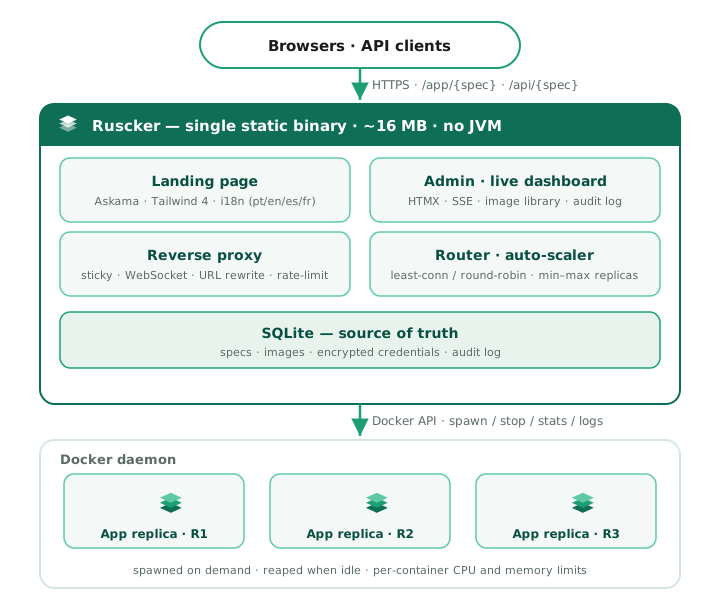
Visitors and API clients hit one Ruscker process. It serves the landing page and admin UI, and reverse-proxies each request to the right app container — picking a replica, keeping Shiny sessions sticky, upgrading WebSockets, and rewriting URLs. When no replica can take the load (and the spec allows it), Ruscker asks the Docker daemon to spawn one; idle containers are reaped automatically.
Why Ruscker
Modern web workloads demand speed and minimal overhead. Ruscker is engineered to keep the runtime light while staying compatible:
- Zero-friction migration — bring your apps over with a familiar YAML schema, no rewrite.
- Single compiled binary — one artifact to ship and run, measured at ~14 MB idle, with instant startup.
- Batteries included — a proper admin panel, a live monitoring dashboard, per-app step-up MFA, identity forwarding, scheduled jobs and load balancing, out of the box.
In production
Ruscker runs in production today — the releases page has the current release. Its measured idle footprint is:
~14 MB idle — measured on a real production deployment serving a real multi-app config. (The JVM-based proxy it replaced on the same machine sat at ~540 MB.)
The compatibility checker reports imported, ignored and unsupported ShinyProxy fields before a migration. Releases are multi-arch and cosign-signed; the Roadmap tracks what’s shipped and what’s next.
What’s in the box
- Reverse proxy + load balancer with sticky sessions, WebSocket
forwarding, per-spec replica pools, an auto-scaler, and URL rewriting
(a generalized runtime shim patches
fetch,XMLHttpRequest,WebSocket,script.src,link.href, and more) so unmodified apps work behind a sub-path. - Access at the proxy boundary with users/groups, per-app step-up TOTP MFA, and opt-in ShinyProxy-compatible identity headers plus selected profile claims for authenticated apps.
- Container backend (Docker) that spawns app containers on demand,
applies per-container CPU/memory limits, and reaps idle ones. Per-spec
container-envandcontainer-cmdlet you configure notebook servers (Jupyter, RStudio) without custom images. - Admin panel — apps CRUD with a full advanced form, a unified
media library (built-in logos, uploads, drag-and-drop, “in use”
badges), an encrypted credentials store (AES literal or
${VAR}env-ref, resolved only at pull time), a landing-page editor (colors, intros, SEO, social meta, analytics, custom HTML blocks, header/footer logos with alignment and links), audit log, user accounts with Viewer / Editor / Admin roles and group-scoped Editor delegation, and a live monitoring dashboard (CPU/memory, live-follow logs, stop/restart). Editors manage open apps, apps and non-Admin accounts in their own groups, while Admin and break-glass access stays global; the Media library remains shared. Admin tables and process logs show timestamps in each viewer’s browser timezone. On the local Docker backend, operators can also manage named Docker volumes and run a spec’s image to completion on a cron schedule, with history, log tails, timeouts and failure alerts. Cron usesserver.timezone(an IANA name) and remains on UTC when it is unset or invalid; the Schedules page labels the effective zone. Volumes and schedules are unavailable with the multi-host backend. - Sub-path mounting: serve the whole portal under a prefix via
server.context-pathor--base-path. Health probes (/healthz,/readyz) stay at the root for load balancers. - Operations: graceful shutdown, structured (JSON) logging, per-API
rate limiting + CORS, request body-size limits, gzip/br compression,
immutable-versioned static assets, and an opt-in Prometheus
/metricsendpoint. - Distribution: a cosign-signed multi-arch container image
(
ghcr.io/strategicprojects/ruscker), a Debian package with a hardenedsystemdunit, static musl tarballs, and a Homebrew tap. The project is Apache-2.0 licensed. - Server-rendered UI: Askama templates with HTMX and Alpine.js; there is no Node build step.
Where to next
- Quickstart — from zero to a running app in minutes.
- What Ruscker can serve — Shiny, Streamlit, Dash, FastAPI, JupyterLab, LLM UIs, BI tools, and more.
- Where Ruscker fits — what Ruscker is for and when to use it.
- Installation — Docker, the
.deb, orbrew. - Migrate an existing config — point Ruscker at your
existing
application.yml. - Configuration — the full YAML reference.
- The admin panel — what each screen does.
- Deploying in production — systemd + nginx.
- Roadmap — shipped phases and what’s planned.